Is Your Business One Call Away From a WhatsApp Hack?


A single fake courier call let scammers hijack an actress’s WhatsApp and ask her contacts for money. Here’s how the attack worked, why businesses should pay attention, and seven steps to protect your accounts from a takeover
Did you know that a single phone call is now enough to hijack an account and turn its entire contact list into scam victims?
That's exactly what happened to a well-known Marathi actress. Attackers took over her WhatsApp and started asking her friends for money. And the craziest thing is that she never handed over her password. One conversation was all it took.
In this blog post, we'll break down what happened to this actress' WhatsApp account, why you should care, and the exact steps you can take right now to protect your own accounts from a takeover.
What Happened to This Actress' WhatsApp Account?
In August 2026, an actress’s WhatsApp account was hijacked and used to scam the people closest to her. Here's what we know:
A popular actress had her WhatsApp account hijacked after a fake courier call, and later shared a video explaining how the scam worked.
She was expecting a parcel when she received a call from a person claiming to represent a courier company. The caller said the delivery agent could not locate her address and asked her to dial another number, which she eventually did.
According to the actress, her WhatsApp account was hacked within seconds of making that call, and she was logged out of the app. She also alleged that her incoming calls were forwarded to the scammer's number.
Immediately after that, messages were then sent from her account to people in her contact list, claiming she was in trouble and urgently needed money. The scammer reportedly asked some contacts for amounts such as Rs 62,000, and several of her friends transferred money believing she had genuinely asked for help.
The actress then apologized to those who received the messages, clarified she had not sent them, and later confirmed she had recovered her account. She also urged people to directly call and verify with a friend or relative before sending money in response to an urgent WhatsApp message.
Why Should You Pay Attention To This Hack?
This actress has the reach to post a public warning and clear her name fast. But the problem is that most brands don't have the ability to do the same, so a hijacked account can scam your customers and burn years of trust before anyone even notices. And this is nothing new, we see it happen all the time, all over the world.
For example, see these other recent hacks:
- Obama's Instagram Got Hacked. Yours Could Be Next
- What the Scott Simon X Hack Teaches Us About Brand Security
- How to Stop Hackers From Hijacking Your Instagram Account
- Pro Golfer's 621K Followers Hit by Crypto Scam
- What Greg Gutfeld's Hack Can Teach Your Business
That said, attackers target established accounts because they allow hackers to tap into a large, trusting audience with very little effort.
And this trend isn’t slowing down, as we mentioned above, it happens all the time. According to Cybersecurity Ventures, global cybercrime costs are expected to grow by 15% per year, reaching $10.5 trillion USD globally this year and $12 trillion annually by 2031. Also, attackers aren't always using malware to break in. According to CrowdStrike's 2025 Global Threat Report, malware-free activity accounted for 79% of detections in 2024.
But then does this mean you are helpless?
This is something every business must keep in mind, but it doesn't mean there's nothing you can do about it. Here’s what we recommend you do.
How To Protect Your Accounts From Hacks
WhatsApp is a Meta account like Instagram and Facebook, so when hackers target them, their methods usually come down to stealing verification codes, phishing, having weak credentials, or hijacking sessions.
The good news is that you can reduce your attack surface and make your WhatsApp and connected Meta accounts far harder to breach.
Here's what we recommend you do right now:
1) Use Strong Passwords Across All Accounts
Your password strength is one of the easiest ways attackers measure how hard your account will be to breach. As your first layer of defense, make it as strong as possible and never reuse it across platforms.
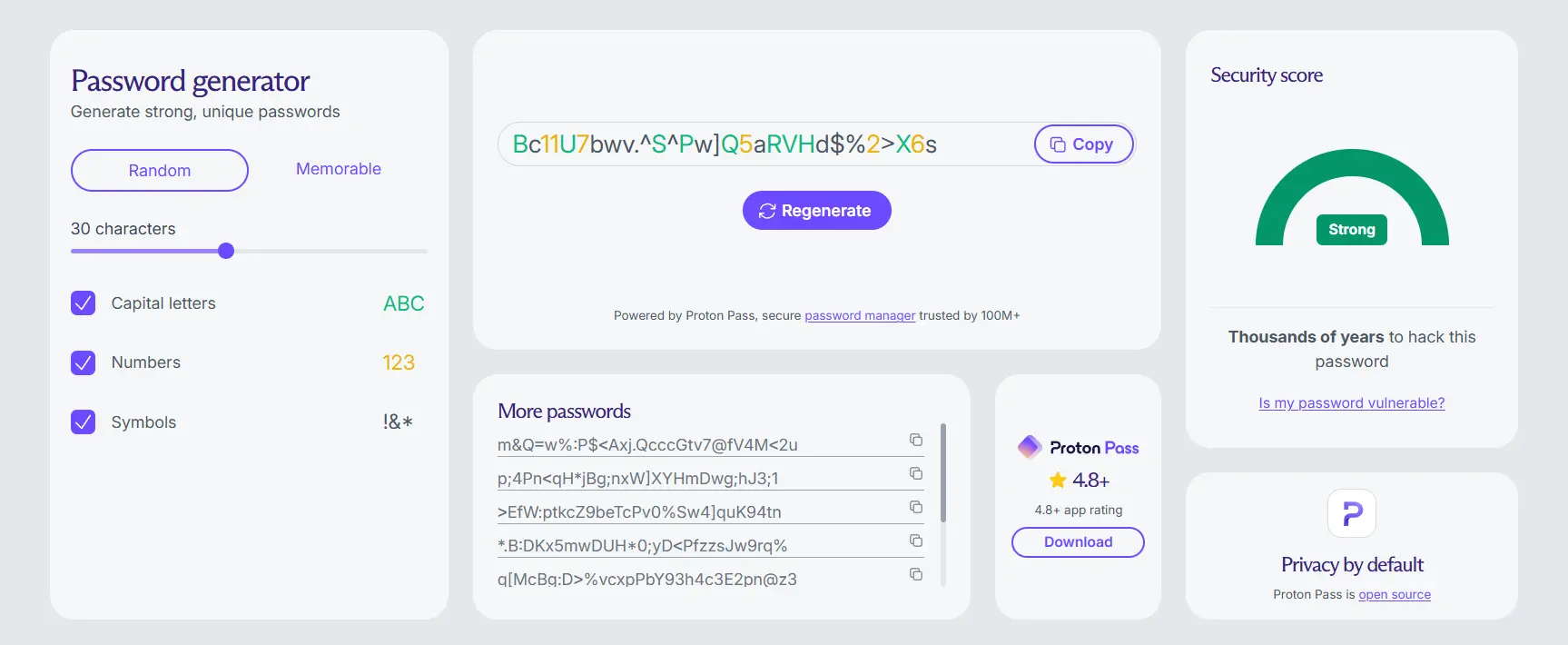
A strong password is long, random, and unpredictable. Aim for at least 16 characters, and mix uppercase letters, lowercase letters, numbers, and special symbols so it can't be guessed or brute-forced so easily.
If you're worried about remembering them all, use a company-approved password manager to securely create, store, and retrieve them. A few good options include Proton Pass, 1Password, and Bitdefender SecurePass.
2) Enable 2FA For Teams
A personal PIN or authenticator app works fine for one individual, but it gets messy for businesses since multiple people often need access to the same account. However, that's where team-based 2FA comes in.
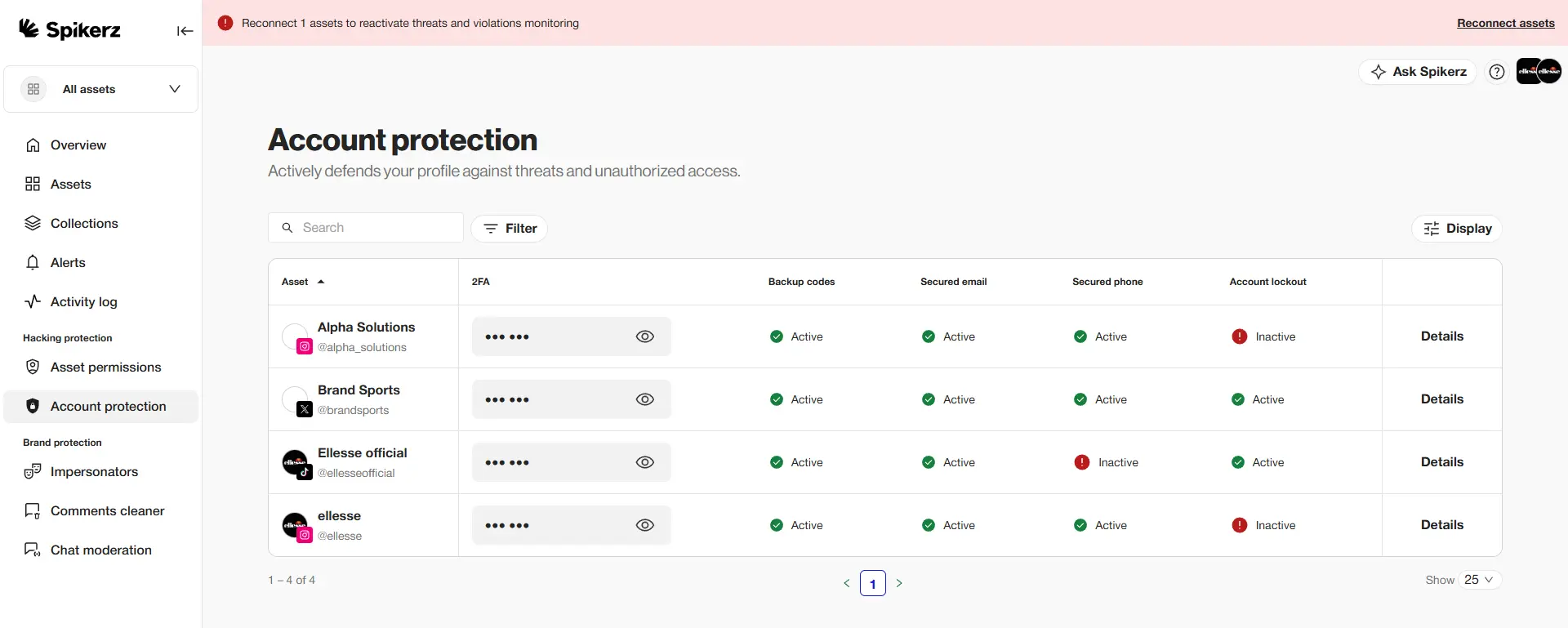
For example, at Spikerz, we host and manage 2FA tokens through a secure web-based dashboard for your whole team, that way nobody has to share codes over Slack or WhatsApp.
3) Regularly Review And Revoke Account Access
It's essential to regularly review who and what has access to your accounts. For example, on WhatsApp, that means checking your linked devices and removing any you don't recognize.
And on business accounts, people naturally leave organizations and sometimes keep admin rights they no longer need. If one of those accounts gets hacked, you can lose your account through them, so you should revoke access whenever someone leaves to reduce that risk.
Unfortunately, this is something we've seen cause a lot of preventable damage. Just pay close attention to this and create a process to ensure you never forget and you should be fine.
4) Protect Your Local Devices With Antivirus Software
While 2FA and social media monitoring stop most threats, they aren't perfect. Some attacks let hackers bypass your password and 2FA altogether by stealing your session tokens.
They are called session hijacking attacks. Info stealers grab the session cookies stored on your device and use them to log in as you, with no password or 2FA required.
The best way to stop them is traditional antivirus software, which scans your device and removes malicious programs before they can steal your data. If you want a recommendation, check Bitdefender. It’s one of the best options for stopping info stealers.
5) Enable Account Monitoring
Social media account monitoring watches your accounts around the clock and alerts you the moment something looks wrong. The goal is to catch a takeover in progress, like a login from a new device or a burst of unusual activity, and alert you before the attacker can scam your audience.
There are many tools in the market, but you should choose one that focuses on security, like Spikerz.
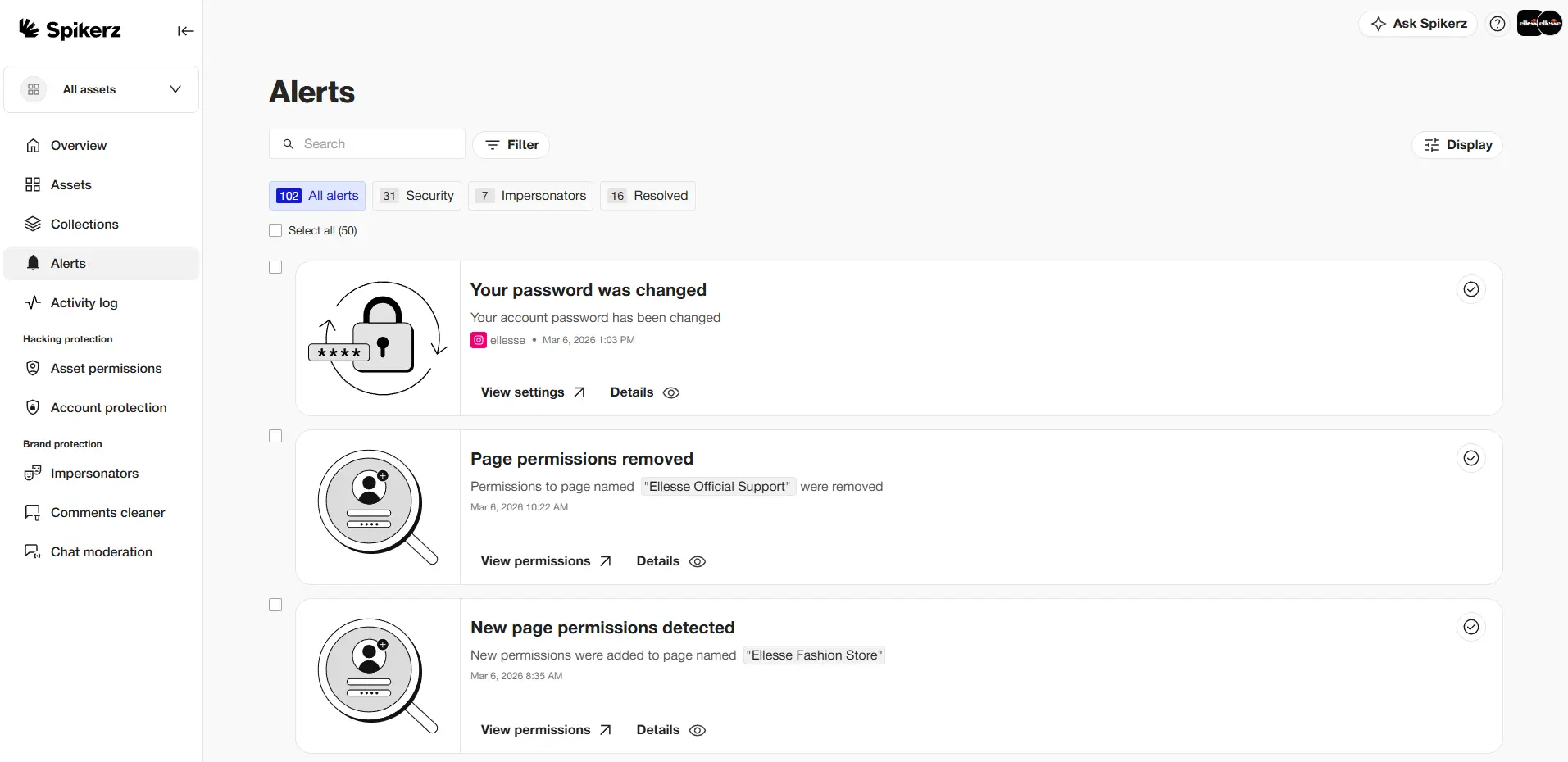
Spikerz is an all-in-one social media security platform that helps brands protect their presence, connecting through official APIs in a few clicks so you're covered without ever handing over your passwords. Here's what we do:
- Account takeover protection: blocks unauthorized access and hijacking attempts in real time.
- Phishing protection: scans incoming DMs and links, neutralizing threats before anyone clicks.
- Permissions management: gives you full visibility and control over who can access your accounts.
- Impersonator takedown: finds and removes fake accounts impersonating your brand, with a 95%+ removal rate on Meta.
- Comment moderation: automatically hides scams, spam, and hate speech across your posts.
So ask yourself: if one courier call can drain money from a public figure's contacts in seconds, what would that same speed cost your business?
If you really want to protect your social media accounts, book a demo right now. We’ll show you exactly how to do so.
6) Create A Social Media Policy
A social media policy is a clear set of rules that helps brands decide who gets access to the account, what they can publish, and how they should use it.
If you want to create one in minutes, check our customizable template. It covers a customized policy based on your teams, accounts, and risks, a review of your current security blind spots, and a workflow for approval, access, and crisis response.
7) Build A Rapid Response Team (RRT)
Even with strong defenses, no account is fully hackproof, so you should prepare for the worst. A rapid response team is a small group across your social media and security teams that's ready to identify a breach and respond before the damage spreads.
Look at this actress’ case as a cautionary example. With no early warning, the attacker had time to lock her out, forward her calls, and message her contacts for money before anyone realized what was happening, and some friends even paid.
Now contrast that with a business that spots the intrusion early and re-secures the account before a single scam message reaches its audience. That's the difference between a quick scare and a crisis that plays out in public.
Conclusion
This is a reminder that no following is big enough to protect your account on its own. Attackers go where the trust is, and a recognizable account is one of the most valuable things a hacker can hold, even for a few minutes.
This actress was able to limit the damage only because she could post a public warning and personally vouch for herself, which is a safety net most businesses will never have. When your fallback is hoping a customer calls to double-check before they send money, you're betting your brand on a step most people skip.
The best defense is to reduce your attack surface ahead of time so a hacker never gets the chance to message your contacts from your account in the first place.