7 warning signs your social account is at risk

Phishing is up 17.3% in six months, and 83% of attacks are now AI-powered. This guide lists seven warning signs of an account attack, uses the Arbitrum DAO hijacking as an example, and outlines a three-layer defense of account monitoring, antivirus and email monitoring.
Phishing attacks are growing at a pace that should alarm any business with a social media presence. According to KnowBe4’s Phishing Threat Trends 2025 Report, between September 2024 and February 2025, phishing emails increased by 17.3% compared to the previous six months. What’s worse is that with nearly 83% of those phishing emails using some form of AI, these attacks are only getting harder to detect.
This is exactly what happened to Arbitrum DAO. On February 3, 2026, attackers hijacked the organization’s official X account and used it to run a fake token giveaway designed to steal user credentials. If a major crypto organization can fall victim to this, so can your brand.
Here’s what you need to know and the warning signs to watch for.
What happened to Arbitrum’s X account?
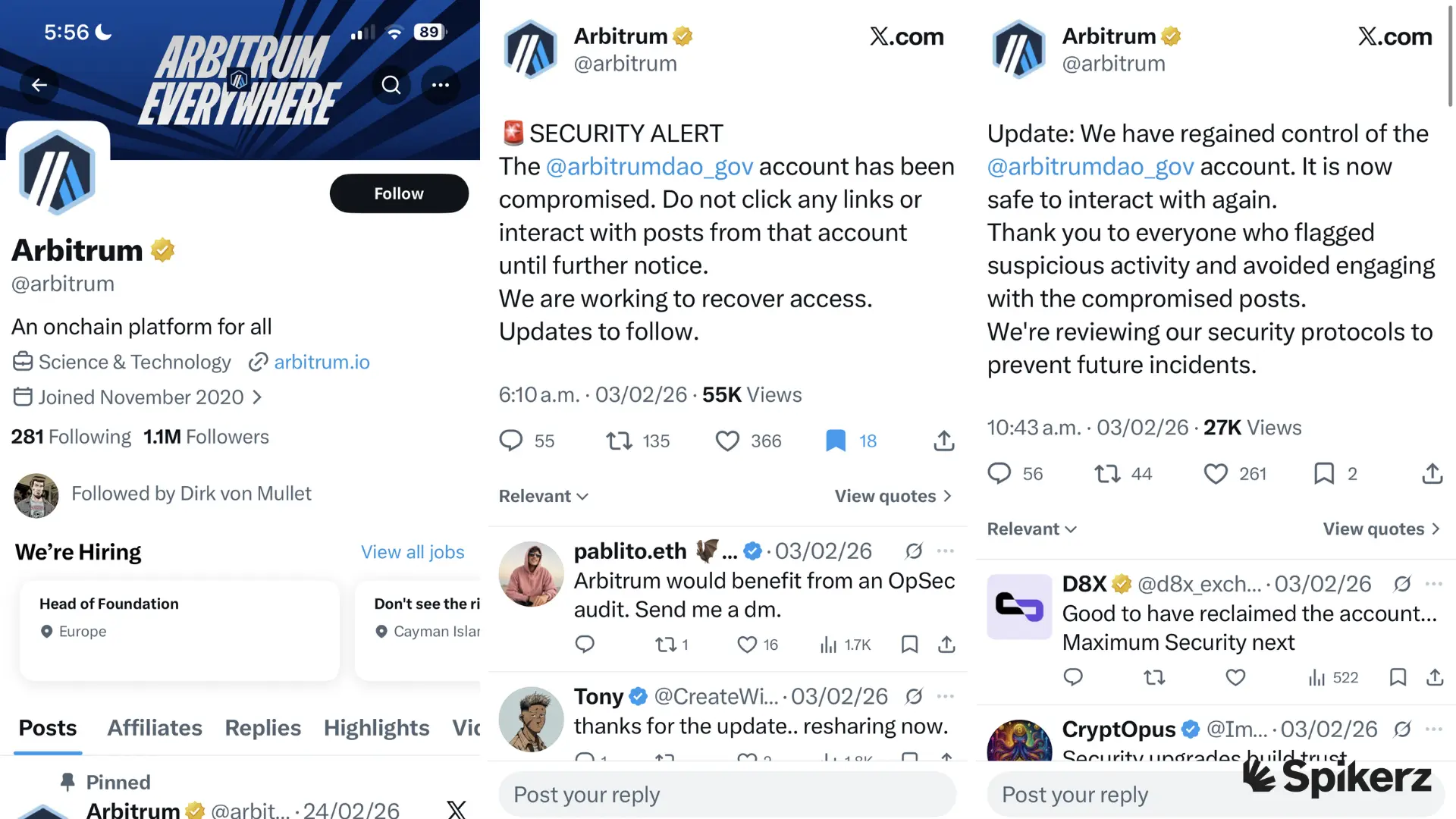
On February 3, 2026, Arbitrum DAO issued a warning that their official governance X account had been hacked. The organization advised users not to click any links or interact with content posted from the account. Then the DAO team assured users they were actively working to regain control and clarified that the Arbitrum protocol and investors’ funds remained safe.
As soon as the attackers took over, they launched a fake token giveaway. Posts about rewards for participating in governance and providing liquidity came in first. Then a banner promoting a fake airdrop went up, complete with an image and a link to gov-arbitration.com (an unofficial website with a “Connect Wallet” button designed to steal credentials.)
This isn’t the first time that Arbitrum has fallen victim to phishing attacks. Back in 2023, scammers were successful because they coincided with a real, widely publicized token distribution event. At the time, they created fake application websites and spam accounts to trick users into handing over wallet access.
Why should this matter to you?
Arbitrum’s situation isn’t unique. People fall victim to phishing attacks every day. The biggest problem is that AI-powered polymorphic phishing creates thousands of unique email variations that bypass traditional detection methods, making it harder for security tools to flag them. That’s why organizations have to spot these messages before a human gets to see them.
Here are data points from KnowBe4’s report that show how fast this problem is growing:
- 17.3% increase in phishing emails (Sep 15, 2024 to Feb 14, 2025, vs. previous six months).
- Top three words used in phishing emails: Urgent, Review, and Sign.
- 57.9% of phishing emails were sent from compromised accounts.
- 54.9% of emails analyzed contained a phishing hyperlink payload.
- 22.6% increase in ransomware delivered by phishing email since Sep 15, 2024.
How to tell your account is at risk
There are a few things that can tell you a message is phony and should be examined carefully.
1) You get odd direct messages from friends or family
Scammers compromise social media accounts and then target people in the victim’s contact list, asking for money or “help with something urgent.” The goal is to compromise those accounts too and keep the cycle going.
Remember: If a DM from someone you know feels out of character or asks you to click a link, verify through another channel before you respond.
2) You get a message about a problem with your account or payment info
This is an old email tactic, but they keep using it because it’s highly effective. The way it works is, you receive a message claiming a billing issue or suspicious login on your account. It urges you to “update your payment information” through a link that leads to a fake website designed to capture your credentials.
Remember: To avoid falling victim to this type of scam, check the sender’s email address carefully and hover over links before clicking. Real companies never ask you to update sensitive information through an email link.
3) You get a message asking you to confirm personal or financial information
This is phishers favorite tactic to target ecommerce users. The way it works is, you get an email saying a recent order requires identity confirmation (like your Social Security number, banking info, or date of birth). Then you click the link and it takes you to a spoofed version of the retailer’s website. After that, you enter your personal information and it gets sent to the scammers.
Remember: retailers never ask for sensitive information via email. When in doubt, go directly to the website by typing the URL yourself and confirm everything there yourself.
4) You get a message with an invoice you don’t recognize
This scam mainly targets C-suite executives and finance teams. The way it works is, the attacker sends a professional-looking invoice from what appears to be a vendor your company uses. The invoice contains a link to “view payment details” or an attachment that installs malware.
Remember: Always verify invoices directly with your accounting department or the vendor before clicking anything.
5) You get a message asking you to click a link to make a payment

Small business owners and freelancers are frequent targets of this one. Scammers send messages disguised as payment requests from platforms like PayPal or Stripe. Then the link takes you to a fake payment page.
Remember: To avoid falling for this scam, check the sender’s email address for misspellings (like “paypa1.com” instead of “paypal.com”) and log into your account directly rather than clicking the link.
6) You get a message saying you’re eligible for a government refund
Taxpayers and small business owners are the most common targets, especially during tax season. The way it works is, the message says you’re eligible for a refund and includes a link to a fake government website that asks for your Social Security number and bank details.
Remember: Government agencies like the IRS never initiate contact through email or text. If you receive a message like this, go directly to the official website.
7) You get a message offering a coupon for free stuff
Online shoppers and social media users are the primary targets for this scam. These messages promise free gift cards or discounts from brands like Amazon or Apple. The link asks for your email, phone number, or credit card to “process” the reward.
Remember: Ask yourself: did you enter a contest or sign up for this? If not, it’s a scam.
How to protect yourself from phishing attacks
There are three proven ways to protect yourself: account monitoring for social media, antivirus software to protect against malware, and phishing monitoring for your email.
Account monitoring for social media accounts
Account monitoring continuously scans your social media accounts for suspicious activity, unauthorized logins, and security threats. If someone gains access to your account and starts posting phishing links (like what happened to Arbitrum), account monitoring flags that activity and notifies you immediately.

That said, if you want a reliable platform that focuses on cybersecurity, check out Spikerz. Spikerz is a social media security platform that provides 24/7 monitoring and protection. It connects through official APIs (no passwords are needed) and scans for threats using advanced AI.
Here’s how it helps protect your brand:
- Account Takeover Protection: Monitors accounts around the clock for unauthorized access and suspicious login attempts. When it detects something suspicious, it kicks out the intruder, automatically changes your password, and alerts you to the issue.
- Phishing Protection: Detects and flags phishing attempts targeting your social media, including malicious links and fake messages. When it detects a phishing message, it deletes it or flags it (it depends on your settings) so your employees never have to worry about it.
- Permissions Management: Gives you full visibility into who has access to your accounts so you can control permissions and reduce your attack surface. It’s particularly useful when someone leaves your organization and needs their access revoked.
- Impersonator Takedown: Identifies fake accounts impersonating your brand or violating your copyrighted content and helps take them down.
- Comment Moderation: Uses AI to filter out spam, bot activity, and harmful comments from your posts.
If this is something your brand would benefit from, book a demo right now to see how Spikerz can help protect your social media.
Antivirus software to protect against malware
Antivirus software scans your devices for malicious files, programs, and scripts by comparing them against a database of known threats. It’s a great way to protect your local devices against malware, so use it alongside account monitoring software and email monitoring to create a layered defense that covers all your entry points.
Phishing monitoring for your email
Email monitoring scans incoming messages for phishing attempts, malicious attachments, and suspicious links before they reach your inbox.
Note: Some antivirus software provides Chromium extensions to monitor your email for phishing. Look into those options to save on costs and simplify your tech stack.
Conclusion
Phishing attacks are not slowing down. Attackers are getting smarter, their tools are getting cheaper, and AI is giving them the ability to create thousands of convincing messages at scale.
The fact is that if your brand has a social media presence, you are a target.
But it’s not like you are powerless to fight back. The seven warning signs we covered are your first line of defense. So train your team to recognize them and don’t stop at awareness. Combine account monitoring, antivirus software, and email monitoring to build a defense that covers every angle.
One click can hand over your entire social media presence to an attacker. The cost of doing nothing is far greater than the cost of being prepared.