Social Media Hacks & AI Attacks: What Marketers Can Learn From the Biggest Brand Disasters

Summary:
Social media is now one of the most visible and vulnerable parts of a brand’s business. It is where customers ask questions, campaigns go live, communities form, and trust is built. But that also makes it an attractive target for hackers, impersonators, scammers, and AI-powered attacks. This guide explains the main ways brands get exposed on social media, including account takeovers, fake support profiles, scam comments, phishing links, impersonated campaigns, and AI-generated deception. It also includes practical checklists to help marketing and social teams review access, protect campaigns, clarify ownership, prepare for the first five minutes of an incident, and decide what to automate versus what should stay human-led. Use it as a starting point to understand where your brand may be exposed, then validate the gaps with a free Spikerz social media security audit.
Social media is no longer just a marketing channel.
For many brands, it is customer support, PR, community, commerce, paid media, reputation management, and customer trust all rolled into one. It is where people ask questions, complain, buy, share, discover, and decide whether your brand feels credible.
That makes social media incredibly valuable.
It also makes it one of your most exposed public-facing assets.
A hacked account, fake support profile, scam comment, impersonated campaign, or AI-generated phishing message can spread faster than most teams can respond. And unlike many traditional cybersecurity incidents, social media attacks happen in public. Customers see them. Screenshots spread. Journalists notice. Internal teams scramble. Trust takes the hit.
The good news is that most social media security failures are not completely random. They usually follow recognizable patterns. Once you know what to look for, you can start reducing risk before it becomes a public crisis.
This guide breaks down the key risks, the hidden operational gaps behind them, and the practical steps social and marketing teams can take now.

Why has social media has become such a major attack surface?
Social media teams are managing far more than content calendars.
They're managing:
- Brand reputation
- Customer conversations
- Paid campaign visibility
- Creator and influencer activity
- Regional and sub-brand accounts
- Agency access
- Product launches
- Giveaways and promotions
- Customer support escalations
- Community safety
Every one of those areas creates exposure.
The risk grows as social operations become more complex. A global brand might have dozens or hundreds of accounts across markets, platforms, business units, agencies, freelancers, creators, and paid media teams.
Over time, people gain access, change roles, leave the company, move agencies, or remain connected to platforms long after they should have been removed.
Then AI adds a new layer.
Attackers can now create convincing phishing emails, fake login pages, brand impersonator profiles, fake customer support replies, and personalized scams at far greater speed and scale. What used to take technical skill and manual effort can now be generated quickly, cheaply, and in multiple languages.
That changes the threat model for social teams.

The issue is no longer just:
“Could someone hack our account?”
It's also:
- Could someone impersonate our brand?
- Could customers be scammed in our comments?
- Could a fake support profile move customers into DMs?
- Could an agency or former employee still have access?
- Could a social media manager be targeted through a fake job offer?
- Could an AI-generated message trick someone into giving away credentials?
- Would we know what to do in the first 5 minutes?
The 3 ways brands usually get exposed
Most social media threats fall into one of three patterns.
1. Account takeover
This is the scenario most teams think about first.
An account is compromised. Attackers gain access and start posting scam content, offensive messages, fake links, crypto promotions, or other content the team did not approve. In some cases, the team may be locked out entirely.
Account takeovers often happen because of:
- Credential theft
- Phishing
- Fake login pages
- Compromised personal profiles connected to brand accounts
- Shared passwords
- Weak admin controls
- Former employees or agencies retaining access
- Inconsistent two-factor authentication
- Poor recovery processes
The visible incident may look sudden. But the root cause is often operational: access was too broad, ownership was unclear, or recovery routes were not properly controlled.

2. Impersonation and customer diversion
Not every attack requires access to your official account.
A fake support profile can reply to real customers in your comments, pretend to be your brand, and move the conversation into DMs. From the customer’s perspective, the interaction may feel legitimate because it started under your real post.
This is especially dangerous for brands with:
- High comment volumes
- Customer support on social
- Promotions and giveaways
- Travel, ticketing, retail, gaming, finance, or sports audiences
- High trust or emotional engagement
- Multiple sub-brands or regional accounts
Fake support profiles may ask customers for payment, login details, booking information, personal data, or verification codes. Even when the brand has not been hacked, customers may still blame the brand because the scam happened in its social environment.
.png)
3. Brand trust exploitation
Sometimes attackers do not need your account or your comments. They simply borrow your brand’s credibility.
This can include:
- Fake giveaways
- Fake promotions
- Fake job offers
- Fake creator partnerships
- Fake customer service messages
- Fake campaign landing pages
- Fake login pages using your brand or platform design
- Phishing messages written in a convincing brand tone
The attacker’s goal is to make the customer, employee, creator, or social team member believe they are interacting with a trusted brand or platform.
This is where AI makes a major difference. Scam messages are no longer always badly written or obviously suspicious. They can be personalized, timely, on-brand, and context-aware.
| Area | Question |
|---|---|
| Access visibility | Do we know everyone with access to every priority social account? |
| Ownership | Is there a named owner and backup owner for each priority account? |
| Offboarding | Are employees, agencies, freelancers, creators, and vendors removed quickly when they leave? |
| Credential control | Are passwords, 2FA, recovery emails, and phone numbers controlled by the brand where possible? |
| Impersonation monitoring | Do we actively detect fake profiles, lookalike accounts, and fake support accounts? |
| Comment threat detection | Do we monitor scam replies, phishing links, and suspicious comment patterns? |
| Campaign protection | Do giveaways, launches, and high-engagement campaigns include anti-scam safeguards? |
| First-five-minutes plan | Does the team know exactly what happens in the first five minutes of a hack or scam? |
| Escalation | Do we know who contacts platforms, comms, legal, IT/security, customer support, and leadership? |
| AI phishing readiness | Are social teams trained to spot AI-generated phishing, fake login pages, and personalized scams? |
The iceberg problem: Public incidents usually expose private operating gaps
When something goes wrong on social, the public sees the visible incident:
- A hacked account
- Scam comments
- News headlines
But beneath the surface are usually deeper issues:
- Weak brand security
- No visibility into who has account access
- Marketing and IT assuming the other team owns social media security
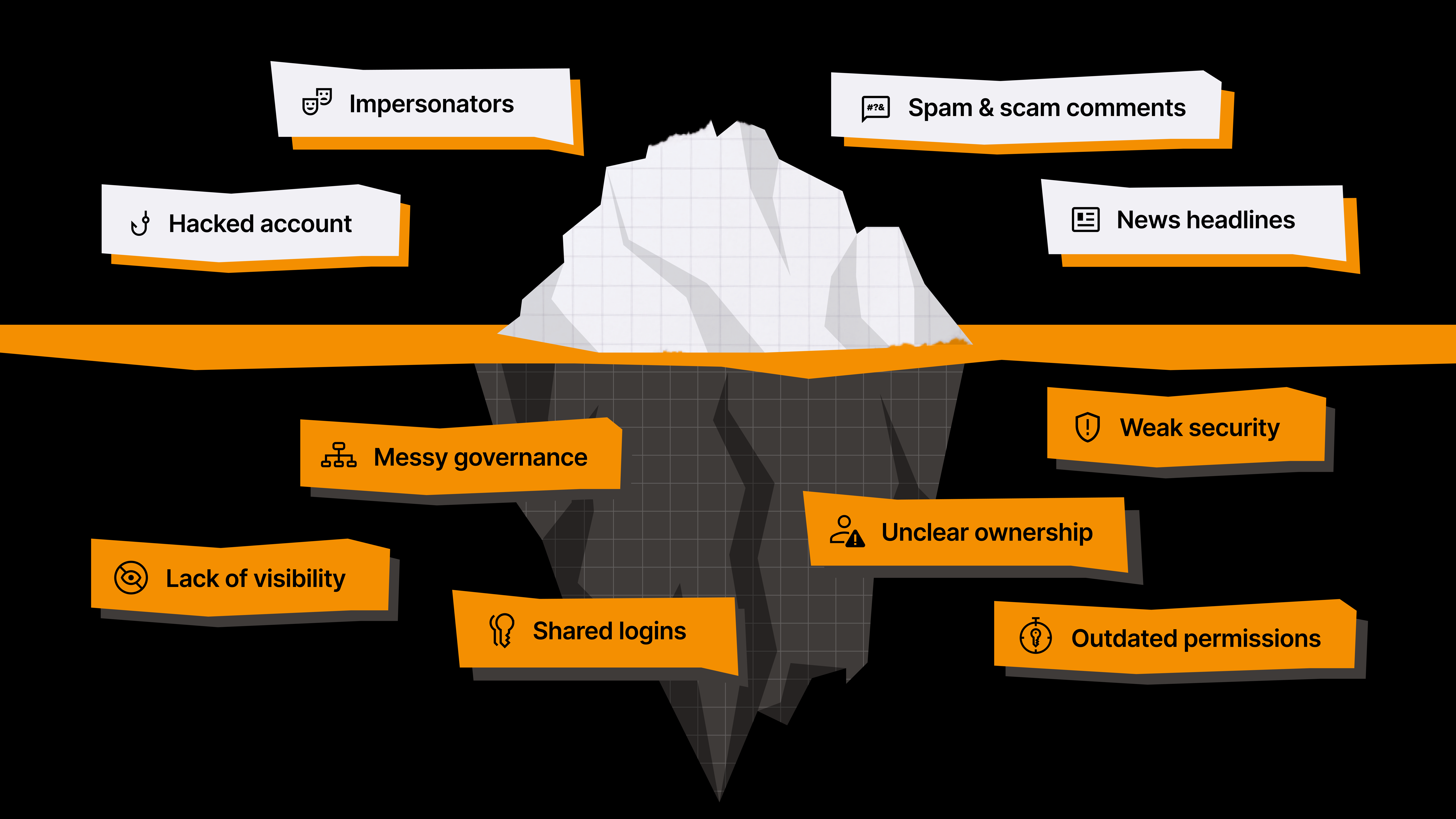
This is why social media security can't be treated as a one-time password hygiene exercise.
The strongest teams don't stop at checking their passwords are secure. They ask the following questions:
- Do we know who has access?
- Do we know what normal activity looks like?
- Do we know where customers are most likely to be targeted?
- Do we know who owns response?
- Do we know what to automate?
- Do we know what requires human judgment?
- Do we know what happens first when something goes wrong?
Quick self-assessment: Where is your brand exposed?
Use this as a fast internal check. Score each area from 0 to 2.
0 = Not in place
1 = Partly in place
2 = Fully in place and recently reviewed
| Area | Question | Score |
|---|---|---|
| Access visibility | Do we know everyone with access to every priority social account? | |
| Ownership | Is there a named owner and backup owner for each priority account? | |
| Offboarding | Are employees, agencies, freelancers, creators, and vendors removed quickly when they leave? | |
| Credential control | Are passwords, 2FA, recovery emails, and phone numbers controlled by the brand where possible? | |
| Impersonation monitoring | Do we actively detect fake profiles, lookalike accounts, and fake support accounts? | |
| Comment threat detection | Do we monitor scam replies, phishing links, and suspicious comment patterns? | |
| Campaign protection | Do giveaways, launches, and high-engagement campaigns include anti-scam safeguards? | |
| First-five-minutes plan | Does the team know exactly what happens in the first five minutes of a hack or scam? | |
| Escalation | Do we know who contacts platforms, comms, legal, IT/security, customer support, and leadership? | |
| AI phishing readiness | Are social teams trained to spot AI-generated phishing, fake login pages, and personalized scams? |
How to read your score
0–7: High exposure
Your team may be relying on informal processes, manual checks, or unclear ownership.
8–14: Gaps likely
You have some foundations, but specific blind spots could slow response or create avoidable risk.
15–20: Stronger foundation
You're ahead of many teams, but your exposure should still be validated across platforms, people, comments, and impersonators.
Your score is not the final answer. It is a starting point. Most teams overestimate what they can see manually, especially across access, impersonators, scam comments, and regional account activity.
Access & governance: The first place to look
Most social media security failures build gradually.
A freelancer gets temporary access. An agency is added for a campaign. A regional team creates its own process. Someone changes roles but keeps permissions. A former employee still receives login codes. A sub-brand account is forgotten. A platform recovery email still points to someone who left.
None of this feels urgent until something goes wrong.
Use this checklist to pressure-test whether access is actually under control.
Account ownership checklist
- Every priority account has a named business owner.
- Every priority account has a backup owner.
- Every account has a documented recovery route.
- No critical account depends on one employee’s personal profile, email, or phone number.
- Ownership is reviewed after team changes, agency changes, market changes, and platform changes.
Access control checklist
- All employees, agencies, freelancers, creators, and regional partners with current or historic access have been reviewed recently.
- Admin-level access is limited to people who genuinely need it.
- Temporary access has an expiration date or review date.
- Offboarding includes social platform access, not just internal systems.
- Permissions follow the principle of least privilege.
Credentials & alerts checklist
- Passwords are not shared through Slack, WhatsApp, email, or spreadsheets.
- Passwords are unique across platforms.
- Passwords are rotated after personnel, agency, or vendor changes.
- 2FA and recovery methods are brand-controlled where possible.
- Security alerts route to more than one responsible person.
A useful senior-team question:
If one person left tomorrow, how confident are you that every permission, login route, recovery method, and 2FA dependency would be removed?
If the answer is “not very,” that's a priority risk.
Campaigns, comments, and impersonators: Protect high-risk moments
High-engagement moments attract high-risk behavior.
Giveaways, launches, ticket drops, product announcements, viral posts, and customer complaints create urgency and attention. Scammers look for exactly those moments because customers are more likely to act quickly and ask questions publicly.
The goal is to reduce ambiguity before scammers exploit it.
Campaign risk checklist
Before a campaign
- Search for lookalike handles and fake support accounts
- Add clear safety language to campaign posts
- Tell customers which official account will contact them
- State what you will never ask for: payment, passwords, card details, or login codes
- Brief community managers, customer support, agency partners, paid media, and comms
During a campaign
- Monitor comments closely in the first hour
- Watch for fake accounts replying to customers
- Hide or remove scam replies quickly where possible
- Capture screenshots, URLs, handles, and timestamps before reporting
- Escalate immediately if customers are being asked for money, login details, or personal information
After a campaign
- Search again for fake profiles using campaign language
- Review what scam patterns appeared
- Update moderation rules and blocked terms
- Add new impersonator handles to monitoring lists
- Share learnings with social, support, comms, and agencies
If a fake support account appears
Follow this simple response sequence:
Capture → Remove visible scam replies → Report → Warn affected customers → Escalate internally → Monitor copycats
Speed matters. But evidence matters too. Capture the account, handle, URLs, screenshots, affected posts, and timestamps before content disappears.
The first 5 minutes: What should happen when something goes wrong?
During a social media incident, confusion creates delay. Delay creates damage.
The first five minutes should not be spent deciding who is in charge, where to talk, who contacts the platform, or whether customer support needs to know.
Use this drill to define the first response before you need it.
.png)
0–1 minute: Confirm (what happened?)
- Is it a hack, impersonator, scam comment wave, fake promotion, accidental post, or paid media issue?
- Who confirms severity?
1–2 minutes: Contain
- Should scheduled posts be paused?
- Should paid amplification stop?
- Can account access be restricted or reviewed?
- Has evidence been captured?
2–3 minutes: Escalate
- Has the incident channel opened?
- Have social, comms, legal, customer support, IT/security, agency partners, and leadership been alerted as needed?
3–4 minutes: Communicate
- Is there an internal update?
- Does customer support need guidance?
- Is a public holding statement needed?
- Who approves it?
4–5 minutes: Track
- Are URLs, handles, timestamps, screenshots, customer reports, decisions, and actions being logged?
- Who owns monitoring?
- A simple tabletop exercise once per quarter can expose gaps before a real incident does. Use realistic scenarios: hacked account, fake support scam, giveaway impersonation, AI-generated phishing attempt, or a former employee access issue.
Ownership: Who actually owns social media security?
Social media security often falls into the gap between teams.
Marketing owns the channels. IT owns security. Comms owns reputation. Customer support handles the fallout. Legal reviews risk. Agencies may manage publishing or community management.
That works until something goes wrong.
The fix is not to make one team do everything. The fix is to define ownership clearly.
Use a simple ownership matrix. For each task, mark who is the Owner, who Supports, and who must be Informed.
| Task | Social | Comms | Legal | IT/Security | Customer Support | Agency |
|---|---|---|---|---|---|---|
| Detect issue | ||||||
| Confirm severity | ||||||
| Pause content or ads | ||||||
| Contact platform | ||||||
| Approve public statement | ||||||
| Respond to customers | ||||||
| Report impersonators | ||||||
| Run post-incident review |
The important part is not the table. It is the conversation the table forces.
If nobody owns a task before a crisis, everyone will assume someone else is handling it during one.
What to automate and what to keep human
Social threats now move too quickly for manual monitoring alone. But that does not mean every decision should be automated.
A useful principle: Automate signal detection. Keep judgment human.
Automate detection
Technology should help teams catch:
- Fake account discovery
- Lookalike profile monitoring
- Scam comment alerts
- Suspicious link detection
- Access-change alerts
- Unusual posting patterns
- Comment or DM volume spikes
- Repeated fake support replies
- Known impersonator patterns
Automation is especially useful where scale, speed, and repetition are the problem.
Keep human judgment
Humans should still own:
- Crisis severity decisions
- Public statements
- Legal and comms approvals
- Sensitive customer replies
- Brand tone decisions
- Campaign pause or resume calls
- Executive escalation
- Post-incident learnings
The goal is not to replace the social team. It is to make sure the social team sees the right risks fast enough to act.
30-day plan to reduce social media risk
You don't need to fix everything at once. Start by finding the highest-risk gaps, assigning ownership, and building a response system your team can actually use.
This week: Get visibility
- List all priority social accounts
- Confirm owners and backup owners
- Remove obvious outdated access
- Check recent scam comments and fake profiles
- Identify the internal channel for incident response
- Review whether platform security alerts reach the right people
Next 2 weeks: Reduce avoidable risk
- Complete a full access review
- Add campaign safety language to launch and giveaway templates
- Define the first-five-minutes workflow
- Brief social, customer support, comms, IT/security, agencies, and paid media teams
- Decide what requires manual review versus automated monitoring
Next 30 days: Operationalize
- Run a tabletop crisis exercise
- Set a monthly access review cadence
- Create an impersonator reporting process
- Document platform escalation routes
- Update onboarding and offboarding processes
- Validate blind spots with a social media security audit
The bigger shift: From reactive cleanup to operational readiness
Social media security is about protecting the trust your brand has built.
That means knowing who has access, how customers might be targeted, which campaigns create risk, where impersonators appear, how quickly scams are detected, and who makes decisions when something happens publicly.
The teams that handle social media incidents best are rarely the ones improvising under pressure. They are the ones that have already answered the difficult operational questions:
- Who owns this?
- Who has access?
- What do we monitor?
- What do we automate?
- What do we escalate?
- What do we say publicly?
- What do we do in the first five minutes?
- What do we need help validating?
Once those answers are clear, the next step is to confirm where your brand is actually exposed.
A self-assessment can show where risk may exist. An audit can help validate what is really happening across accounts, comments, impersonators, access, and security blind spots.
Because by the time an incident is public, the window to prepare has already closed.
Check your brand’s exposure with a free social media security audit
You now know what to look for.
The next step is visibility.
Spikerz offers a free social media security audit to help your team understand where your brand is exposed across account security, access risks, impersonators, scam activity, and social media blind spots.
The audit is designed to help you:
- Get visibility into your brand’s social media risks
- Uncover security blind spots before they become incidents
- Identify impersonators, scam activity, and account vulnerabilities
- Prioritize what to fix first
- Build a practical plan to protect your accounts and brand reputation
The audit is secure and read-only. we don't ask for any of your account passwords, as your accounts are connected through official APIs.
