How to manage Facebook Page admins for business

A forgotten contractor with lingering admin access is how most Facebook Page takeovers happen. Learn the three types of admin roles, why Full Control should stay limited to one or two people, and four access control practices, from zero trust to instant revocation, that keep your Page secure.
Managing Facebook Page admins is one of the most frustrating parts of Facebook marketing. You hand out access to team members, contractors, and agencies, and before you know it, you've lost track of who holds the keys to your online presence.
Unfortunately, we’ve seen this happen so many times. And what’s worse is that a lot of businesses fail to revoke user access, and then someone gets hacked (or even worse a disgruntled ex-employee kicks you out), leading to getting completely locked out of your own Page.
In this post, we'll cover what Facebook Page admins are, why managing them matters, the different types of admin roles available, and the best practices for keeping your Page secure.
Additionally, you'll learn how to structure admin access safely so your business never loses control of its most valuable social media asset.
TLDR:
Facebook offers three admin categories:
- Facebook Access: Full Control or Partial Control, letting people manage the Page directly.
- Task Access: Managing from tools like Meta Business Suite without switching into the Page.
- Community Manager Access: Built for moderating live stream chats.
To keep your Page safe, stick to four practices:
- Adopt a zero trust framework so nobody gets access by default
- Train your team to spot phishing and social engineering
- Enforce 2FA on every account
- Revoke access the second someone leaves.
Note:
Forgotten contractors with lingering Full Control access are how takeovers often happen (as shown by real cases where entire Pages were wiped out because a single admin got phished or an old contract was never cleaned up).
That’s why you should use a social media security tool like Spikerz to monitor and manage user access. These tools centralize permissions across all your social accounts so you're not juggling spreadsheets and hoping for the best.
What are Facebook Page admins?
Facebook Page admins are the people who hold permissions to manage your business Page on Facebook. They can post content, respond to messages, run ads, view analytics, and depending on their role, even delete the Page entirely. Think of them as the people in charge of your brand's public face on the platform.
Each admin has a specific level of access tied to what they need to do their job. For example, some can control everything, while others only handle narrow tasks like replying to comments or pulling performance reports. This system lets you delegate work without handing over the entire account to every team member.
Why managing Facebook Page admins matters
- Prevent account takeovers: Hackers target accounts with weak or scattered admin controls because more entry points mean more chances to slip through.
- Protect sensitive business data: Admins can see customer messages, ad spend, and audience insights. The wrong person with this access can leak or misuse that information.
- Avoid losing access to your Page: If the only person with Full Control leaves your company without transferring their role, you could lose control of the Page permanently.
- Maintain brand consistency: Too many admins posting without coordination leads to off-brand content, conflicting messages, and a confused audience.
- Reduce internal mistakes: Limiting access to what each person actually needs reduces the likelihood of accidental deletions, misposted content, and budget errors on ads.
- Stay compliant with security standards: Many regulations require businesses to track and document who has access to customer-facing systems, including social media accounts.
What types of Facebook admins exist?
Facebook offers three main categories of Facebook Page admin access, each designed for different responsibilities.
1) Facebook access
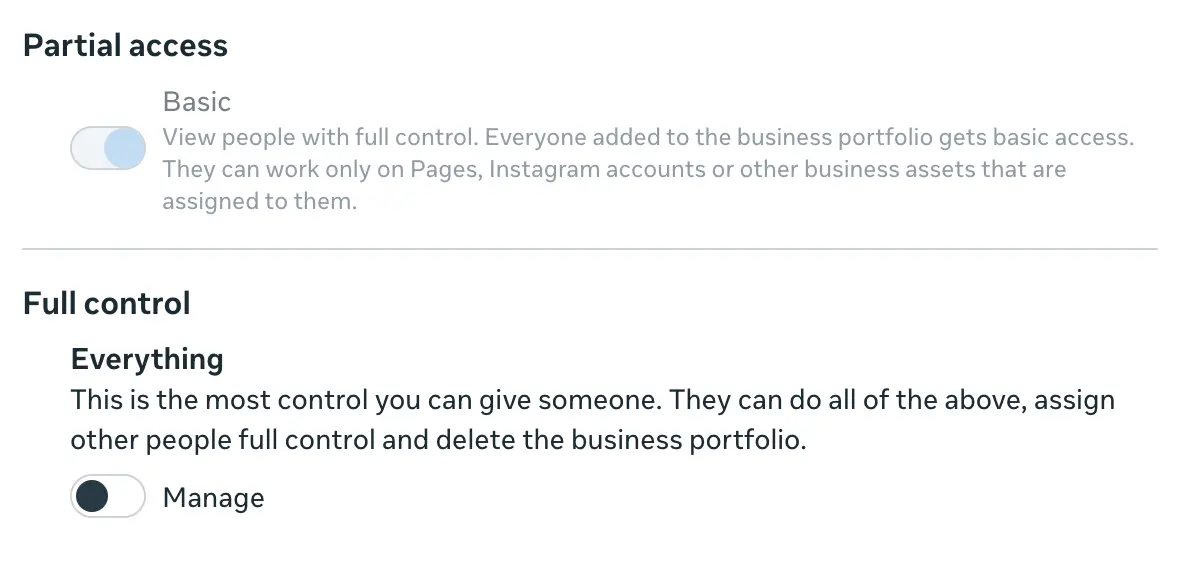
This category lets individuals switch into the Page and manage it directly on Facebook or through other Facebook tools. There are two levels of control within Facebook Access:
- Full Control: This role grants the same access as the Page creator. People with Full Control can manage all settings, delete the Page, and assign or remove access for others.
- Partial Control: This role allows people to manage content, messages, comments, linked accounts, ads, insights, events, and remove or ban people from the Page. They can’t manage settings, permissions, or task access.
2) Task access
People with Task Access manage the Page from outside tools like Meta Business Suite, Creator Studio, Ads Manager, or Business Manager. They can't switch into the Page or manage it on Facebook directly. People with task access can manage the following:
- Content: Create, manage, or delete any content on your Page like posts, Stories, and more. They can also apply for and access ways to monetize your original content.
- Messages and Community Activity: Respond to direct messages, comment, manage unwanted content, and report Page activity.
- Ads: Create, manage, and delete ads, plus handle other ads-related tasks.
- Insights: View Page, content, ad, and metric performance.
3) Community Manager Access
This role is built specifically for moderating your Page's live streams’ chat. People with Community Manager Access can't switch into the Page or manage it on Facebook either. Their permissions focus on keeping live conversations safe and on-brand through these actions:
- Deleting or reporting comments during live streams.
- Suspending users from live stream chat for 15 minutes.
- Banning users from a current live stream or from all live streams on the Page.
- Pinning comments to the top of the live chat.
Best practices for access control
There are four main ways to guarantee the best access control on Facebook. Each one tackles a different angle of the security puzzle, and together they create a system that's tough to crack.
1) Use a Zero Trust framework
A zero trust framework is a security model that assumes no user or device should be trusted by default, even if they're already inside your network. Every access request gets verified before permission is granted, regardless of where it comes from.
It works by requiring continuous authentication, strict identity checks, and the principle of least privilege. This means each person only gets the minimum access needed to do their job, nothing more.
The main benefits a zero trust framework provides organizations include:
- Reduced risk of insider threats: Limiting access by default cuts down on what a compromised account can damage.
- Stronger protection against credential theft: Even if a hacker steals a password, additional verification stops them from accessing the Page.
- Better visibility into user activity: Continuous monitoring shows you exactly who is doing what, when, and from where.
- Faster threat detection: Anomalies get flagged in real time, so you can respond before damage spreads.
- Easier compliance with security regulations: Detailed access logs make audits straightforward.
2) Provide security awareness training
Security awareness training teaches your team how to spot phishing attempts, suspicious links, social engineering tactics, and other common attacks targeting social media accounts. The goal is to transform employees into a strong line of defense against cyber threats by altering behavior and limiting human-driven cyber risks before they escalate.
Most social media hacks start with someone clicking a malicious link or falling for a fake message, and training is what stops that from happening in the first place at your company.
3) Enforce 2FA across all accounts
Two-factor authentication, or 2FA, adds a second verification step beyond your password when logging in. This is so even if a hacker steals your password, they still can't access the account without the second factor, which makes account takeovers far harder to pull off.
There are different types of 2FA, including:
- SMS-based 2FA: A code gets sent to your phone via text message.
- Authenticator app 2FA: Apps like Google Authenticator or Authy generate time-sensitive codes that refresh every 30 seconds.
- Hardware key 2FA: Physical devices like YubiKeys provide the strongest form of verification.
- Biometric 2FA: Fingerprints or facial recognition confirm your identity.
- 2FA for teams: Centralized 2FA that covers every team member with shared access to business accounts.
That said, the best way to ensure all your employees have 2FA enabled is to use a platform like Spikerz that supports 2FA for teams.

The simple truth is, manually checking each employee's 2FA status across multiple accounts is a headache, and gaps slip through fast when your team grows. The good news is, Spikerz 2FA works by centralizing 2FA management across your entire team and all connected social media accounts.
You can see at a glance who has 2FA turned on, push reminders to anyone who hasn't set it up yet, and require 2FA as a condition for accessing your business Pages. This removes the guesswork and closes the security gaps that scattered, individual 2FA setups leave behind.
4) Revoke user access as soon as someone leaves your organization
User access control is the practice of managing, monitoring, and adjusting who can reach specific systems, accounts, and data within your organization. It covers everything from granting initial permissions to removing them when someone no longer needs them.
Revoking user access the moment an employee leaves your organization or a contractor stops working with you is essential. This is due to how forgotten accounts with active permissions are one of the easiest ways for hackers to slip in, and disgruntled former team members can use lingering access to cause real damage. And this isn’t just us saying it, we see it happen all the time on social media.
A clear example of this risk happened when a marketing agency lost control of a client's Facebook Page after a former contractor's account was hacked months after their contract ended. The contractor still had Full Control admin access, and once their personal account was compromised, the attackers used it to remove all other admins from the client's Page.
Another example is when an event planning business lost control of their Facebook Page after someone demoted all existing admins to regular users and a new admin from Vietnam was set in place. The Page’s owner explained that one of the page admins accepted an invite or clicked on a link she shouldn't have and as a result, the business lost access entirely, along with years of content, ad history, and audience reach.
Here’s the takeaway:
- For the marketing agency example, a simple access revocation when the contract ended would have prevented the whole disaster.
- For the event planning business, limiting who has full admin control to only those who truly need it and implementing other security features would have most likely saved them from losing the entire page.
How to structure admin access safely
Managing user access is essential to ensuring you have full control over your Facebook Page. Without a system that tracks permissions, enforces security policies, and removes old access automatically, you're left juggling spreadsheets and hoping nothing slips through the cracks.
The good news is that keeping track of who should have their access revoked is quite easy when you have the right tools. The best way to do this is with a social media security tool like Spikerz. It centralizes access management across all your social media accounts, so you spend less time chasing permissions and more time growing your business.
Securely manage user permissions on Facebook
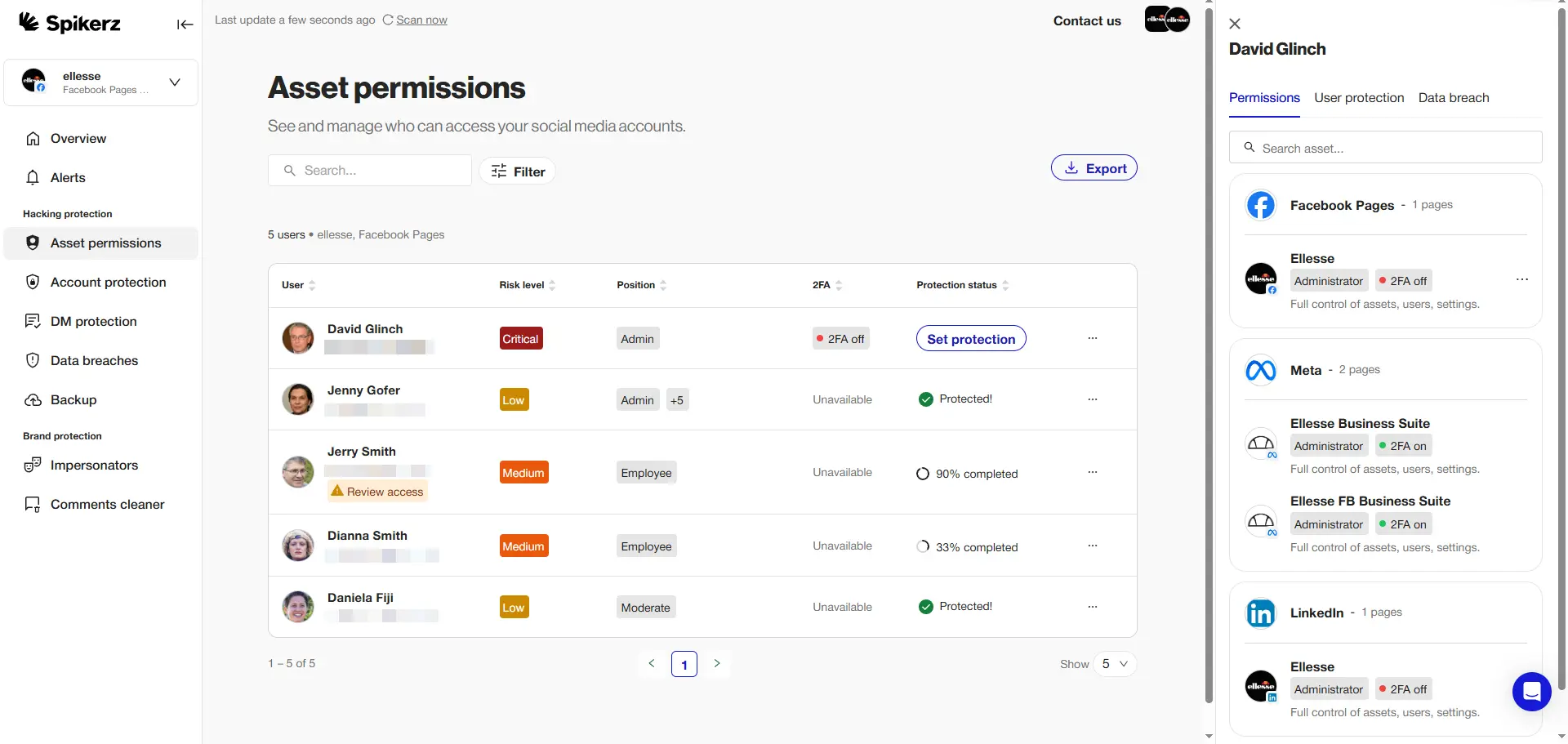
Spikerz is a social media security platform built to protect business accounts from hacking, impersonation, phishing, and access mismanagement. We help creators, brands and enterprises lock down their Facebook, Instagram, TikTok, YouTube, X, and LinkedIn accounts with one connected system.
Spikerz user access works by giving you a single dashboard where you can see every person with permissions across your social accounts. You assign roles, set access levels, enforce 2FA, and remove users instantly when their role changes or they leave the company. Every action gets logged, so you always know who did what and when.
Here are some examples of how Spikerz's user access management can help your organization:
- Spotting unauthorized admins: See every person with access to your Facebook Page and flag anyone who shouldn't be there.
- Enforcing 2FA across your entire team: Push 2FA setup to all admins and block access for anyone who hasn't enabled it.
- Revoking access in one click: When an employee leaves, remove their permissions from every connected account at once.
- Tracking permission changes: Get notified the moment someone's role gets upgraded or downgraded on your Page.
- Auditing past access: Pull detailed reports showing who had access to what during any given time period.
Are you ready to protect your Facebook Page from hacking, impersonation, and access mismanagement?
Book a demo and join the global brands and enterprises already trusting Spikerz to secure their accounts, moderate their comments, and identify brand impersonators. Your Page took years to build. Protecting it should take minutes.
Conclusion
Managing Facebook Page admins is not a task you can set and forget. The hard truth is that most businesses lose control of their Facebook Pages through preventable mistakes. A forgotten admin, a phished password, or a former contractor with lingering access. Every one of these security gaps can turn into a full account takeover, and rebuilding from that kind of loss takes months or even years of work that you simply can’t afford to repeat.
The good news is that Spikerz exists to close those gaps before they become disasters. With one platform that manages permissions, enforces 2FA, and removes old access in a single click, you stop juggling spreadsheets and start running your social media on solid ground.
Your business deserves that kind of protection, and your Facebook Page is too valuable to leave exposed. So go ahead and book a demo right now to learn how we can help protect your social media presence.
