How to delete and hide comments on X (Twitter)


You can delete your own replies on X, but not other people's. Learn how to hide replies, limit who can reply, mute words, block accounts and report abuse to keep your brand's threads clean.
You can delete your own replies on X (Twitter), but you can't delete replies other people leave on your posts. What you can do is hide those replies, limit who can reply in the first place, mute or block the accounts behind them, and report anything that breaks X's rules.
This Spikerz guide walks through every native X tool for managing comments, explains where manual methods fall short, and shows how AI-powered moderation fills the gaps.
Can you delete comments on X?
It depends on whose comment it is. On X, comments are called replies, and the rules are simple:
- Your own replies: You can delete them at any time. Deleting removes the reply for everyone.
- Other people's replies to your post: You can't delete them. Only the person who wrote the reply (or X, if it breaks the rules) can remove it.
For replies you can't delete, your options are to hide the reply, restrict who can reply to the post, mute or block the account, or report the reply to X.
How to delete your own reply on X
- Open the reply you want to remove (on your profile, it's under the Replies tab).
- Click or tap the three-dot icon on the reply.
- Select Delete and confirm.
Deleting can't be undone. The steps are the same on desktop and mobile.
What are comments on X (Twitter)?
Comments are the replies users leave on posts. On a busy brand account, the ones that cause problems usually fall into a few groups:
- Spam comments: Irrelevant, self-promotional or automated messages that clutter your threads.
- Hate speech: Offensive or harmful remarks targeting specific people or groups.
- Troll comments: Replies designed to provoke or derail a discussion.
- Bots and fake accounts: Replies from automated or fake profiles that post spam or impersonate real accounts.
Why you need to manage comments on X
There are several reasons it's worth managing your replies properly:
- Brand reputation: Harmful or negative replies left unchecked can hurt your reputation, especially if you represent a brand or business. A study by InMoment found that 94% of consumers say a negative review or social media comment has convinced them to avoid a company.
- User experience: A hostile or spam-filled reply section puts people off. A well-moderated one encourages genuine engagement and builds community.
- Community guidelines: X has rules on harassment, hate speech and spam, and your threads are part of how your account is perceived.
- Security concerns: Some replies contain malicious links or phishing attempts that put your followers at risk.
How to manage comments on X (step by step)
1. Limit who can reply to your posts
X lets you choose who can reply to each post. Setting this before you publish is your first line of defense, and you can also change it afterward from the post's three-dot menu.
Your options:
- Everyone: The default, open setting for organic engagement.
- Accounts you follow: Useful for community-only discussions.
- Verified accounts: Limits replies to verified accounts, which cuts down on a lot of low-effort spam.
- Only accounts you mention: Good for giveaways, Q&As or campaigns where you only want replies from tagged participants.
How to set it: While composing your post, click the reply setting below the text box (it shows who can reply) and choose an option. People outside your selection can still view, repost and like the post, but they can't reply.
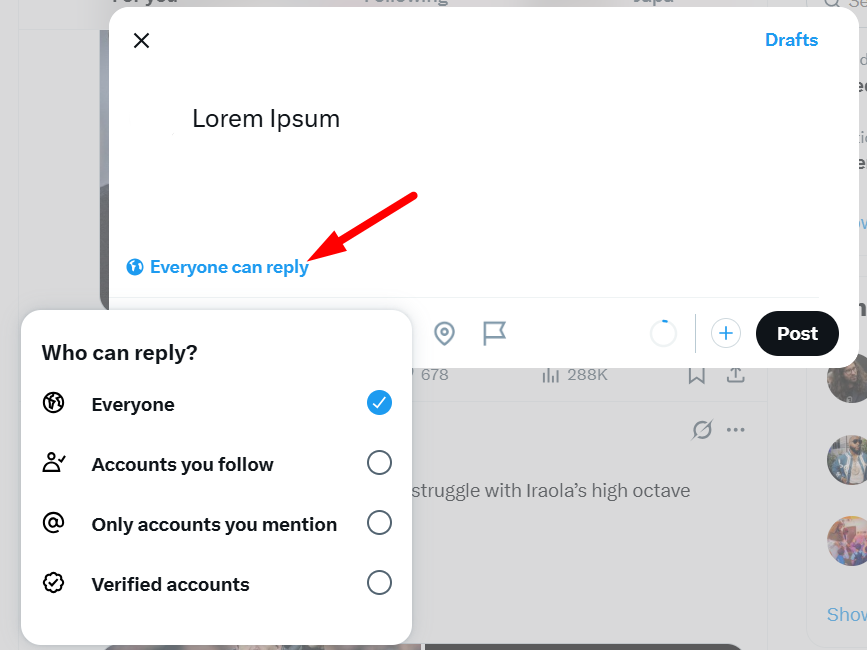
Use stricter settings for high-stakes announcements. A product launch or crisis update doesn't need open replies from every bot account on the platform.
2. Build and maintain a muted words list
Muted words hide posts, replies and notifications containing specific terms from your own view. Muting is invisible to the other person and fully reversible. Keep in mind that muted replies are only hidden from you; other people can still see them, so muting works best alongside hiding and blocking.
How to add terms:
- On desktop, click More in the left-side menu and go to Settings and privacy.
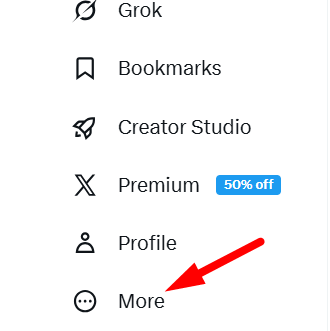
- Click Privacy and safety.
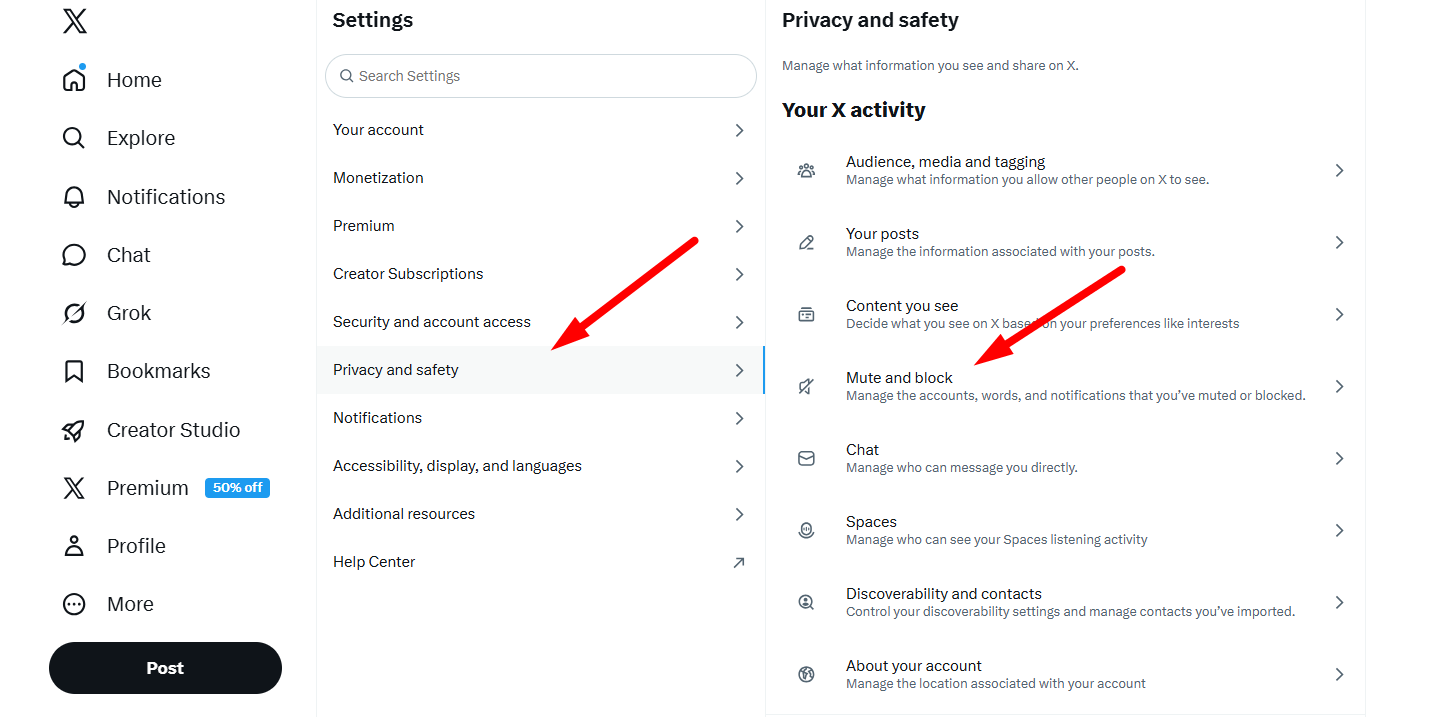
- Go to Mute and block, then Muted words. Click the plus icon, enter your term, choose where to apply it (timeline, notifications or both), pick how long to mute it and save.
Here's a starter list for brand accounts:
- Scam keywords: "free followers," "buy followers," "DM me for promo"
- Spam CTAs: "check bio," "link in bio," "click here," "limited offer"
- Harassment terms: Slurs, explicit profanity and terms targeting protected characteristics
Muting isn't case-sensitive, and muting a word also mutes its hashtag. High-traffic accounts should keep a longer list and review it regularly as spam tactics change.
Spikerz supplements your muted words list with AI that catches variations, slang and emojis a static list will always miss.
3. Hide replies on X without escalating conflict
Since you can't delete other people's replies, hiding is the closest thing to it. A hidden reply is moved out of the main conversation under your post, but it isn't deleted, and anyone can still view it. It's a lower-friction option than blocking and avoids a public back-and-forth.
When to hide rather than block:
- Personal attacks on team members
- Off-topic replies that derail the thread
- Promotional spam that doesn't break X's rules but falls below your brand standards
- Borderline content you want out of the main thread
How to hide a reply: From the reply, click or tap the more icon, select Hide reply and confirm. You can only hide replies to your own posts. The person who wrote the reply isn't notified.
Hidden replies aren't secret. Anyone can see them by clicking the hidden reply icon at the bottom right of your original post, and you can unhide a reply from there too.
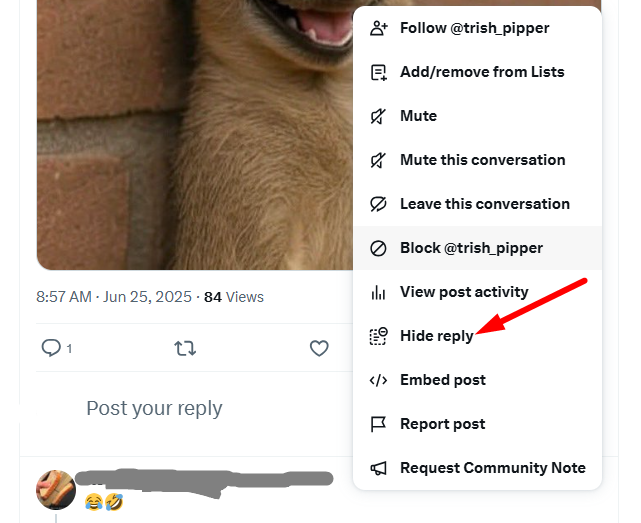
Act early on high-engagement posts. The replies that sit at the top of a thread in the first hour shape how people read the rest of the conversation.
4. Mute, block and report persistent offenders
For accounts that keep posting spam or harassment, muting or blocking is the next step. Here's how the two compare:
Mute
- The account isn't notified.
- They can still see and reply to your posts, but you won't see their posts or replies.
- Best for noisy but harmless accounts.
Block
- The account isn't notified, though they'll see that they're blocked if they visit your profile.
- They can't follow you, reply to your posts, like or repost them, or send you direct messages.
- Best for harassment, threats, repeat spam and impersonators.
Report replies that violate X's policies, including hate speech, threats, non-consensual intimate media and brand impersonation. X reviews reports and may remove the reply or suspend the account.
5. Understand what X's native tools can't do
X removed 1.7 million bot accounts in October 2025, one of its largest purges in recent years. Even so, estimates of how many bots remain on the platform vary widely, and bot activity tends to cluster in busy or controversial threads.
What this means for brands:
- Bot accounts removed in a purge can be recreated within days.
- High-traffic threads (product launches, news, politics) need active management beyond periodic platform cleanups.
- Relying only on X's own moderation leaves your replies exposed between cleanups.
6. Automate what manual tools can't scale
When a brand post gets thousands of replies in a day, manual moderation can't keep up. Bots often reply within seconds, before a human moderator can act, and phishing links in replies put your audience at direct risk of fraud.
X's native tools have clear limits. Muted words catch exact matches but miss variations, slang and emojis. Reply settings are a blunt instrument that can shut out genuine customers too. Hidden replies have to be handled one at a time, and none of these tools learn or adapt.
Spikerz connects to X through the official API, so you never share your password, and uses AI that reads intent as well as keywords.
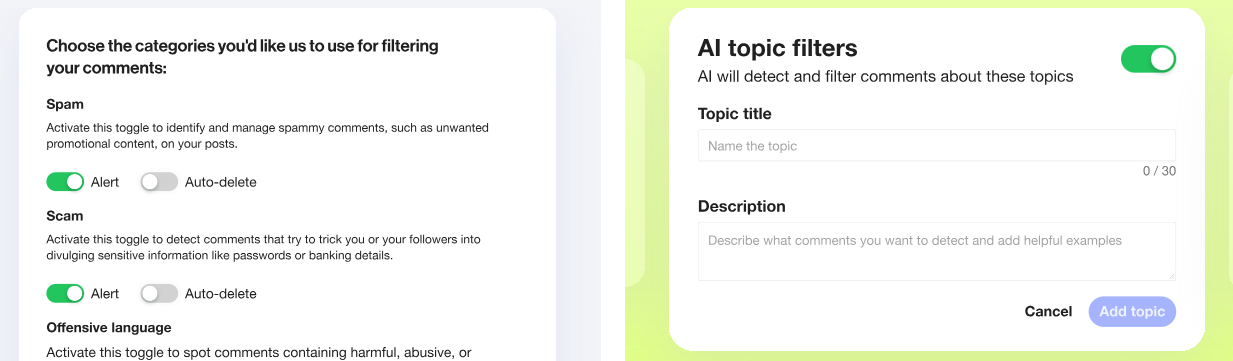
What this means in practice:
- Context-aware AI detects hate speech, scams and phishing based on meaning and sentiment rather than rigid keyword lists, so it catches variations muted words miss.
- Around-the-clock scanning hides problematic replies as they come in, instead of hours later when a moderator logs in.
- Multilingual support understands slang, emojis and nuance across 25+ languages.
- Custom brand rules let you describe in plain language what breaks your standards, rather than building endless muted word lists.
- Impersonator detection flags fake accounts posing as your brand so you can get them taken down.
Connect your X account, set your rules and monitor results in a single dashboard that also covers impersonation detection and account takeover protection. Read our social media comment moderation playbook for a cross-platform view.
Final thoughts
You can't delete other people's comments on X, but you're far from powerless. Reply settings, muted words, hidden replies, muting, blocking and reporting together give you a lot of control over your threads. The catch is that they're manual and reactive.
Spikerz automates comment moderation on X and the other major platforms, hiding spam, scams and abuse in real time. Pair it with X's built-in features and your replies stay clean, safe and on-brand.
Want to see how it works for your accounts? Book a consultation with our team.

.webp)


