Block vs Mute vs Restrict on Facebook: What Social Media Managers Should Know


Summary:
Social media managers face constant threats from spam, phishing, and trolls that damage brand reputation and drain team resources—but Facebook's three built-in tools offer practical solutions. Learn when to block users entirely, mute annoying but harmless accounts, or restrict comments for subtle moderation, plus discover how AI-powered tools like Spikerz can automate this process and free your team to focus on meaningful engagement. By combining Facebook's native features with advanced permission management, you'll protect your brand while maintaining the community trust that drives real business results.
Block vs Mute vs Restrict on Facebook: What Social Media Managers Should Know
Keeping your online community safe and engaged is key for business success. But what happens when unwanted interactions like spam, harassment, phishing, account hacks, or negative comments go unnoticed?
These issues can quickly get worse, damaging your brand's reputation and blocking meaningful engagement. Thankfully, Facebook offers a few built-in tools to help you maintain a positive environment.
In this post, we'll cover the differences between blocking, muting, and restricting users, and how to use them effectively. Plus, we'll discuss how Spikerz's permission management tools can streamline this process for your team.
What Are The Biggest Challenges Social Media Managers Face On Facebook?
One of the biggest challenges social media managers face is managing unwanted behavior. Every day, they have to handle spam, harassment, hacking attempts, phishing scams, trolls, and negative comments that can easily disrupt their plans and strategies.
For instance, to keep things professional, social media managers spend hours moderating comment sections, removing malicious content, and blocking fake accounts. All this manual work takes up hours of their valuable time, and when issues start to stack up, the damage goes beyond lost productivity. It directly impacts the brand’s reputation.
That impact can happen faster than many realize. If a phishing link stays visible for too long, followers fall victim to it and lose trust almost immediately. And If a page gets hacked and isn’t fixed quickly, it puts the audience at risk of scams and privacy breaches, while also causing long-term harm to the brand’s credibility.
With bad actors targeting social media channels more and more, it's becoming harder for social media managers to keep up. In the first quarter of 2021 alone, phishing emails using LinkedIn as bait were the most clicked-on social media scams, drawing 42% of clicks, compared to 20% for Facebook and 9% for X (formerly Twitter).
That's a clear sign attackers are getting more creative and targeted. And with an average of 1.4 billion social media accounts hacked every month, the threat is growing. To make things more complicated, around 40% of phishing campaigns now spread through platforms like Slack and Teams, reflecting a major shift in how attackers reach their targets.
But it doesn't stop at spam and scams. Social media managers also deal with algorithm changes that tank reach without warning, platform updates that break their workflow, and constant pressure to generate high-performing content at scale. These issues make it even harder to stay consistent, keep engagement up, and maintain the brand's voice across the board.
How Do These Issues Negatively Impact Brands?
A strong social media presence depends on meaningful engagement, trust, and consistency. When spam, phishing links, or hacked posts appear on the brand's Facebook page, followers lose trust. They start to think the brand isn't paying attention or doesn't care about safety, and that can lead to people unfollowing, ignoring posts, or even reporting the page.
For example, if someone gets scammed through a link on your page or by a fake profile, they may blame your brand, even if it wasn't at fault.
This kind of unwanted activity also makes people less likely to engage. When comment sections are full of spam or trolls, regular followers stop joining the conversation because they don't feel comfortable or heard. They stop liking, sharing, or commenting. That makes it harder for content to gain traction (since Facebook's algorithm favors posts that get quick engagement). Over time, fewer people see their posts, and the brand becomes less visible even to followers.
Other problems like constant algorithm changes and platform updates also make the brand look inconsistent. When reach drops and nothing seems to work, managers are forced to post more often or take risks, which can lead to lower-quality posts or off-brand messaging. If a page starts becoming disorganized and random, people stop paying attention.
All of these issues together weaken the connection between the brand and its audience. Resulting on the community getting smaller, attracting less leads, contributing less to the bottom line, and the brand's image suffering.
How Can Businesses Protect Their Brands On Facebook?
Facebook offers three main ways to deal with unwanted comments, giving businesses the tools to control who engages with their content and how. Here’s a brief overview of them.
1) How To Block Users
Blocking is the most direct way to cut off all interaction with a user on Facebook. When you block someone, they can no longer see your posts, comment on your content, send messages, or even find your business in search results. It completely cuts off the connection.
This is an option that you should use only in serious cases, like when a competitor is trolling your page, a former client is leaving fake reviews, a customer is threatening your staff, or a former employee is posting confidential company information.
To block someone from your Facebook business page, do the following:
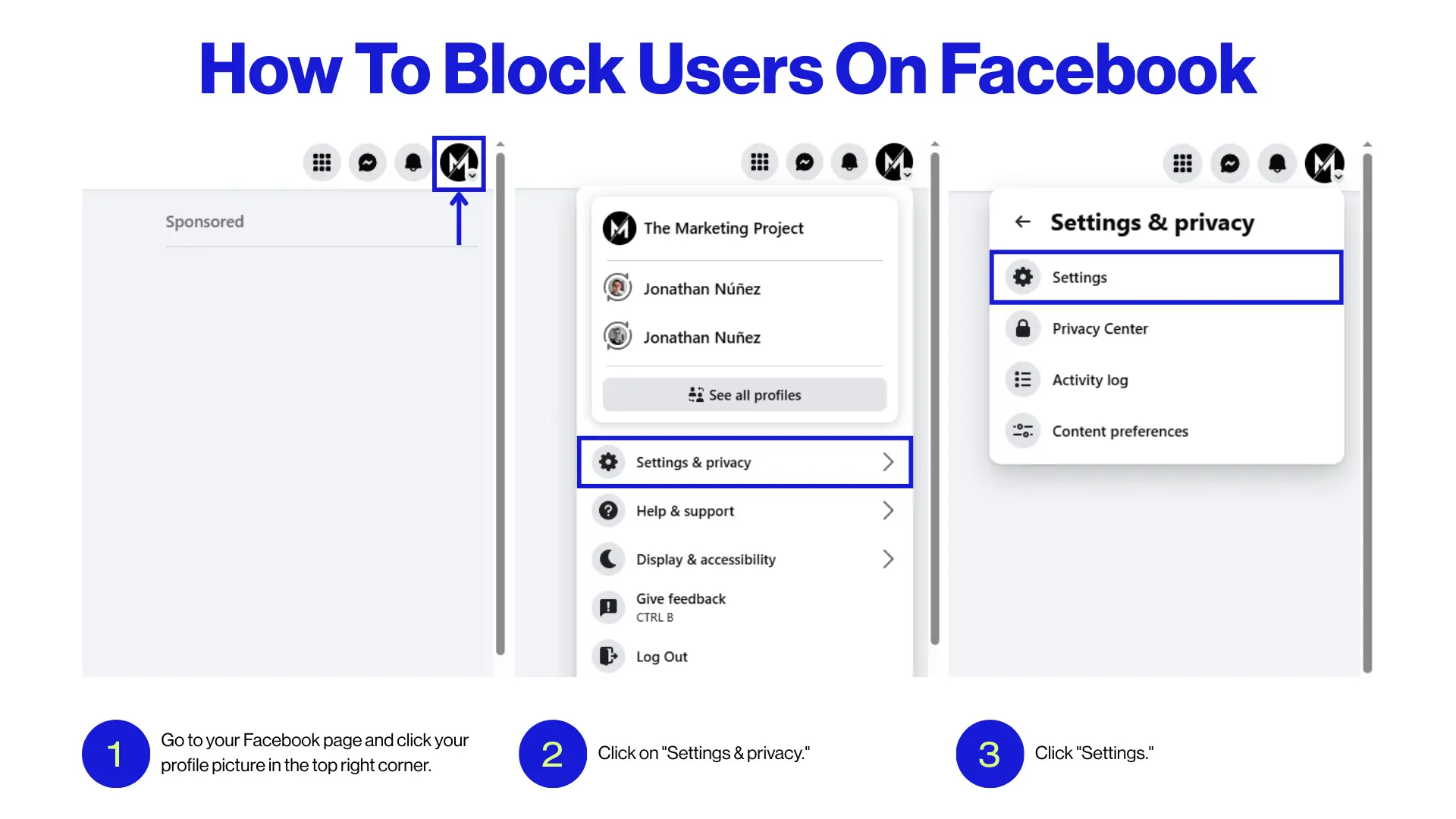
- Go to your Facebook page and click your profile picture in the top right corner.
- Click on "Settings & privacy."
- Click "Settings."
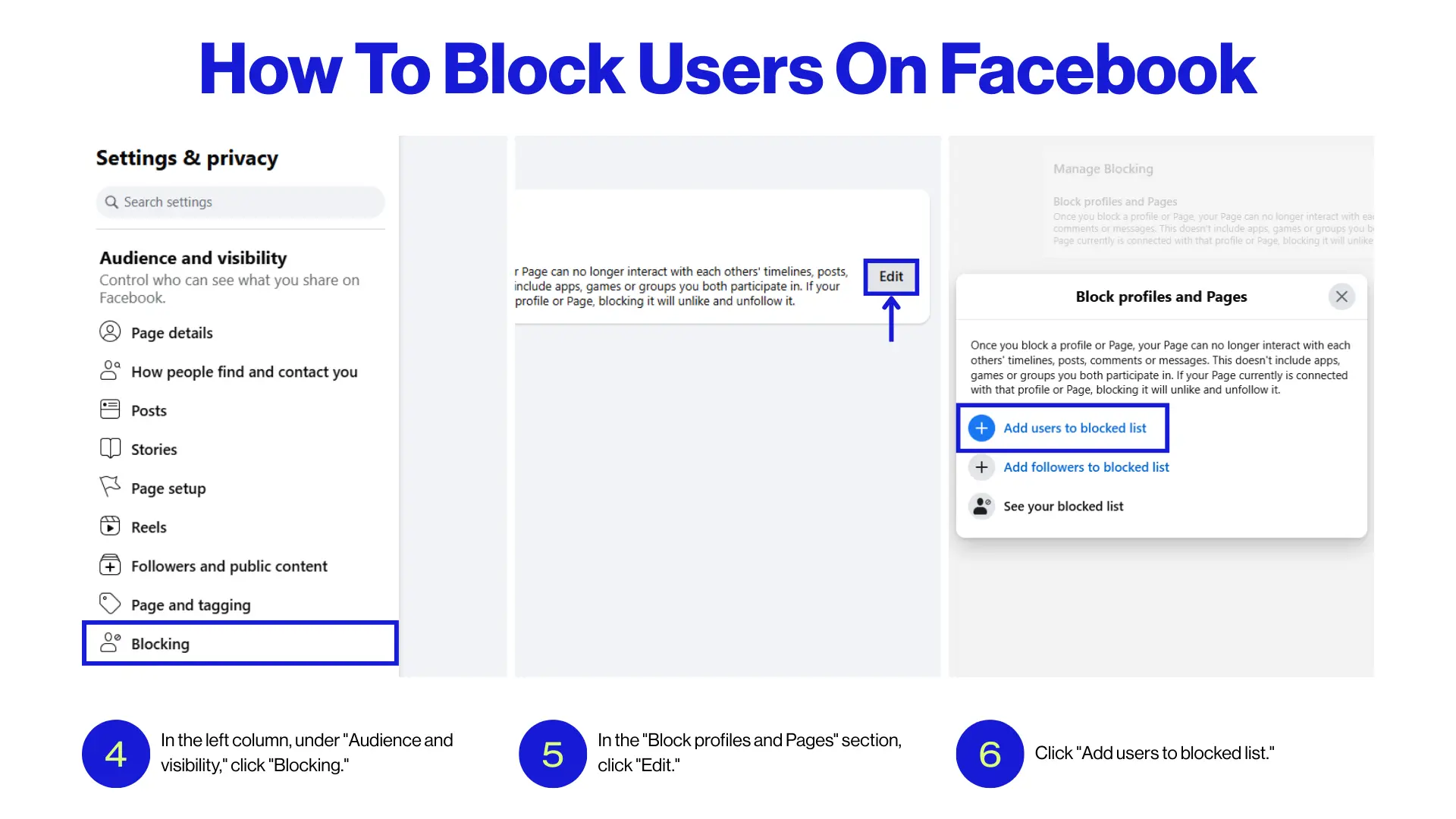
- In the left column, under "Audience and visibility," click "Blocking."
- In the "Block profiles and Pages" section, click "Edit."
- Click "Add users to blocked list."
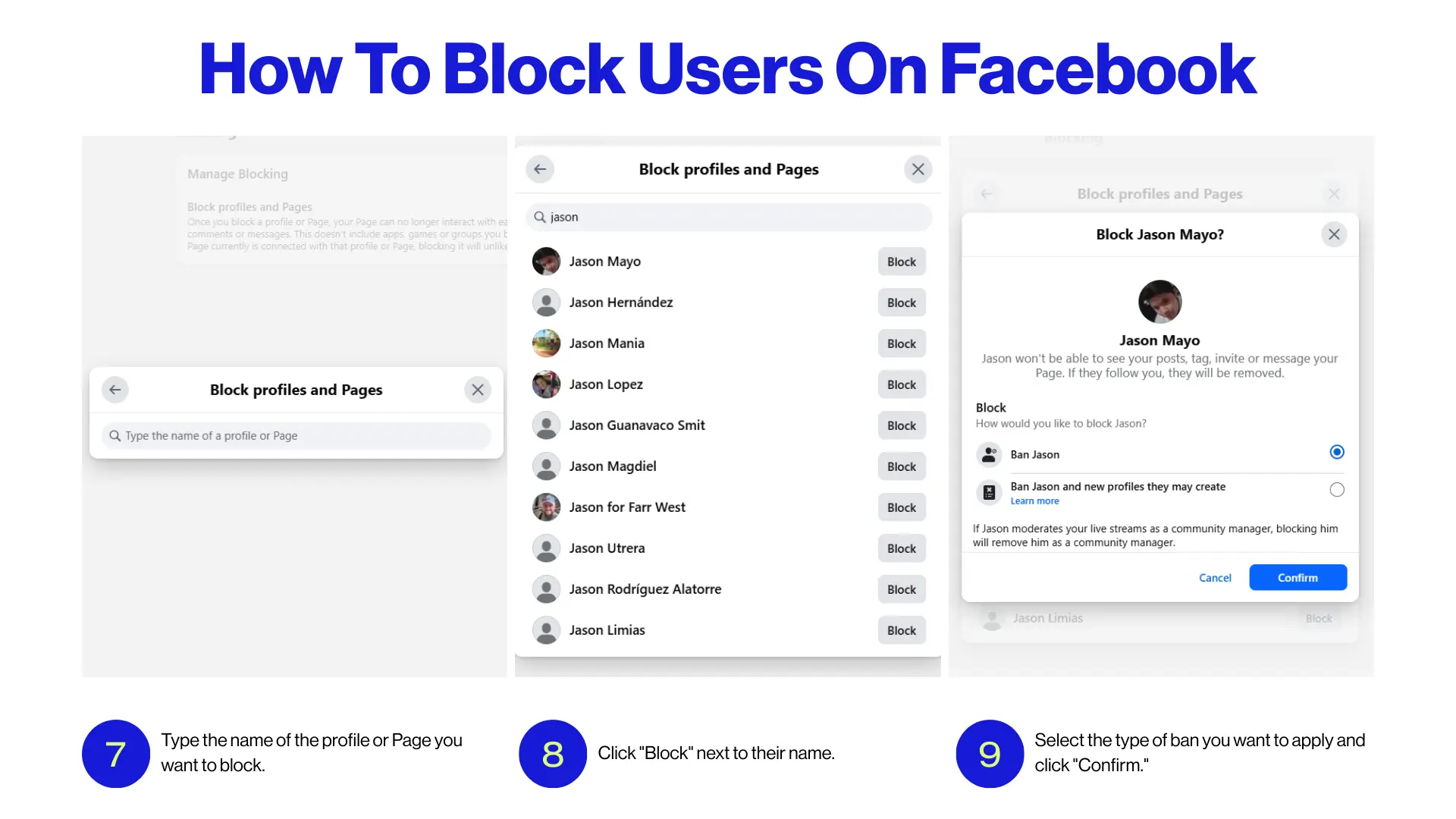
- Type the name of the profile or Page you want to block.
- Click "Block" next to their name.
- Select the type of ban you want to apply and click "Confirm."
2) How To Mute Users (Snooze)
Muting is a more subtle way to manage interactions on Facebook. It doesn't block or remove the person. Instead, you just stop seeing their posts in your feed, and they won't know it. This is useful when someone is posting annoying or repetitive content that isn't harmful but still distracts you from your daily workflow.
For example, you might mute a customer who keeps complaining about the same issue you've already addressed, or someone who constantly posts negative (but not abusive) comments. They'll still be able to see and interact with your content, but you won't see their posts unless you visit their profile directly.
To mute someone from your feed, do this:
%2520On%2520Facebook.webp)
- Find one of their posts in your News Feed.
- Click the three dots (•••) in the top right of the post in your Feed.
- Click "Snooze [Name] for 30 days."
To immediately undo "Snooze [Name] for 30 days," click "Undo" in the confirmation message.
3) How To Restrict Users
Restricting someone on Facebook is the most subtle way to manage interactions without blocking or muting them completely. When you restrict a user, they can still see your public posts and interact with your content, but their comments and messages will only be visible to them unless you choose to approve them. This gives you more control over what others see without alerting the person.
It's a useful tool when you're dealing with someone who's generally fine but tends to post comments you'd rather filter, especially on sensitive topics like a customer complaint or a product withdrawal.
Note: This process only works for personal profiles, not business pages.
To restrict someone from your Facebook business page, follow these steps:
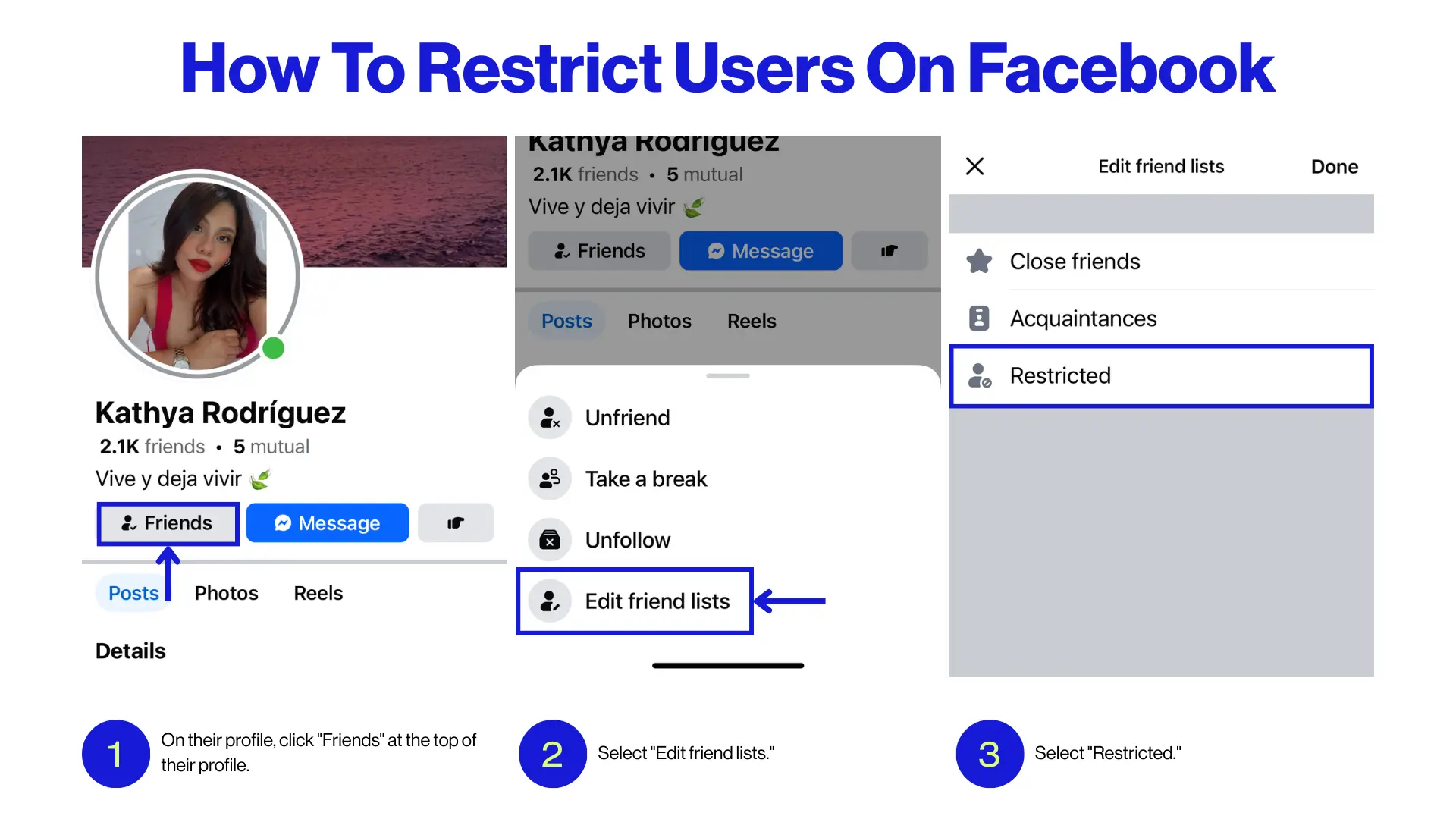
- On their profile, click "Friends" at the top of their profile.
- Select "Edit friend lists."
- Select "Restricted."
How Spikerz Can Help Enforce Comment Management Effectively
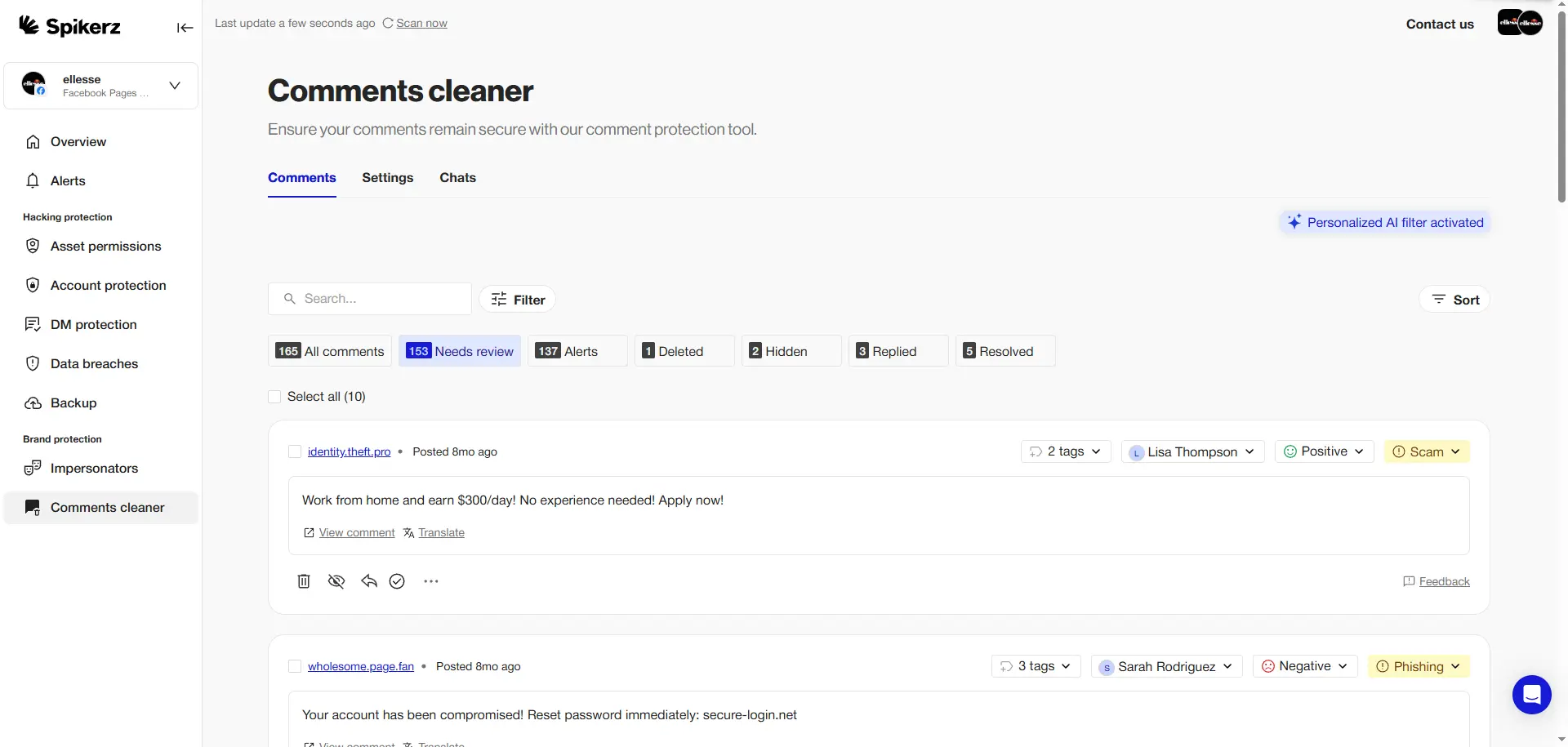
Spikerz's permission management tools make comment control so much easier for teams, especially when you're dealing with a high volume of spam, trolls, or even potential phishing attempts.
Instead of manually scanning every comment or DM, Spikerz uses AI to analyze and flag suspicious behavior like bots, spammy messages, phishing links, or even social engineering tactics. It sends everything it detects to your alerts tab, so your team can quickly review and decide whether to block, mute, or restrict.
And since the system is tied to permission levels, you can make sure only the right team members have control over these moderation actions, keeping things clean, efficient, and secure.
In short, it's a huge time-saver and helps you enforce your content safety rules without burning out your team.
Conclusion
Managing unwanted comments on Facebook is one of the toughest challenges social media managers face today. The constant flood of spam, phishing attempts, and negative comments can drain your team's energy and damage your brand's reputation if not handled. But with the right tools and strategies, you can turn these challenges into opportunities to strengthen your online presence.
Facebook's built-in tools give you basic control over who interacts with your content. Each has a specific purpose:
- Bocking for serious threats,
- Muting for minor annoyances,
- And restricting users for light moderation.
If you understand when and how to use each tool, you’ll be able to maintain a professional, engaging community without alienating followers.
Yet in today's online world, where cyber threats change daily and bad actors grow increasingly sophisticated, basic tools aren't always enough. That's where advanced solutions like Spikerz come in, transforming comment management from a time-consuming chore into an automated, intelligent process.
Combine Facebook's native features with AI-powered security tools to create a comprehensive defense system that protects your brand while maintaining the type of engagement that drives business growth.
