How to Spot and Remove a Fake X Account (Guide For Brands)

.webp)
Summary:
Learn how to spot fake X accounts, remove impersonators, and protect your brand from scams, phishing, and customer fraud.
The sad reality is that scammers create thousands of fake accounts on X every day, and many of them target real brands. They copy your profile picture, swap one letter in your handle, and start messaging your customers within hours. And by the time you notice, your followers have already shared their passwords, payment details, or trust.
The simple truth is, if you run a business, build an audience, or manage a brand on X, fake accounts already affect you.
That’s why in this we walk you through what these accounts look like, why removing them matters, and how to take them down. You'll also see how we help brands at Spikerz stay ahead of impersonators on X.
What Are Impersonators and Scam Profiles on X?
An impersonator is an account built to look like yours but run by someone else. These accounts copy your handle, bio, profile picture, and posting style to fool your followers. They often add small variations like an extra underscore, a number, or a misspelled word to slip past detection.
Scam profiles take impersonation further by using your brand to defraud people. They reply to customer service complaints, send fake giveaway links, or run phishing campaigns through direct messages. Some even buy X Premium to grab a blue checkmark, then change their display name to match a real brand.
The goal stays the same across every variant: turn your reputation into their revenue. They harvest passwords, push fake products, or move markets with false announcements.
Why Should Brands Identify and Remove Fake Accounts?
The honest truth is that fake accounts cause damage that reaches far beyond a few stolen followers. Their impact hits your ad spend, your support team, your reputation, and your revenue. Here's what's at stake when you let them run rampant.
1) They Drain Your Advertising Budget

Juniper Research found that around $84 billion in global digital ad spend was lost to fraud in 2023, with projections reaching $172 billion by 2028. Roughly one out of every three dollars spent on digital advertising goes to non-human or fraudulent traffic.
When bots click your ads, the X algorithm reads them as engaged users and feeds your campaigns more bot-heavy audiences. Your targeting models train on fake signals, so your real customers see fewer ads. As a result, you end up paying more for results that exist only in your dashboard.
2) They Hijack Your Customer Support
Public complaints on X are gold for scammers. Fake support accounts like @YourBrand_Help can reply to angry customers within minutes, offering help through direct messages. Once the conversation moves off X, your customers walk into credential theft, fake "verification" fees, or other scam tactics.
What’s worse is that the damage doesn't stop with the customer. Research shows that around 63% of victims blame the real brand for failing to protect them. Your support team then absorbs the cleanup cost. Incident response, forensic work, and public warnings burn hours that should go to your real customers.
3) They Destroy Brand Equity
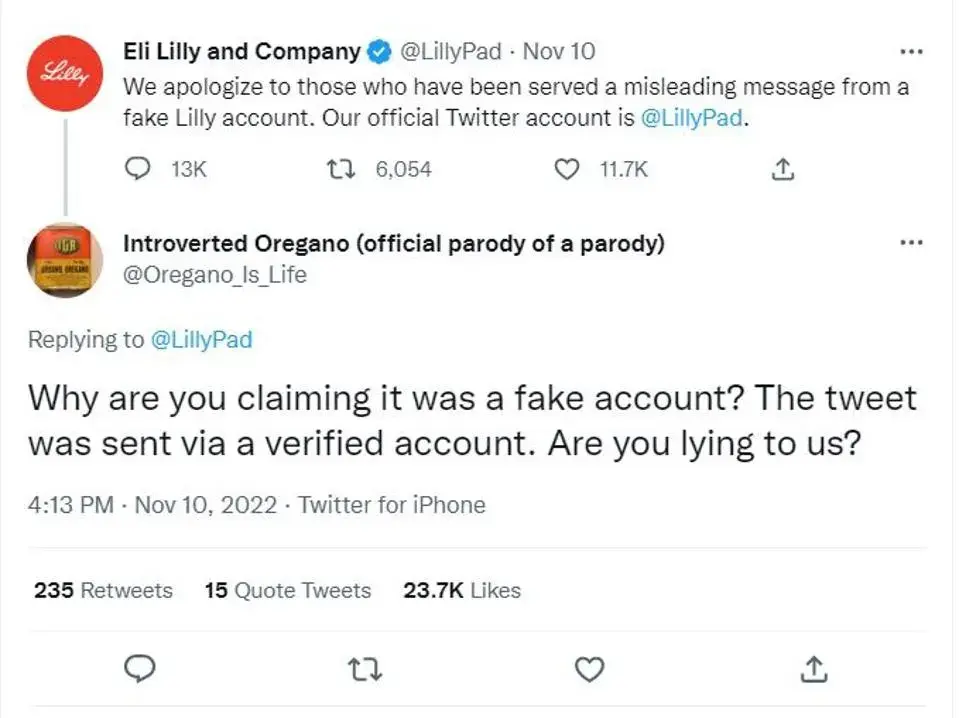
A single viral impersonation can erase billions in market value. In November 2022, a verified fake account called @EliLillyandCo posted that insulin would be free. Eli Lilly's real stock dropped more than 4% the next day, erasing roughly $15 billion in market capitalization, while shares of Novo Nordisk and Sanofi slid alongside it.
Starbucks faced a similar crisis in 2018 when fake coupons spread across social platforms, promising free drinks tied to a fake promotion. As a result, staff had to deal with confused customers for weeks, and the brand's reputation for inclusivity took a public hit.
This kind of impact lasts long after the fake post disappears. Reports show that 81% of consumers consider trust a deciding factor in their buying decisions. Once that trust breaks, winning customers back costs up to seven times more than retaining them.
4) Reactive Reporting Alone Doesn't Work
X removed roughly 800 million accounts in a single year for manipulation and spam, almost three times its active monthly user base at the time. Yet new fake profiles appear faster than the platform can remove them. Trust and safety teams have shrunk, and standard impersonation reports now take weeks to process.
And bot operators adapt to every defense the platform deploys. If posting limits drop, they slow their cadence. If profile photo detection improves, they generate new faces with AI tools that defeat reverse image search.
Unfortunately, manual reporting leaves your brand exposed during the entire detection window. That’s why proactive monitoring is the only way to close that gap.
How to Identify Impersonators and Scam Profiles on X
Spotting a fake profile takes a trained eye, but once you know what to look for, it’s pretty easy to spot them.
Examine The Handle Closely
Impersonators often rely on small character swaps to avoid detection. Look for extra periods, underscores, numbers, or lookalike letters like a capital "I" replacing a lowercase "l" or a zero replacing the letter "O".
Check The Account's History
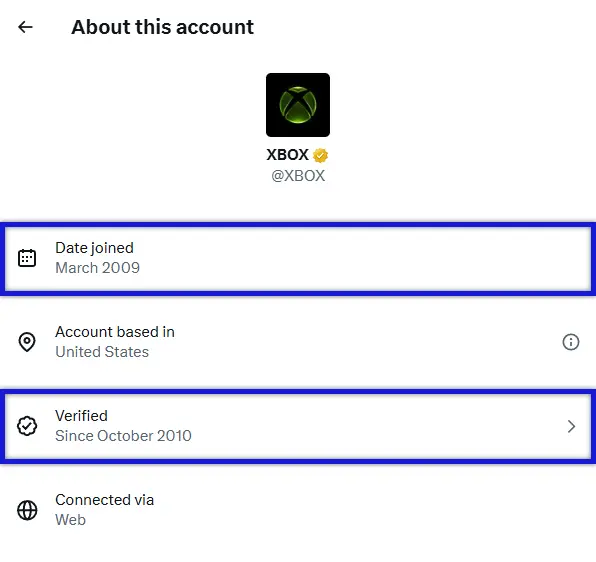
Real brand accounts post regularly over months or years. Fake profiles often show recent creation dates, sparse history, or sudden bursts of activity tied to one scam campaign.
Audit The Follower-To-Following Ratio
Real brand accounts usually have many followers and follow few. Impersonators often follow thousands of accounts while having few followers themselves, since they're hunting for engagement.
Review The Engagement Quality
Real engagement includes varied comments, sentiment, and language. Bot-driven accounts show copy-pasted replies, identical emoji patterns, or generic praise across hundreds of posts.
Verify The Verification Badge
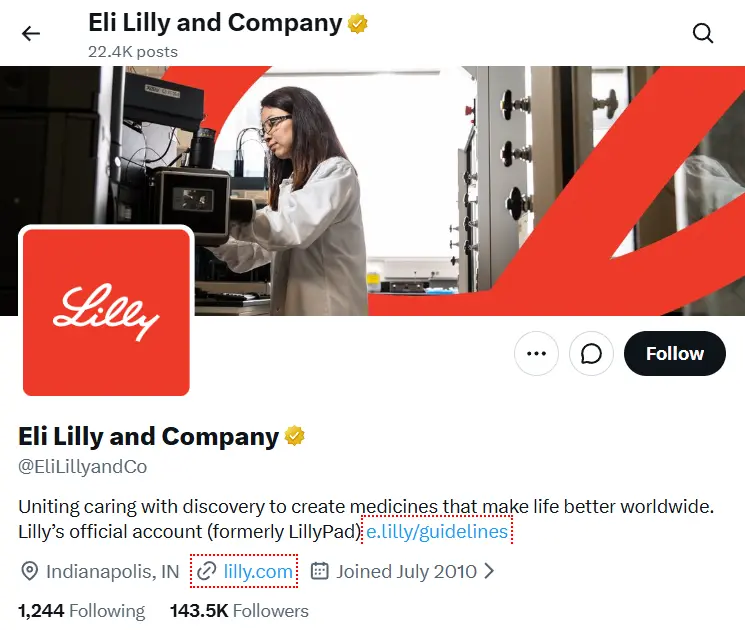
A blue checkmark on X no longer proves a brand is real, since anyone can buy X Premium. Look for the gold checkmark, which X reserves for businesses approved through Verified Organizations.
Cross-Reference The Bio Link
Click any link in a suspicious bio and check it against your official domain. Impersonators often use shortened URLs, lookalike domains, or addresses with extra hyphens and characters.
A Better Alternative: How Spikerz Automatically Finds Impersonators on X
Manually watching X for impersonators is a full-time job, and most brands can't keep up. That’s why we built Spikerz so you don't have to.
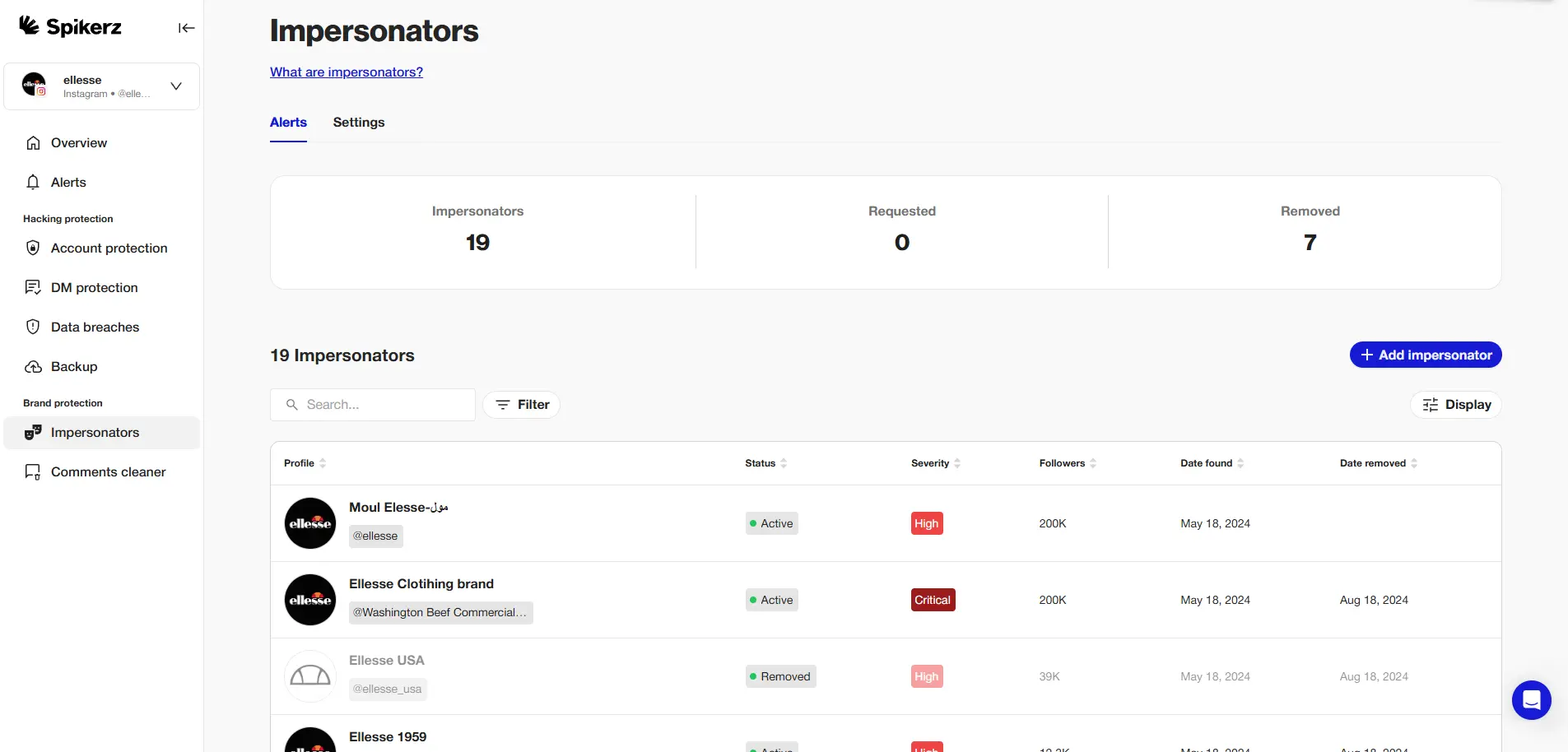
Our platform scans X around the clock, flagging accounts that copy your handle, logo, or content patterns. We use AI to detect lookalike profiles, including ones that swap characters, mirror your bio, or post fake support replies. When we find one, we kick off takedown requests right away, so your team doesn't waste hours on platform forms.
We also offer other tools to help protect your brand on social media like:
- Account Takeover Protection: Real-time monitoring detects unauthorized access attempts and login anomalies before attackers gain control of your accounts
- Phishing Prevention: AI-powered scanning identifies phishing attempts in direct messages and comments that try to steal credentials or sensitive information
- User Access Management: Centralized control over who has access to your accounts with easy permission revocation when team members change roles or leave
- Comment Moderation: Advanced filtering removes spam, bots, and harmful comments that could damage your brand image or expose followers to scams
How Many Fake Accounts Are Targeting Your Brand On X Right Now?
If you don't know the answer, you're already behind. Impersonators move in hours, not weeks, and every day without monitoring is a day they get to operate freely on your brand.
Book a free demo today and we'll run a scan of your accounts so you can see the threats hiding in plain sight.
How to Report and Remove Fake Accounts From X
Once you confirm an account is fake, move fast. Here's the process that gives you the best chance of removal.
Step 1: Capture Evidence
Before you report anything, document the fake profile. Save full-page screenshots showing the browser address bar, timestamps, and the post ID. Archive the page using archive.org or archive.today so the record survives even if the account gets deleted.
Step 2: Choose the Right Reporting Path
X offers different forms depending on the violation. Use the right one to avoid delays:
- Impersonation: Go to the Help Center Impersonation Form. You'll need a government ID or proof of real-world authority.
- Copyright (DMCA): Submit through help.x.com/en/forms/ipi/dmca. You'll need URLs of the original work and the infringing posts.
- Trademark infringement: Use the Intellectual Property Form with your trademark registration number.
- Illegal content in the EU: File through help.x.com/en/forms/dsa under DSA Article 16.
Step 3: Submit a Complete Notice
Fill out every required field. Include the impersonator's full profile URL, the post IDs, and a clear explanation of the violation. For DMCA claims, add a statutory declaration and electronic signature matching your legal name.
Example Of An Impersonation Report
- Head to X’s Authenticity on X page.
- Then answer the following when asked:
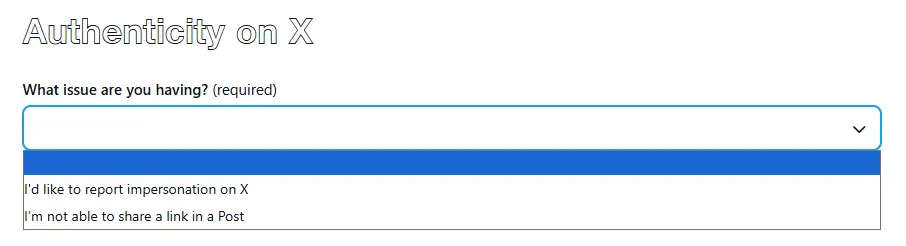
- Question: What issue are you having?
- Answer: “I’d like to report impersonation on X.”
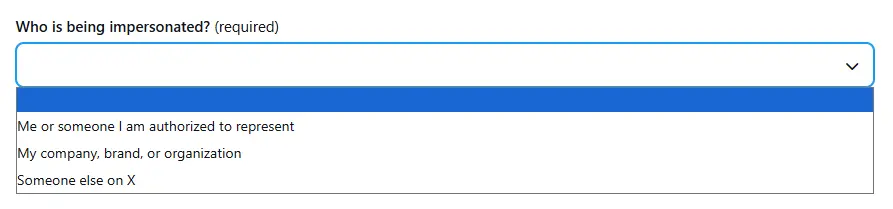
- Question: Who is being impersonated?, select the option that corresponds to your situation and continue the process (it’s very similar no matter the option selected).
- Answer: For this example, we’ll select, “Me or someone I am authorized to represent.”
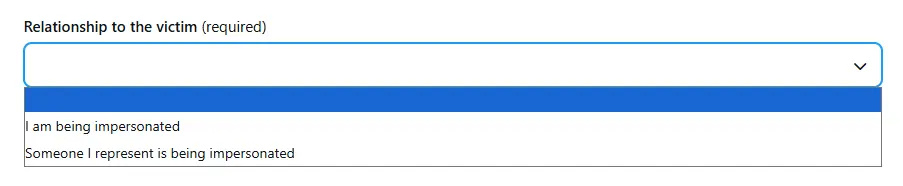
- Question: Relationship to the victim.
- Answer: Select the option that corresponds to your situation. For this example, we’ll select, “I am being impersonated.”
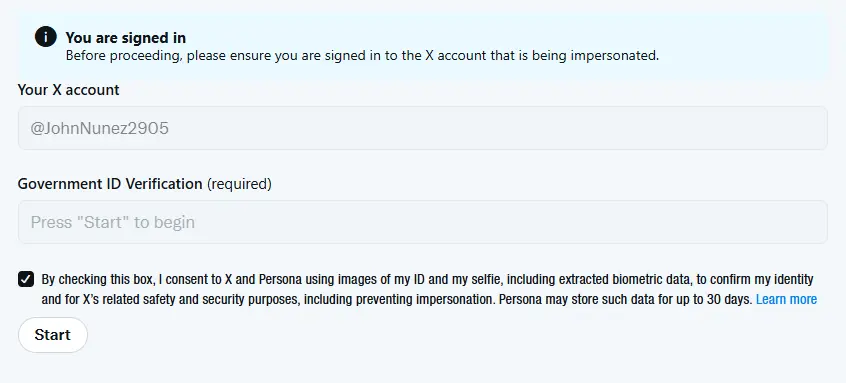
- Make sure you are signed in to X to have it automatically autopopulate some of the information required. Then click “Start” to begin the identity verification process. Here’s what you’ll need:
- Prepare a government-issued ID
- Check if your device’s camera is uncovered and working
- Be prepared to take a selfie and photos of your ID
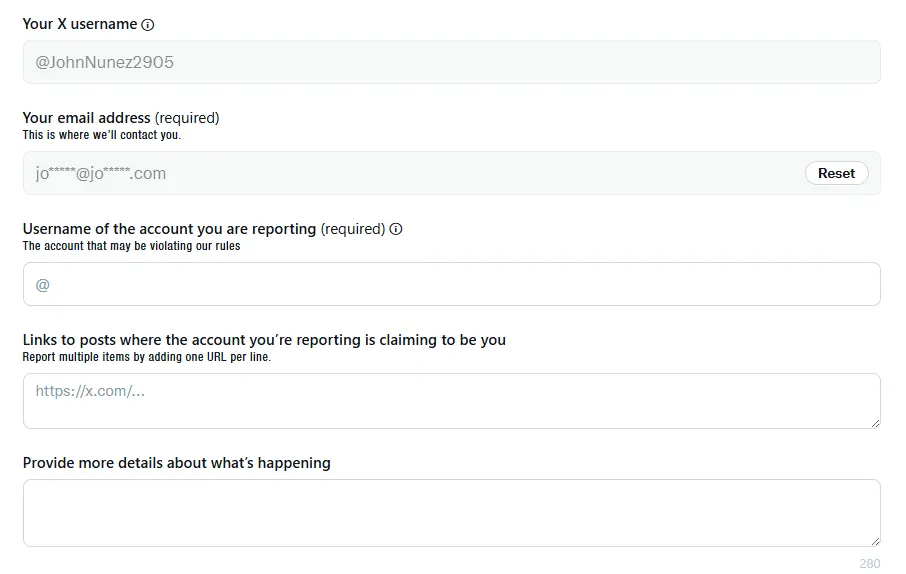
- Complete the impersonation report. Include the username of the account you are reporting, links to posts where the account you’re reporting is claiming to be you, and provide X more details about what’s happening so they have a full picture of the issue.

- Optional: Include additional documentation to help them speed up the reporting process. For example, if you use a trade name, pseudonym, or other name that does not appear on your government-issued photo ID, you’ll have to include documentation demonstrating that name is associated with you (like proof of registration of your trade name or pseudonym).
- Select, “Submit” to complete the process.
Step 4: Track Your Ticket
Save the ticket number and submission timestamp. Around 18% of reports get rejected on first submission due to technical errors, so prepare to refile if needed.
Step 5: Follow Up
Trademark and impersonation reports now take 5 to 7 business days minimum, with general cases stretching weeks. Keep records of every interaction in case you need to escalate.
What to Do If Customers Are Interacting With a Fake Profile
You'll sometimes find an impersonator mid-attack. If you spot one, immediately do the following:
- Post a public warning from your real account.
- Pin a tweet identifying the fake handle and tell followers to never share personal information through DMs.
- Reply directly to the affected customer's thread to redirect them to your verified support channels.
- Document everything. Screenshot the fake account's interactions for your takedown report.
- If the impersonator collected sensitive data, tell the customer to change their password, enable two-factor authentication, and monitor their accounts for suspicious activity.
How To Reduce Impersonation Risk
You can't stop scammers from trying, but you can make their job much harder.
- Verify your real accounts and clearly label them across every channel.
- Pin posts that list your official handles so followers know where to look.
- Register trademarks for your brand name and visual identity to strengthen takedown claims.
- Train your customer support team to spot impersonation patterns.
- Set up keyword monitoring for your brand name, common misspellings, and lookalike handles.
- Educate followers through periodic posts about how your real support team works, and what it never asks for.
Conclusion
Fake accounts on X aren't a future problem. They are unfortunately already targeting your customers, draining your ad spend, and shaping your brand’s public opinion.
How much would one viral impersonation cost your business right now? Identify suspicious accounts, report them fast, and put a monitoring system in place that works while you sleep.
Book a demo with Spikerz to see how we shut down impersonators on X before they reach your audience.
