Here's How to Moderate Instagram Comments in 2026 (Ultimate Guide)


Summary:
Discover why effective comment moderation is essential for protecting user well-being, safeguarding brand reputation, and combating spam and misinformation on Instagram. Learn the limitations of Instagram's built-in moderation tools and how AI-powered solutions like Spikerz can help you manage thousands of comments contextually in real-time, enabling you to maintain a healthier, more engaging community while scaling your moderation efforts efficiently.
As one of the most popular social media platforms, Instagram or IG is home to millions of users. Individuals, businesses, influencers, and public figures use IG for different purposes. The platform is for sharing content and interacting with millions of users.
However, this platform is not without its challenges. One of the most pressing issues users and administrators face is the need for effective comment moderation.
This Spikerz guide walks through a practical, step-by-step approach to moderating Instagram comments at scale, from native platform controls to automated solutions that understand context and intent.
The Importance of Comment Moderation on Instagram
The need for comment moderation on IG cannot be overstated. User-generated content, such as comments, shapes the overall experience for creators and audiences.
On the positive side, comments boost engagement, community building, and meaningful conversations. However, unchecked, they can also become a breeding ground for hate speech, spam, misinformation, and harassment.
Protecting User Well-Being
One of the primary reasons comment moderation is critical is to ensure user well-being. A study by the Royal Society for Public Health (RSPH) ranked Instagram as one of the most harmful social media platforms for mental health. Users are prone to anxiety, depression, and body image issues caused by negative interactions. 68% of UK teens felt social media platforms like IG increased their concerns about appearance.
Without proper moderation, hateful comments, body shaming, and cyberbullying can increase. These problems can cause emotional harm to users. Moderation helps create a healthier, more supportive space by filtering these contents.
Ensuring Brand Safety
For businesses, comment moderation is crucial for protecting their brand image. Negative comments can hurt a company's reputation as they deter potential customers. Consumers expect brands to be responsible for moderating negative interactions on their pages. A failure to respond or manage such comments can give the impression of neglect, potentially affecting customer trust.
Fighting Spam and Misinformation
Instagram is flooded with spam accounts containing irrelevant or promotional content in the comment sections. Moreover, misinformation can spread quickly through false claims or harmful conspiracy theories. These allegations could significantly damage public discussion.
Platforms have faced increased pressure to manage misinformation. IG introduced several measures to counter this, but user-level moderation remains critical in curbing the spread of false information.
How to Moderate Comments on Instagram (Step-by-Step)
Step 1: Run a Baseline Audit of Your Comment Section Health
You can’t fix what you haven’t measured. Before adjusting any settings, assess the current state of your most engaged content.
Pull the last 30 days of comments from your highest-performing organic posts and paid advertisements. Review and sort them into three buckets:
- Spam and bots: Repetitive phrases like "Nice pic!", emoji strings, or scam invitations ("DM me for free money")
- Negative or abusive remarks: Hate speech, harassment, trolling, or off-topic attacks
- Legitimate engagement: Customer questions, product feedback, or positive community interaction
Record the proportions. A 2026 analysis of 168.8 million social comments found that roughly 20% contain spam, bot activity, or abuse. The problem intensifies on paid content: TikTok Ads see hide rates of 38.4%, while Meta Ads hit 34.1%.

If your audit shows numbers in that range, you will need aggressive filtering in Step 2. If you are below 10%, you have breathing room to prioritize response quality over deletion volume.
Step 2: Activate and Customize Instagram's Built-In Filters
Instagram hides comments containing common offensive terms by default, but that baseline protection is minimal for brands managing large audiences. To tighten it:
Navigate to Settings > Hidden Words. Turn on both Hide comments (default) and Advanced comment filtering (off by default). The advanced layer catches trickier variations of spam and hate speech that basic keyword blocks miss.
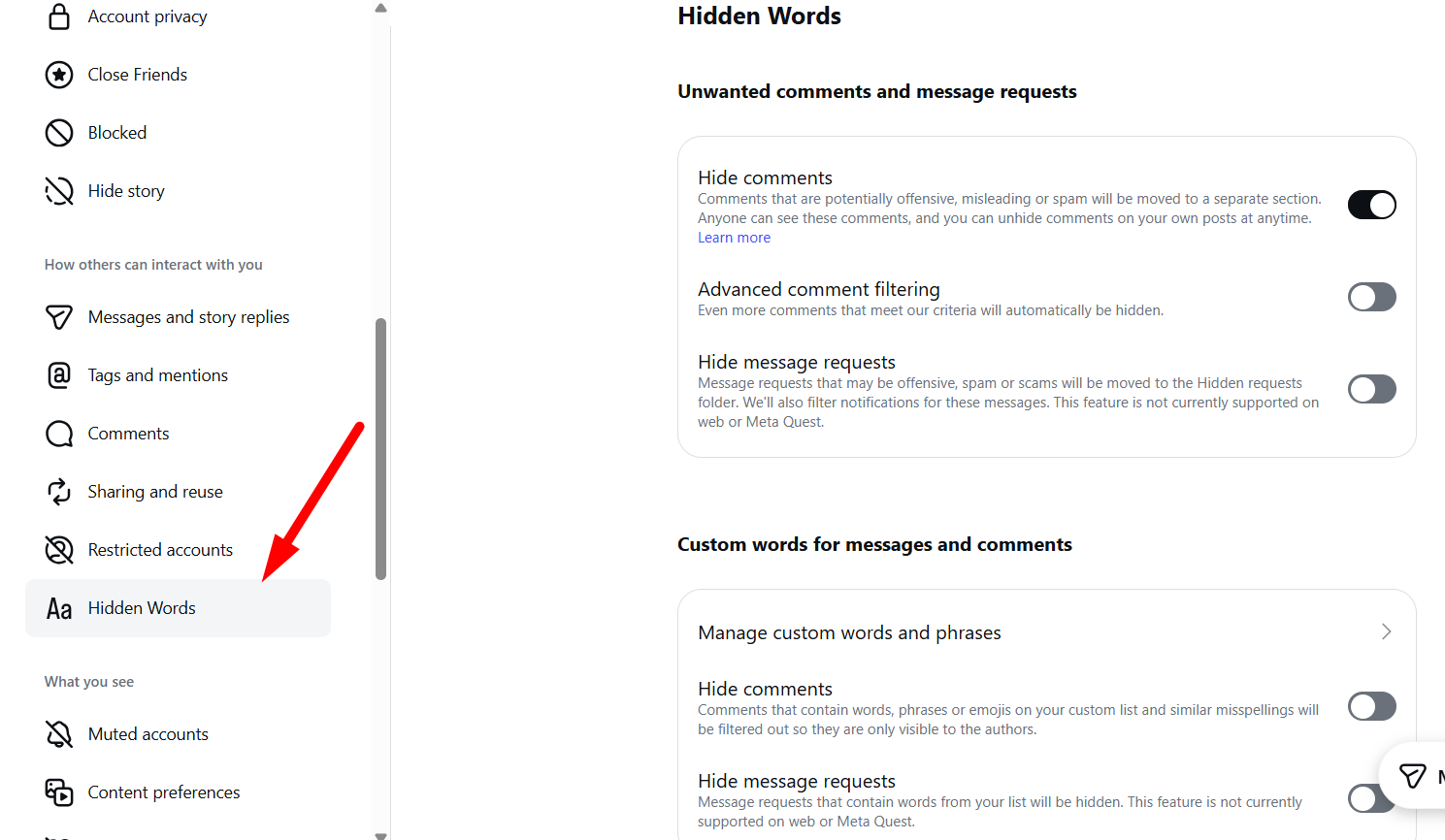
Then open Manage custom words and phrases and build a list specific to your brand risks. Include:
- Competitor names used in spam context
- Scam keywords ("free," "DM me," "click link")
- Product-related spam terms
- Slang variants of offensive language
Aim for 50–100 entries in your initial setup. Revisit this list weekly. Spammers evolve fast, replacing "i" with "1" or using leetspeak to evade detection. Instagram's native tools require you to chase these mutations manually.
For brands receiving hundreds of comments per post, this upkeep becomes unsustainable. Spikerz automates this by reading intent rather than matching static keywords, which reduces the gap between a new spam tactic emerging and it being caught.
Step 3: Apply Restrict and Block Strategically
Keyword filters catch content; they do not manage people. For repeat offenders posting borderline material, use Instagram's Restrict feature before escalating to a full block.
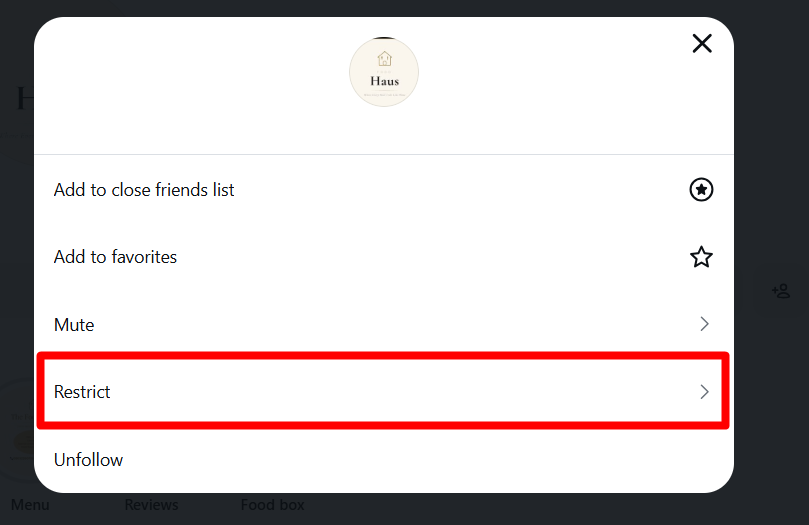
Restricted users can still comment, but their remarks are hidden from everyone except themselves until you manually approve them. This reduces retaliation risk and keeps your public comment section clean without triggering a confrontation.
Reserve Block for severe violations: direct threats, hate speech, or confirmed scam accounts. Blocking removes their existing comments and prevents future contact.
For high-risk periods such as product launches or controversial announcements, apply temporary interaction limits.
To access this, go to your Profile > Settings > Limit Interactions
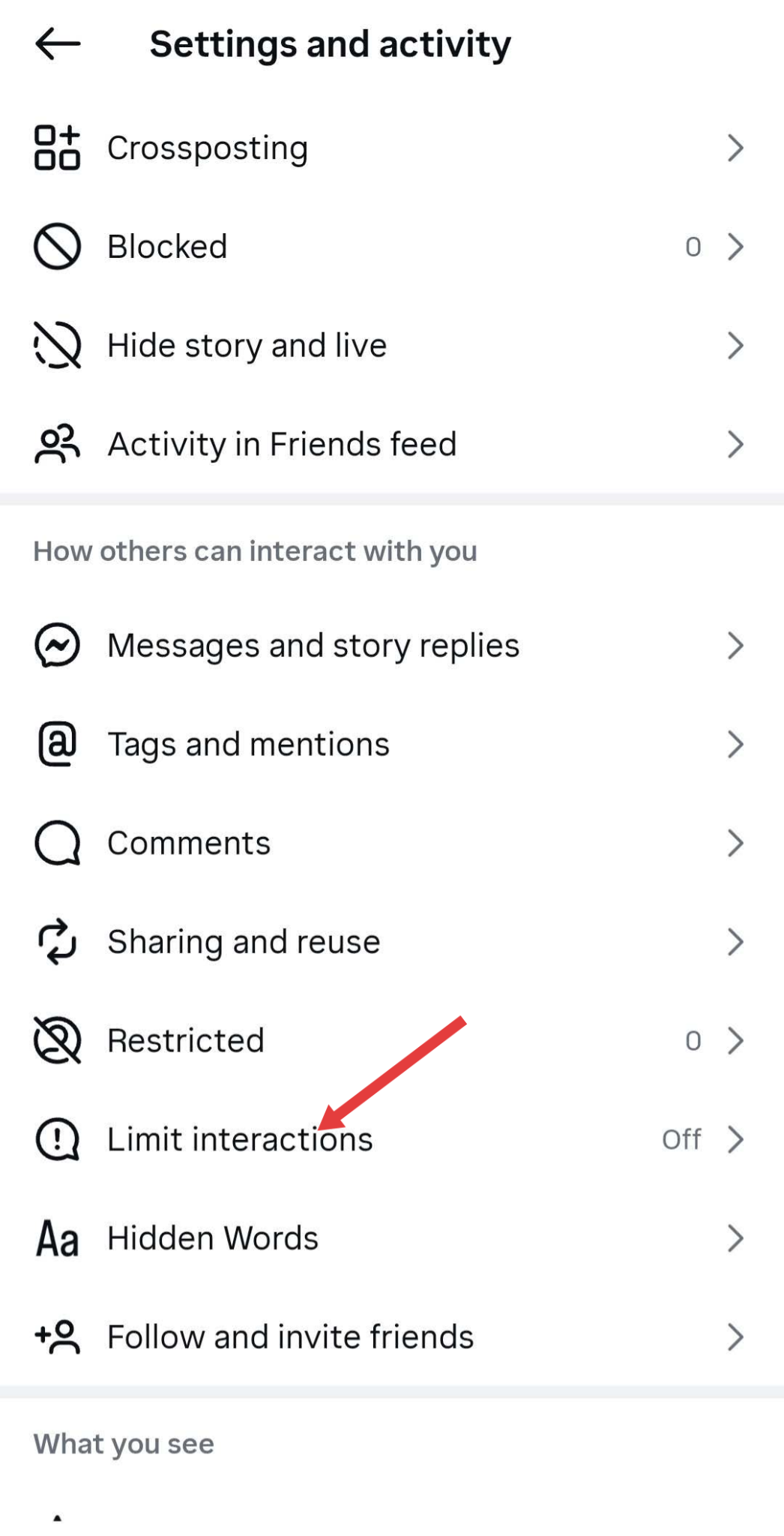
Instagram allows you to restrict comments and direct messages for up to four weeks from non-followers or recent followers. This acts as a cooling-off measure without permanently closing your audience.
The limitation here is vigilance. You must notice the pattern, identify the account, and apply the restriction.
Step 4: Use Post-Level Controls for High-Risk Content
Some posts attract disproportionate spam. Apply targeted controls rather than account-wide restrictions.
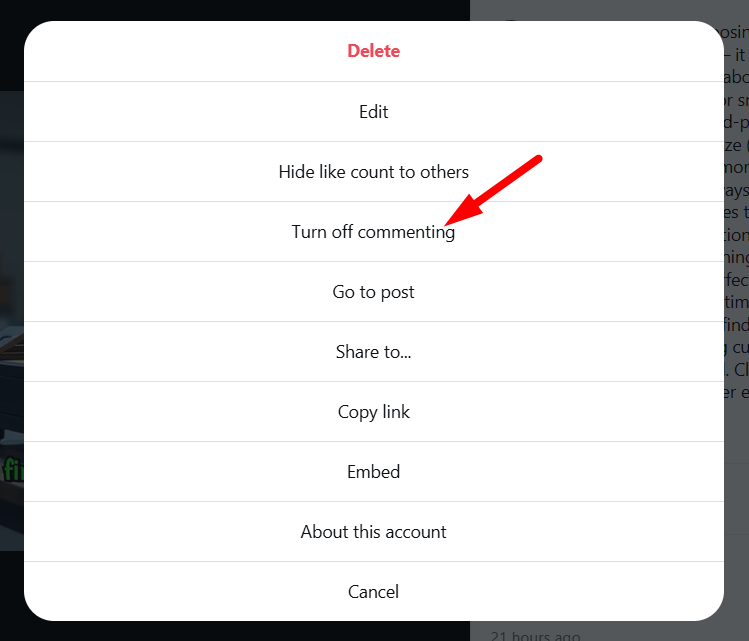
Turn off commenting on any post that becomes unmanageable. Tap the three-dot menu on the post and select the option. This preserves the content and existing engagement while stopping new comments immediately. Use this sparingly, as it may signal that you have lost control of the conversation.
Pin authoritative comments to shape the tone. Swipe left on a valuable comment and tap the pin icon. Visitors then see helpful information or positive community voice before encountering negative remarks.
Monitor paid content separately. Advertised posts receive nearly twice the toxicity of organic content. Spam, piracy, and bot comments on paid posts reduce conversions by 14.7% and click-through rates by 11.3%. If you are running significant ad spend, native tools alone are unlikely to protect your return on ad spend.
Step 5: Build a Response Framework for Legitimate Engagement
Deletion and restriction handle threats; they do not build relationships. Systematic response turns comment sections into conversion channels.
Categorize incoming comments into four types:
- Buying intent: "What size should I get?" or "Is this available in blue?"
- Product feedback: Praise, suggestions, or usage questions
- Negative but legitimate criticism: Delivery delays, quality concerns, or service complaints
- Support escalation: Complex issues requiring direct message or email resolution
Respond to buying intent within two hours whenever possible. Unanswered intent-driven comments signal neglect to every subsequent visitor. For negative feedback, acknowledge publicly and move resolution to direct messages. This demonstrates accountability without cluttering your comment section with extended disputes.
Create saved replies inside Instagram's Creator tools for your five to ten most common question types.
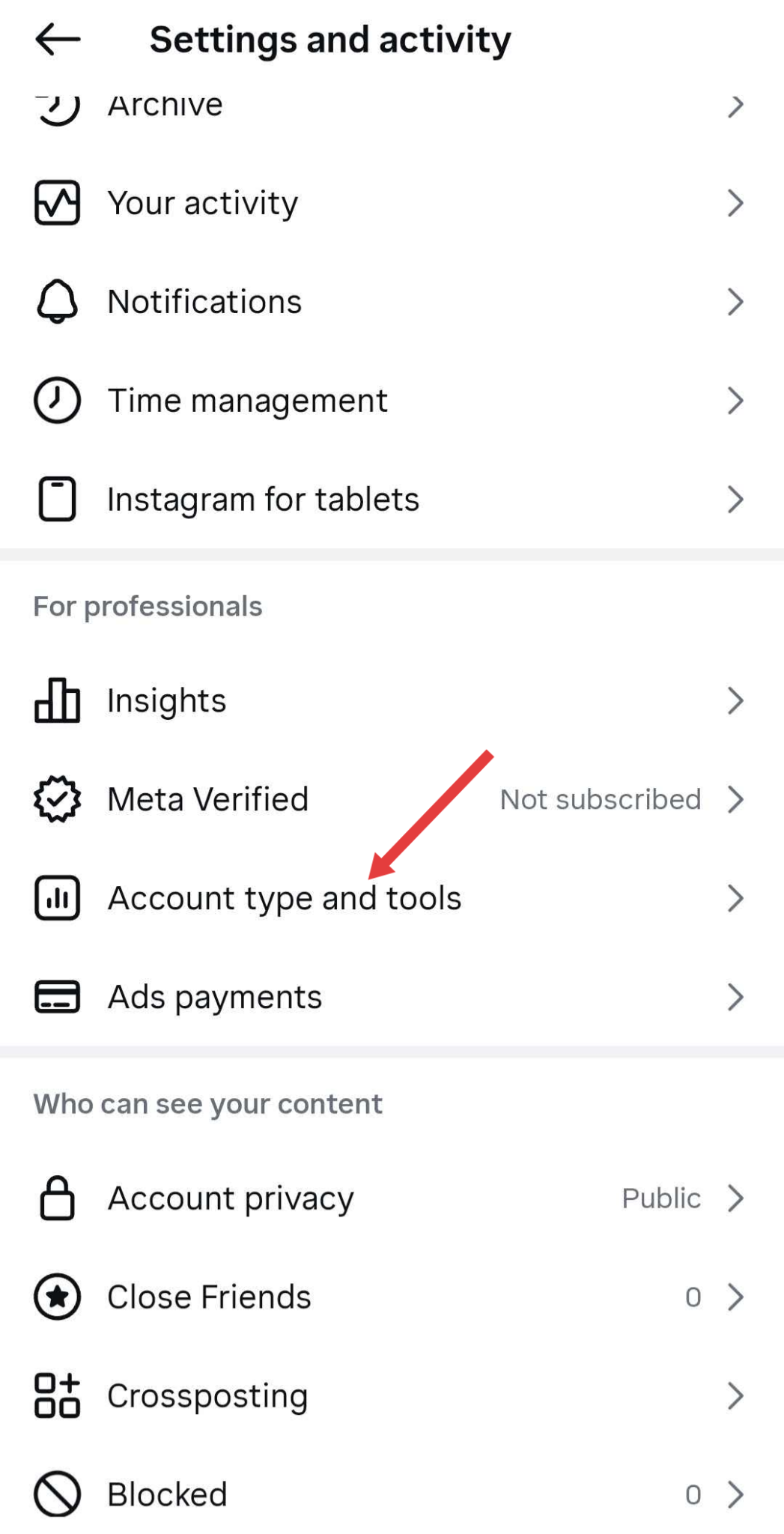
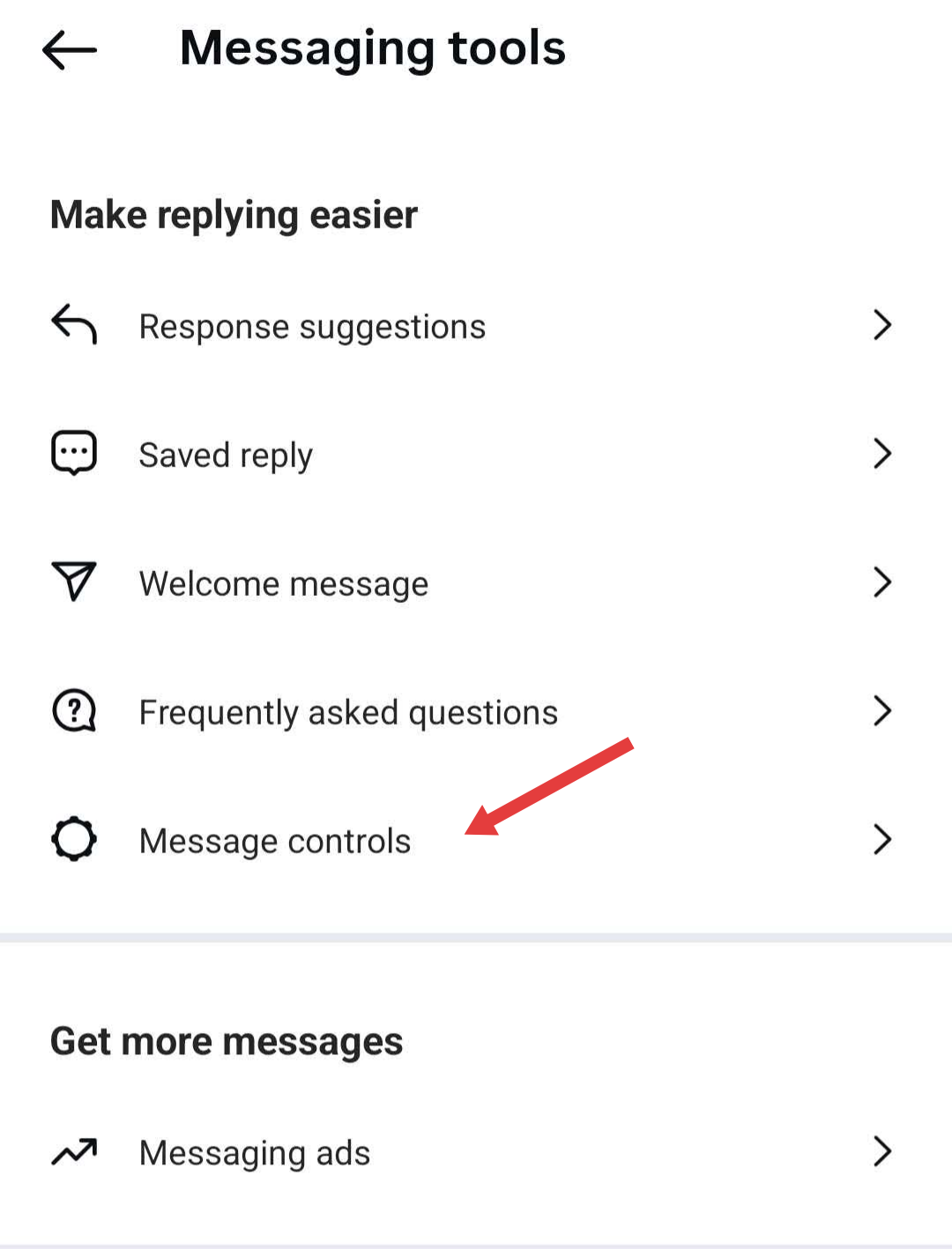
Navigate to Settings > Account type and tools > Messaging tools > Saved reply to build a library of pre-written responses. This accelerates response time without sacrificing personalization.
Step 6: Automate When Manual Methods Break Down
Instagram's native tools work for moderate volumes. Brands receiving thousands of daily comments hit hard limits quickly. The problems stack up:
- Context blindness: Keyword filters cannot interpret intent. "This product is fire" and "Their customer service is fire" use identical words but opposite meanings. Native tools flag neither correctly.
- Evasion speed: Bot operators update tactics faster than manual keyword lists can adapt.
- Time zone gaps: Nearly two-thirds of comments arrive outside standard business hours, leaving accounts vulnerable overnight and on weekends.
- No governance trail: Brands lack built-in records of who deleted what, when, or why, creating compliance and accountability gaps.
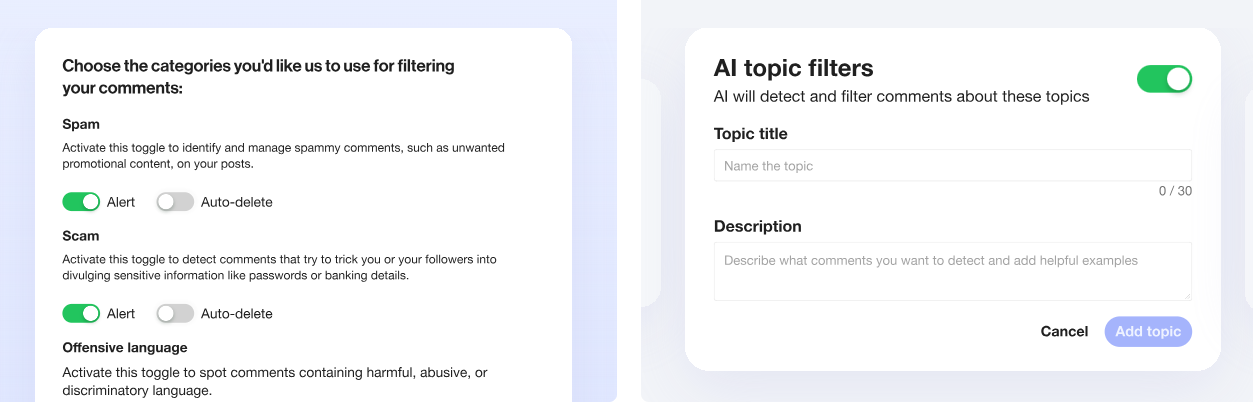
For brands at enterprise scale, AI moderation platforms close these gaps. Spikerz reads sentiment and context rather than scanning keywords, operates continuously, and removes threats directly inside Instagram without manual intervention. It also provides centralized visibility across all connected social accounts, turning comment moderation from a daily firefight into a background-protected system.
If your audit from Step 1 showed 20%+ spam and abuse rates, or if your team spends 30–60 minutes daily just deleting comments, you have crossed the threshold where automation is not a luxury but a requirement.
Protect Your Comment Sections at Scale with Spikerz
Comment moderation on Instagram sits at the intersection of brand safety, community health, and operational scale. The platform's native tools provide a foundation, but they were not designed for the volume and sophistication of threats that high-visibility accounts face today.
If your team is spending more time fighting spam than engaging with your community, or if you are unsure whether your current setup would catch a coordinated bot attack, it is worth assessing whether your moderation stack matches your actual risk exposure.
Get started with Spikerz to see how AI-powered comment moderation, impersonator detection, and access governance work together in a single platform built for marketing and security teams.
