Why Can't I See Comments On Instagram?

Missing Instagram comments? It's usually one of four things: comments turned off, Instagram's AI auto-hiding them, you're blocked or restricted, or a glitch. Some fixes are in your control, others aren't. For creators and brands, tools like Spikerz go further, blocking spam and threats at scale.
Picture this: You scroll to the comments on an Instagram post and find... nothing. No reactions, no questions, no replies. Or maybe you posted a comment yourself, but it seems to have vanished.
This problem frustrates millions of users every day, and it usually comes down to one of three causes: technical glitches, user-defined filters, or deliberate restrictions set by the account owner.
The good news? Most of these issues have a clear explanation.
In this post, we break down every reason your Instagram comments might be missing, how to fix the ones you can control, and how to manage your own comment section like a pro.
TLDR:
Can't see comments on Instagram? It usually comes down to one of a few things: the creator turned commenting off, Instagram's AI hid them automatically, you've been blocked or restricted, or there's a technical glitch messing with your feed.
Some of these you can fix yourself, like switching the sort filter from "Most Relevant" to "Most Recent," clearing your cache, updating the app, or tweaking your custom keyword filters. Others (being blocked, restricted, or a creator disabling comments) are completely out of your hands.
If you're a creator or business owner tired of playing whack-a-mole with spam and trolls, platforms like Spikerz use AI to block harmful comments, phishing links, and impersonators before they cause damage.
Why Can't I See Comments On Instagram?
Missing comments on Instagram doesn't always mean something is wrong with your account. Sometimes, restrictions you've set yourself are filtering them out without you realizing it. Other times, a technical glitch on Instagram's side is to blame. And in some cases, the content creator has made a deliberate choice to limit who can comment or see comments on their posts.
Here are the most common reasons:
Comments Are Turned Off
The simplest reason you can't see comments on a post is that the creator turned them off. Instagram gives every user the option to disable commenting on individual posts by selecting "Turn Off Commenting" before or after publishing. When this setting is active, no one can leave a comment, and the entire comment section disappears from view.
This is a choice the creator makes, so there's nothing you can do on your end. If you notice a post with no comment section at all, this is likely the reason.
Automated Filtering

Instagram uses AI to automatically hide comments it considers offensive, spammy, or inappropriate. This is a built-in option that helps creators filter out comments and message requests they don't want to see. There are two types of filtering you should know about:
- Hidden Comments: If you own the post, you might notice a small link at the very bottom of the comment section. These comments aren't deleted (Instagram just tucked them away). Also, comments that contain common offensive words, phrases, or emojis that are likely abusive, like sexual remarks or personal attacks, get automatically hidden. This setting is on by default, but you can change it at any time.
- Custom Keywords: Creators can set up a "Manual Filter" in their settings. If a comment contains a word the creator blacklisted (for example, "price," "link," or specific emojis), it gets hidden from everyone except the person who wrote it. And the commenter has no idea their comment is invisible to others.
You've Been Blocked
When a user blocks someone from the Instagram app, the block applies to that account, any other existing accounts they may have, and any new accounts they create. If someone has blocked you, you won't be able to see their posts, stories, or comments on third-party posts. Your comments on their content also become invisible.
Limited Interactions (You've Been Restricted)
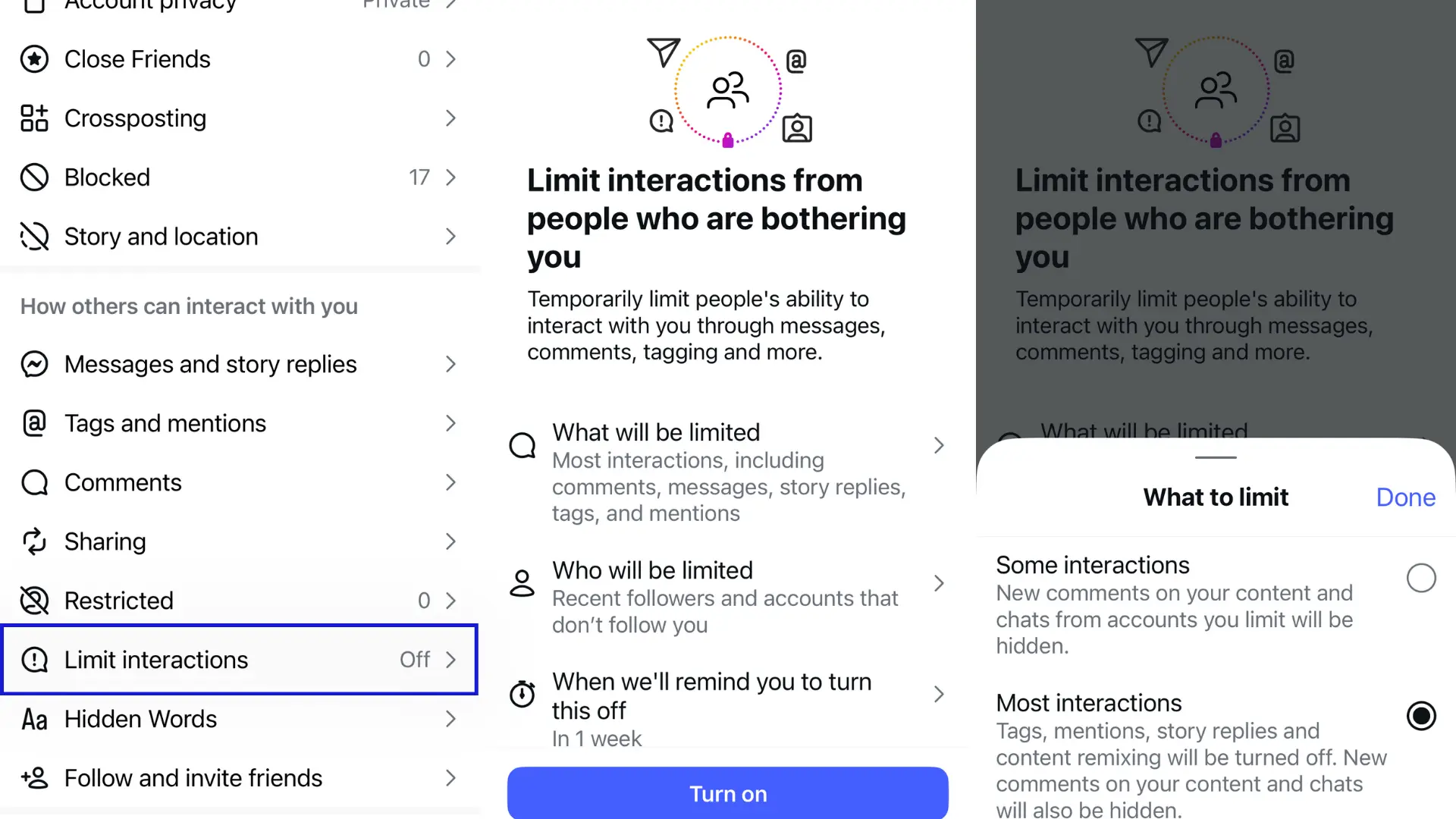
High-profile accounts often "Restrict" users as a way to limit unwanted interactions without fully blocking someone. When you're restricted, the account owner can hide when they're online and whether they've read your messages. Any new comments you leave on their posts will only be visible to you.
The account owner can choose to see your comment by tapping "See comment." If they want others to see it, they tap "Approve," then tap "Approve" again to confirm. Otherwise, they can delete it or ignore it entirely.
Technical Glitches
Sometimes the reason you can't see comments has nothing to do with settings or restrictions, it's just a bug. Here are a few scenarios where this happens:
- Most relevant vs. most recent: By default, Instagram sorts comments by "Most Relevant." The algorithm often hides perfectly fine comments because it considers them not "engaging" enough. Switching the sort filter to "Most Recent" frequently brings those hidden comments back into view.
- Cache and connection: If the comment bubble keeps spinning or the section appears blank, it usually means a weak internet connection or a corrupt cache. Clearing your app cache or switching networks can resolve this.
- Server outages: Instagram's servers (run by Meta) occasionally struggle under heavy load. In early 2026, widespread outages reported by thousands of users caused specific features like comments and DMs to go blank globally.
How To See Comments Again On Instagram
The fix depends on why you can't see comments in the first place.
- Custom Keywords: Go to your custom keyword settings and modify your list. Removing or adjusting blacklisted words will allow more comments to show up in your comment section.
- Technical glitches: Update your Instagram app to the latest version, or close your browser tab and reopen it. You can also switch the sort filter from "Most Relevant" to "Most Recent" to surface hidden comments. This doesn't always work, but it's a quick first step.
If the reason you can't see comments falls into one of the other categories (like being blocked, restricted, or the creator turning off commenting) there's nothing you can do. Those decisions are outside your control.
How To Effectively Manage Your Comments
If you are a content creator or business owner who wants full control over your comment section, use a comment management platform like Spikerz.
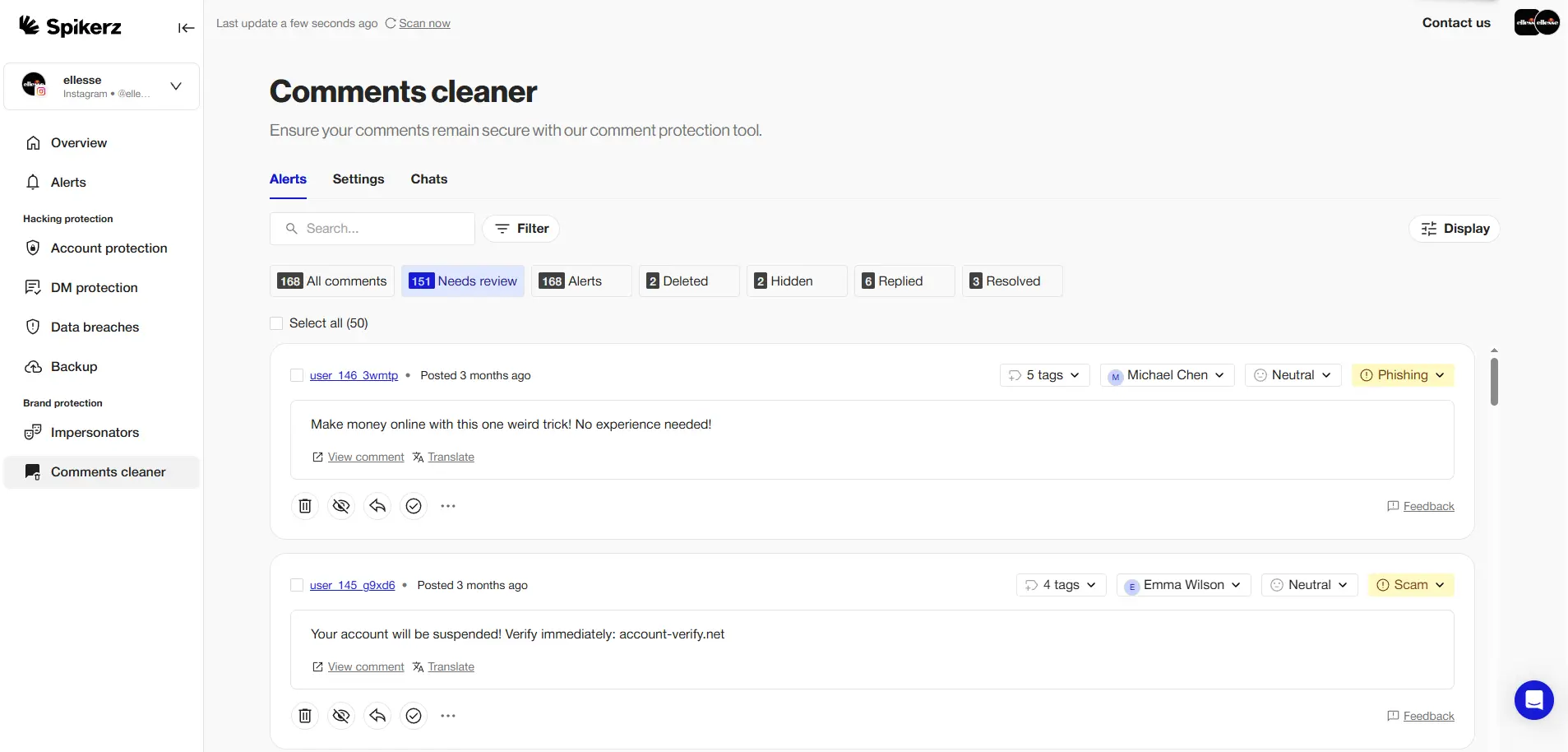
Spikerz is a social media security platform that monitors your accounts 24/7 for threats like hacking attempts, spam, bots, and trolls. It uses AI-powered algorithms to detect and block harmful comments, so you can maintain a clean and safe community without spending hours moderating manually.
Besides comment management, Spikerz protects your entire social media presence through:
- Account Takeover Protection: Spikerz monitors your accounts around the clock for unauthorized access attempts. If it detects suspicious activity (like a login from an unfamiliar location or device), it alerts you immediately so you can act before damage is done.
- Impersonation Takedown: Fake accounts pretending to be your brand can mislead your audience and damage your reputation. Spikerz identifies impersonator accounts and helps you take them down quickly.
- Phishing Protection: Spikerz scans your DMs and comments for phishing links designed to steal your credentials or trick your followers. It flags dangerous URLs before anyone clicks on them.
- Permissions Management: When multiple team members access your social accounts, the risk of accidental or intentional misuse goes up. Spikerz gives you control over who has access and what they can do, reducing the chance of internal security issues.
Want to see how Spikerz can protect your social media accounts?
Book a demo right now to get a firsthand look at how real-time monitoring, AI-powered threat detection, and automated comment management work together to protect your brand.
Conclusion
Not being able to see comments on Instagram usually comes down to a handful of causes: the creator turned off commenting, automated filters are hiding them, you've been blocked or restricted, or a technical glitch is interfering. Some of these are within your control while others are decisions made by the account owner that you can't change.
