Top Social Media Security Risks for Businesses (And How to Avoid Them)

%20(3).webp)
Summary:
Discover the five most dangerous social media security threats targeting businesses today—from phishing and fake pages to malware and social engineering attacks—and learn exactly how cybercriminals exploit them. This guide equips you with six practical, implementable strategies including employee training, access controls, and real-time monitoring to build a multi-layered defense that significantly reduces your vulnerability to account takeovers and brand impersonation. By taking action now on policies, tools, and incident planning, you'll transform your social media presence from a security liability into a protected asset.
Top Social Media Security Risks for Businesses (And How to Avoid Them)
Cyberattacks have grown in frequency and complexity, forcing businesses to take their online security seriously. Every day, companies face threats like phishing scams, social engineering attacks, and account takeovers that can destroy years of carefully built brand reputation in minutes.
A single compromised social media account can lead to devastating consequences. Once cybercriminals gain access to your accounts, they have the power to spread misinformation, run targeted scams, or even demand payment to give your accounts back (ransomware).
In this blog post, we'll cover the most common security risks businesses face and provide practical strategies to protect your accounts from these growing threats.
The Most Common Social Media Security Risks
Social media accounts face many different kinds of security risks, however, the most common ones include:
Phishing Attempts
Phishing is a form of social engineering where cybercriminals pretend to be a trusted company or individual to trick people into handing over sensitive information like passwords, banking details, or other personal data.
The way it works is, scammers create fake profiles on work-focused platforms like LinkedIn. They research companies to learn who works there and who reports to whom, then impersonate managers or colleagues with convincing requests.
And since social media doesn’t have email domains or addresses you can check like @company.com, there’s no easy way to confirm if “Anne from HR” messaging you is actually the real Anne from your company.
The scammers use this trust to request confidential data like login details or account information. Once an attack succeeds, they might drain banking accounts, hijack social media profiles, or promote cryptocurrency fraud. For example, there have been recent high-profile cases including the NY Post hack, TRON DAO's hack, and Slash's account hack, where cybercriminals took over X profiles to promote meme coins.
These attacks are becoming more common, so always verify any unusual requests through a separate channel, even if they seem to come from someone you know.
Fake Pages and Spoofing

Fake pages and spoofing involve cybercriminals creating fake social media accounts that impersonate legitimate companies. They use logos, usernames, posting styles, and photos to make their pages nearly indistinguishable from authentic business profiles.
These imposter accounts exploit people's trust in familiar brands. When users see content from what appears to be a recognized company, they interact with posts, click links, and share personal information without questioning the source's authenticity.
However, fake pages are easy to spot when you know what to look for because they use common methods to steal sensitive data. For example, they post promotional offers requiring login through malicious links, send direct messages demanding immediate attention, or operate customer service accounts that redirect complainers to dangerous websites.
The biggest issue is that social media platforms allow anyone to create company pages with minimal verification, enabling scammers to easily set up impersonating accounts. Once live, they message potential customers directly, pretending to be brand support or offering exclusive deals. Then users share private information without knowing they're dealing with an impostor.
On top of that, some cybercriminals pair fake social media pages with spoofed websites. They send you a link to a page that looks exactly like the real deal. Before you realize what's happening, you've entered your login information straight into their hands.
Brand Impersonation
Brand impersonation happens when someone pretends to be your business for malicious purposes, using your name, logo, and reputation to scam people. The goal varies by cybercriminal but mostly involves stealing money or gathering personal information. Other motivations include spreading misinformation or manipulating situations for their benefit.
Scams range from simple fake social media profiles mimicking your official account to websites that mirror your real business presence.
The way these types of attacks work is, bad actors start by researching targets. They search LinkedIn to find high-level employees and lower-staff who could be tricked into sharing corporate data or falling for phishing attempts. They examine personal details posted on social media like pet names, favorite sports teams, and education history, that help guess security question answers or reset passwords.
When they have enough information, they begin impersonating your business. They use real employee names and photos to make messages and profiles more convincing. As a result, customers or clients think they're dealing with your brand instead of a fake.
Malware Attacks

Malware (Info stealers) is malicious software designed to steal information, damage or take control of computers, servers, or networks without the victim's knowledge. It hides in seemingly harmless files like images or documents and spreads through compromised websites, phishing messages, or infected downloads.
Social media platforms have become main hunting grounds for cybercriminals, with business accounts being especially tempting targets. They represent everything your brand stands for and provide direct access to your customers.
When bad actors infiltrate your business accounts, damage happens fast. They leverage people's trust in your brand to execute bigger scams.
Attacks typically start with something that appears genuine. Then hackers send direct messages containing attachments or links disguised as breaking news articles or interesting videos. They create fake ads, too-good-to-be-true giveaways, or urgent messages claiming your account has been compromised.
Sometimes they target employees directly with what looks like business materials, (including "brand assets" or "partnership opportunities") but that are actually infected files. Once inside your systems, they steal customer information, destroy your reputation overnight, or lock important files until you pay for ransom.
Whether it's viruses, spyware, or ransomware, they are all looking for the same outcome: financial gain or theft of valuable information.
Social Engineering Attacks
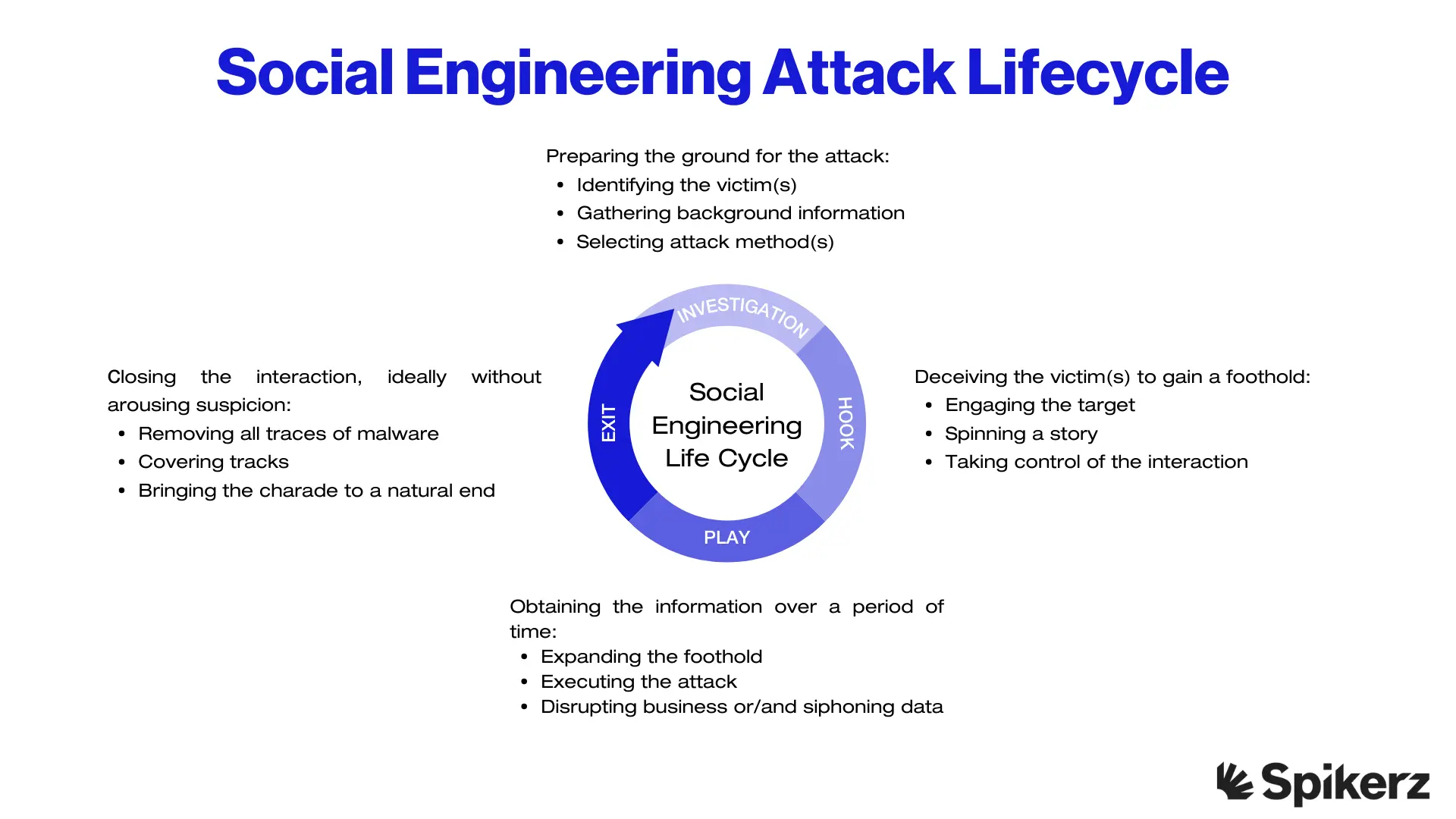
Social engineering attacks use psychological manipulation, not technical exploits to get people to make security mistakes like revealing passwords, clicking suspicious links, or downloading malicious files.
Instead of breaking into systems, attackers manipulate human behavior like trust, curiosity, and helpfulness to achieve their goals.
On social media, these attacks are effective because it's easy to impersonate trusted brands or familiar people. Attackers send DMs pretending to be coworkers, business partners, or company representatives, adding personal details to make interactions feel authentic.
High-profile cases like the NASCAR and NBA social media account takeovers show how damaging these scams can be. For businesses, a single successful social engineering attack can quickly snowball into a company-wide crisis.
How To Mitigate Social Media Risks
You can’t just cross your fingers and hope your business stays safe, you have to do everything you can to reduce your attack surface. Thankfully, there are practical solutions you can implement now to significantly reduce your vulnerability to attacks. Here they are:
1) Create A Social Media Security Policy
A clear, company-wide policy ensures everyone from entry-level employees to executives understands how to protect sensitive information and what behaviors to avoid online. The policy should be easily accessible and form a part of your broader social media strategy, working alongside branding, communication, and security goals.
Your policy should outline your brand's official channels, identify who posts or responds to customers, and define how personal and business accounts should be used. It must set clear rules for creating strong passwords, enabling two-factor authentication, spotting phishing attempts, and avoiding risky third-party apps.
That said, security policies aren't about restricting employees but empowering them to represent your brand safely. With proper training and clear instructions, they can engage on social media while protecting themselves and your company from cyberattacks.
2) Train Employees on Social Media Best Practices
Training employees on social media security awareness is fundamental because people are always the weakest link in company defenses. According to the 2024 Verizon DBIR, the human element is involved in 68% of breaches, with 95% starting with phishing. AI-driven scams have made the problem worse, with phishing attacks increasing over 4,000% since ChatGPT's release in 2022.
What’s worse is that social media makes these threats easier to launch, especially when employees overshare personal or corporate information that attackers use to build convincing scams.
Security awareness training gives employees the knowledge and skills to spot and stop threats before they succeed. It builds on your company's social media policy, turning staff into an active defense layer.
That said, training works best when it lets people ask questions and share experiences. It should cover avoiding oversharing, keeping portable devices secure, rejecting suspicious friend requests, staying away from public Wi-Fi, and regularly reviewing privacy settings.
And the payoff is obvious. Well-trained employees act as a human firewall that strengthens technical security measures and reduces risky behavior. They are also more careful about passwords, protecting their credentials, and avoiding unauthorized tools that create vulnerabilities.
3) Limit And Control Access To Social Media Accounts

Limiting and controlling access to social media accounts starts with strong User Access Management (UAM) practices. UAM ensures only the right people have the right level of access, nothing more.
For social media, this means assigning permissions based on roles, so team members can only perform actions they need for their job.
Control access by restricting account logins to as few people as possible and designating one trained individual to oversee all accounts. This person coordinates with IT on security measures, approves access requests, and immediately revokes permissions when someone changes roles or leaves the company.
Access management also involves secure login methods like complex passwords and multi-factor authentication, regularly reviewing permissions, monitoring account activity with social listening tools, and spotting unusual behavior early.
When you combine limited access with strict controls, you reduce the attack surface and make it harder for cybercriminals to compromise your accounts.
4) Use Anti-Malware Software
Endpoint protection protocols are key to keep your social media accounts and related devices safe. Antivirus software protects you by detecting and removing malicious programs before they cause harm. That’s why you should keep software updated to guarantee protection against the latest attacks, including ones targeting newly discovered vulnerabilities.
Strong endpoint protection provides valuable insight into attempted attacks, helping you understand risks and improve security measures.
If all your devices used for social media management have up-to-date antivirus, you’ll significantly reduce the chances for cyber incidents and protect your brand and audience.
5) Set Up An Incident Response Plan
An incident response plan helps minimize damage if a social media security breach happens. The goal is never needing it, but having a plan ensures your company can act quickly to contain problems and protect your brand.
If an attack happens, your plan should guide immediate actions like shutting down affected social media accounts and securing any connected platforms that may be compromised. Know in advance which assets link to each account and understand how far breaches could reach.
The plan must outline specific roles and responsibilities so everyone knows what to do. Include guidelines for public communication so responses to followers and customers are quick, accurate, and consistent.
If you prepare these steps ahead of time, you’ll be able to respond faster, limit damage, and recover more effectively when a social media security incident happens.
6) Monitor Social Media Activity
Regularly monitoring social media accounts is one of the most effective ways to detect unusual or suspicious activity before it becomes a serious problem. It helps protect your brand's image and prevent confidential information leaks through compromised accounts or careless sharing.

One of the easiest and most reliable ways to monitor accounts is using a social media security tool like Spikerz. Designed specifically for brands, creators, and enterprises, it continuously scans account activity to flag abnormal behavior. Thanks to this, you get a clear, real-time view of your social media health, making it easier to catch threats before they cause harm.
The main benefit Spikerz offers is advanced threat detection beyond surface-level monitoring. It analyzes comments and direct messages to identify phishing attempts, malicious links, and other social engineering tactics, then blocks them automatically.
The platform detects patterns of harmful activity like bots, coordinated harassment, or account takeovers and alerts you immediately. It protects against bad actors trying to impersonate you by detecting unusual logins, automatically kicking out the intruder, and immediately changing your password.
Conclusion
Social media security threats have grown from minor annoyances to sophisticated attacks that can devastate your business overnight. Cybercriminals use everything from phishing and fake pages to malware and social engineering, taking advantage of both technical vulnerabilities and human psychology to compromise your accounts.
The good news is that protecting your business doesn't require becoming a cybersecurity expert. If you implement the strategies we've discussed (including establishing clear policies, training employees, controlling access, using security software, preparing response plans, and monitoring activity), you’ll create multiple layers of defense that will make your accounts significantly harder to compromise. Each layer adds protection, and together they form a complete security framework that stops attackers.
Remember, social media security isn't a one-time project but an ongoing commitment. Threats never stay the same, and neither should your security measures. Take action today to secure your social media presence and protect everything you've worked to build.
