What the NBA X hack teaches about brand security


This guide explains why even large organizations like the NBA suffer social media breaches and which measures work, from strong passwords and team-based 2FA to monitoring tools and staff training. It gives steps you can take now to protect your brand from similar attacks.
What the NBA X hack teaches us about brand security
Every day, social media accounts fall victim to hacking attempts across the globe. This isn't just a problem for small or medium-sized businesses with limited resources. Even massive organizations with dedicated IT teams aren't immune. The recent NBA social media hack proves that no brand, regardless of size, reputation, or resources, is completely safe from digital threats.
When giants like the NBA can fall victim to hackers, it's clear that brand security on social media must be a top priority for every business.
What's been happening to the NBA's social media?

On March 4, 2025, the NBA's official X account was compromised. Malicious posts appeared on the NBA's main X profile promoting an "$NBA Coin" that falsely claimed to be their official asset on the Solana blockchain network.
The hackers didn't stop at a simple tweet. They created an elaborate "Official Announcement" disguised as a press release that read:
"March 4, 2025 - The National Basketball Association (NBA) is proud to announce the official launch of NBA Coin, a groundbreaking digital asset designed to redefine fan engagement, transactions, and experiences within the basketball ecosystem. Built on the Solana blockchain, NBA Coin offers lightning-fast transactions, unparalleled security, and seamless integration into the Web3 landscape. This token will serve as the foundation for exclusive rewards, digital collectibles, ticketing solutions, and much more. By leveraging blockchain technology, the NBA continues its commitment to innovation, bringing fans closer to the game they love in new and exciting ways. Stay tuned for upcoming announcements, partnerships, and activation events that will further solidify NBA Coin as the future of digital basketball interactions. For more details, visit our official website: www.nba.com. National Basketball Association (NBA) 2025. All Rights Reserved."
An NBA PR spokesperson quickly confirmed to Front Office Sports that the coin was fake and that multiple NBA accounts had been compromised. While the exact number of followers who fell victim to this scam remains unclear, the incident left fans concerned about the league's digital security measures.
The public reaction was swift and critical. One fan commented, "Everyone getting 'hacked' recently. It's 2025 and no one's capable of cyber security?" Another noted, "Hopefully people are getting smarter to avoid these obvious rugs."
How can we improve our social media security?
It's surprisingly easy to make a simple mistake that leads to compromised social media accounts. A moment of carelessness, clicking a suspicious link, using a weak password, or falling for a phishing attempt, can result in a security breach that damages your brand's reputation. Fortunately, there are several effective strategies you can implement to shield your business accounts from hackers.
Create strong, unique passwords
Your passwords serve as the first defense line against unauthorized access to your social media accounts. Weak passwords are like leaving your front door unlocked, they practically invite intruders.
Create strong, randomly generated passwords that are at least 14 characters long. Use a mix of numbers, special characters, and both uppercase and lowercase letters. According to Hive Systems, this character combination would take hackers approximately 805 billion years to crack through brute force methods.
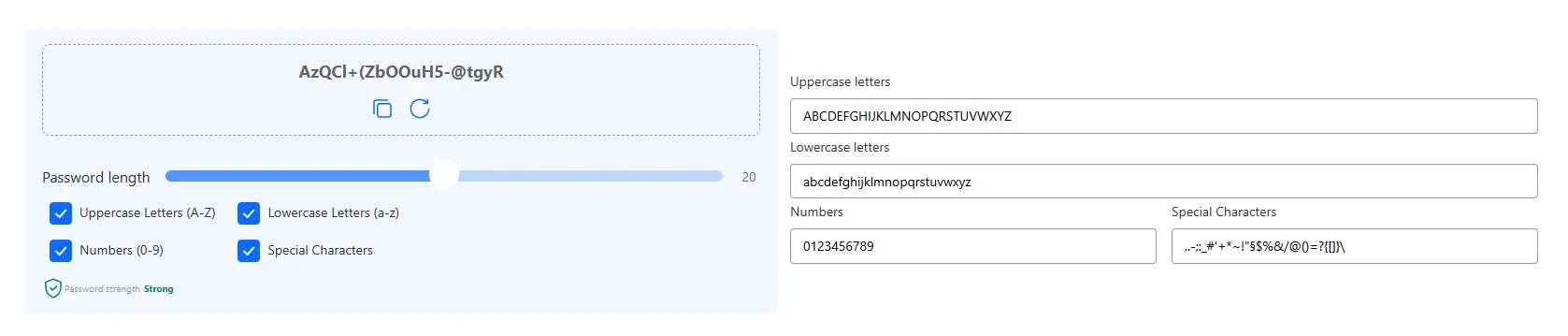
Also, avoid recycling passwords across different platforms. When hackers breach one account, they typically try those same credentials on other sites. Using unique passwords for each platform prevents a single breach from cascading into multiple account takeovers.
Consider using a password manager to generate, store, and autofill your credentials. These tools create complex passwords that are nearly impossible to guess while eliminating the need to remember them yourself.
Enable team-based two-factor authentication (2FA)
Two-factor authentication adds a critical extra security layer by requiring both your password and a time-sensitive verification code that changes every 30-60 seconds.
While basic 2FA is often enough, it presents challenges for brands with multiple social media managers. Traditional 2FA systems are usually tied to a single device or account, requiring team members to contact the main administrator for codes whenever they need access.
This workflow creates frustration and inefficiency. Instead, implement team-based 2FA solutions that allow multiple authorized users to access accounts while maintaining strong security protocols. These systems generate unique verification codes for each team member while giving administrators centralized control.
The most valuable feature of team-based 2FA is simplified access management. When someone leaves your company, you can instantly revoke their access without changing passwords across all your accounts, saving time and reducing security risks during staff transitions.
Keep contact information current
Always maintain up-to-date email addresses and phone numbers associated with your social media accounts. If your account is compromised, platforms need reliable contact information to help you recover access quickly.
Outdated recovery information can significantly delay the account restoration process, potentially extending the time hackers have control of your profiles. Regularly verify and update your recovery options to ensure you can regain access promptly if needed.
Actively monitor and report suspicious activity
Detecting brand impersonation and phishing attempts requires continuous monitoring across all digital channels, including social media platforms, news sites, dark web forums, and chat spaces.
Establish a regular schedule to search for unauthorized accounts using your brand name, logo, or content. When you discover impersonators or content theft, report them immediately to the platform. Swift action helps prevent scams from spreading and protects your followers.
If you receive suspicious messages or emails, never click links, download attachments, or open documents, even if they appear to come from trusted sources. These files often contain malware designed to capture login credentials or gain backdoor access to your accounts.
Deploy specialized social media security tools
Social media security tools provide automated protection by continuously monitoring your accounts for suspicious activities like unauthorized login attempts, strange profile changes, or unusual posting patterns.
These platforms automatically flag potential security threats, eliminating the need for constant manual vigilance. They safeguard your login credentials from malware and keyloggers while providing guided recovery processes if breaches occur.

Take Spikerz as an example: this tool detects brand impersonators attempting to spread misinformation or run scams under your name. It identifies suspicious messages and phishing links, even those coming from seemingly trusted sources, before they can harm your followers.
Spikerz also helps prevent account hijacking, moderates comments for spam, scams, and hate speech, and manages access and permissions for your team.
Are you still not using specialized security tools to protect your brand?
Your business has worked too hard to build its reputation to let hackers destroy it in minutes. Invest in proper social media security before you become the next cautionary tale.
Prioritize staff cybersecurity training
The weakest link in any security system is the human element. Phishing, a social engineering attack that tricks people into revealing sensitive information, remains the most common form of cyberattack.
Regular cybersecurity training for all employees who access company accounts is essential. Teach team members to recognize warning signs of phishing attempts and establish clear protocols for responding to suspicious communications.
Schedule periodic refresher courses to keep your team updated on emerging threats and prevention techniques. Remember that phishing attempts often look remarkably legitimate, sophisticated scammers create emails, messages, and websites that perfectly mimic trusted brands.
Develop a security checklist for staff to follow before entering credentials or sharing sensitive information through any link they receive. This simple step can prevent many common security breaches.
Conclusion
The NBA social media hack serves as a powerful reminder that no organization is too big or too established to fall victim to digital threats. In today's interconnected business landscape, social media security is essential for protecting your brand's reputation, customer trust, and bottom line.
By implementing strong passwords, team-based two-factor authentication, regular security monitoring, specialized protection tools, and comprehensive staff training, you create multiple layers of defense against increasingly sophisticated attacks.
Don't wait for a crisis to prioritize your brand's digital security. Take action today to protect what you've worked so hard to build. Your brand's future may depend on it.
