What Is Social Media Phishing? What Does It Look Like?

.webp)
Summary:
Social media phishing looks different everywhere: fake "account violation" alerts on Instagram, CEO whaling on LinkedIn, hacked-friend money requests on Facebook, crypto DMs on X. Over 90% of cyberattacks start with phishing. Here's how each scam works and how to protect your brand from it.
You can lock down your website, you can secure your servers, encrypt your data, and train your team to spot trouble, but the moment your brand steps onto social media, the rules change.
The biggest problem brands face today isn't on their own website or app. It's everything happening outside of it. On Instagram, Facebook, LinkedIn, YouTube, Reddit, and X (Twitter), you have very little visibility and almost no control. Anyone can message your followers, impersonate your profile, or pose as your support team, and you might not find out until the damage is already done.
The good news is, there are things you can do to protect yourself. In this post, we’ll go over what social media phishing is, why prevention matters, and what the best way to protect yourself is.
TLDR:
Social media phishing is a cyberattack where scammers use platforms like Instagram, LinkedIn, Facebook, and X to trick people into handing over passwords, credit card info, or login codes through fake DMs, comments, and links.
The attack looks different on every platform: fake "account violation" emails on Instagram, CEO impersonation (whaling) on LinkedIn, hacked friend accounts asking for money on Facebook, and crypto scam DMs on X.
Consequences:
Over 90% of cyberattacks start with phishing, around 30% happen through social media, and the average phishing-related breach costs nearly $4.9 million. As a result, companies have lost tens of millions in single incidents.
What can you do about it?
You can't control social media, but you can protect your brand on it. Use a dedicated security tool like Spikerz to monitor your accounts 24/7, block phishing attempts in DMs and comments, take down impersonators, and lock down your logins so scammers can't get in.
Bottom line:
Phishing is preventable, but only if you get ahead of it. Book a demo before you find out the hard way.
What Is Social Media Phishing?
Social media phishing is a type of cyberattack where scammers use social platforms to trick people into handing over sensitive information, like passwords, credit card details, or login codes. They usually do this through fake direct messages, comments, or links that lead to fake websites built to steal your data.
That's the conventional definition. But how phishing actually plays out changes a bit depending on the platform. Each social network has its own culture, its own features, and its own weak spots, and scammers tailor their attacks to match.
Instagram Phishing
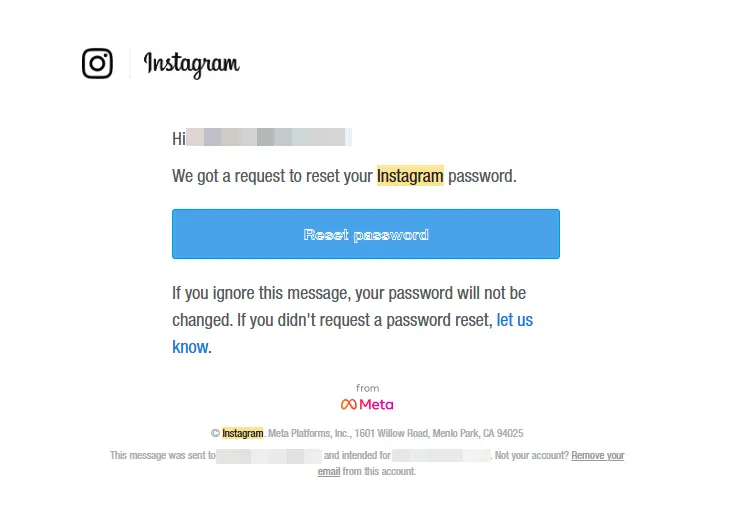
On Instagram, phishing often arrives as a fake message or email that looks like it came from the platform itself. Scammers love to create a sense of panic, warning you that you've broken a rule or that your account is about to be shut down. Then they hand you a link to "fix" it, which is really a trap to steal your login details.
For example, you might get an email that appears to be from Instagram, claiming you violated community guidelines or that you need to verify your identity right away. The email looks official, complete with the logo and formatting so you go ahead and click the link, type in your username and password to "appeal" the decision, and just like that, the scammer has everything they need to take over your account.
LinkedIn Phishing
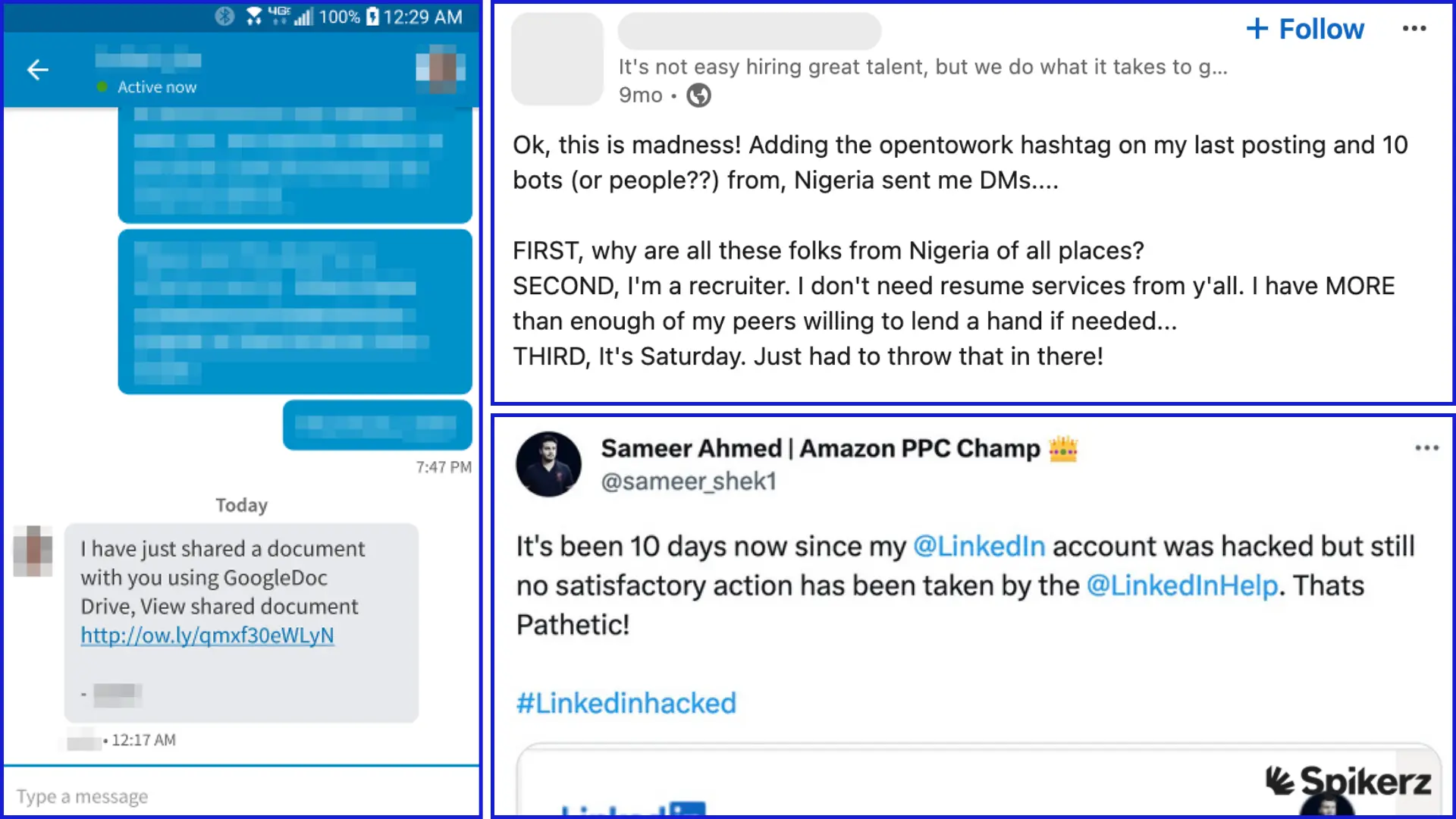
LinkedIn feels professional and trustworthy, which is exactly why it's such a rich target for phishing, especially a kind called whaling. Whaling is a targeted attack aimed at the "big fish" in a company: executives, finance leaders, and other decision-makers who can move money or approve access.
For example, a finance director receives a LinkedIn message that appears to come from the company's CEO. The message is urgent and personal, referencing a real project and asking the director to quietly approve a payment or share login credentials before an important deadline. Since the request seems to come from the boss, the director acts fast and skips the usual checks.
Falling for these attacks is costly:
- In 2015, Ubiquity Networks lost nearly USD 47 million in just 17 days when whale phishing attackers impersonating the company’s CEO and Chief Counsel sent emails convincing the Chief Accounting Officer to make a series of wire transfers to finance a secret acquisition.
- In 2025, Belgian Bank Crelan lost USD 75 million to an executive email scheme.
- In 2026, FACC AG (an Austrian aerospace manufacturer) lost €50 million in a business email compromise scam that targeted their executives.
Facebook Phishing
On Facebook, one of the most common phishing tricks starts with a hacked account. Once a scammer controls a profile, they don't just sit on it, they use the trust that account has already built with its friends and family to scam the people closest to it.
For example, a scammer takes over someone's Facebook account and starts messaging their friends and family one by one. Posing as the real person, they might say they're stuck in an emergency and need money fast, or share a link to a "video of you" that secretly installs malware or leads to a fake login page. And since the message comes from a familiar name, people lower their guard and click, send, or share without thinking twice.
X (Twitter) Phishing
%20phishing%20example.webp)
On X (Twitter), phishing often spreads through hacked accounts that slide into followers' direct messages or send scam tweets. The platform moves fast, and scammers use that speed to push urgent, too-good-to-be-true offers before anyone stops to question them.
For example, a brand or creator's account gets hacked, and the scammer starts DMing followers with a crypto "investment opportunity" (just like in the NY Post Hack). The message promises to double any amount they send, framed as an exclusive deal for loyal followers. And since the offer comes from an account people already trust and follow, some of them send their crypto straight to the scammer, and it's gone for good.
Why Phishing Prevention Matters
Phishing isn't a minor nuisance. A hijacked account can result in lost followers, stolen revenue, scammed customers, and a reputation that took years to build being wiped out in hours. In fact, according to CISA, over 90% of cyberattacks begin with phishing, making it the number one way criminals get in.
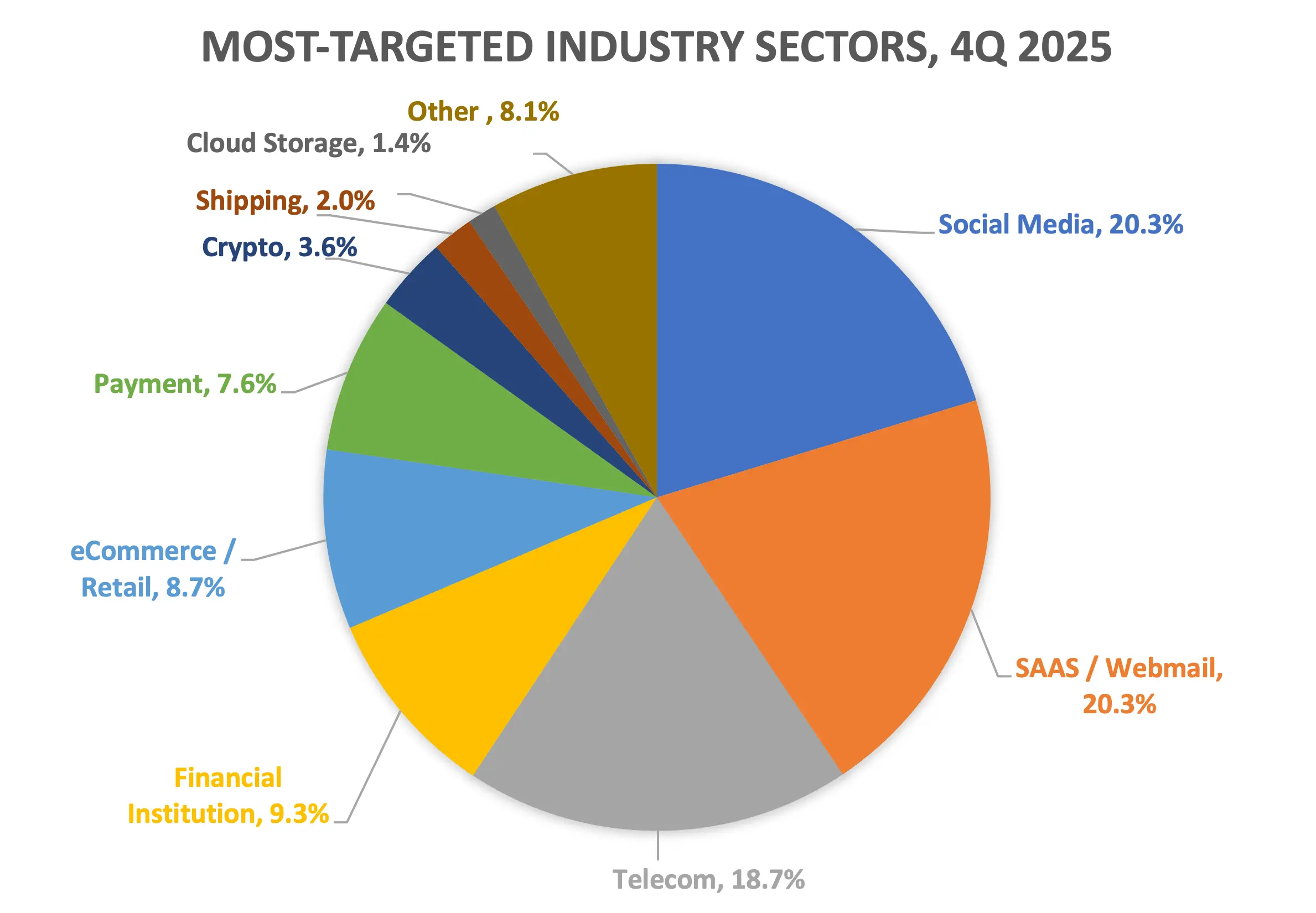
And unfortunately, social media is squarely in the crosshairs: the Anti-Phishing Working Group (APWG) found that around 30% of phishing happens through social media platforms, with social media ranking among the most-targeted sectors in late 2025.
What’s worse is that the FTC reported that fraud losses reached $12.5 billion in 2024, and the average cost of a phishing-related breach now sits near $4.9 million. On top of that, 99% of organizations faced an account takeover attempt in 2024.
The good news?
You don't have to sit back and wait for hackers to target you. Phishing is preventable, and businesses that take a proactive approach can stop these attacks before they ever reach their followers or their team.
What's The Best Way To Protect Yourself From Phishing?
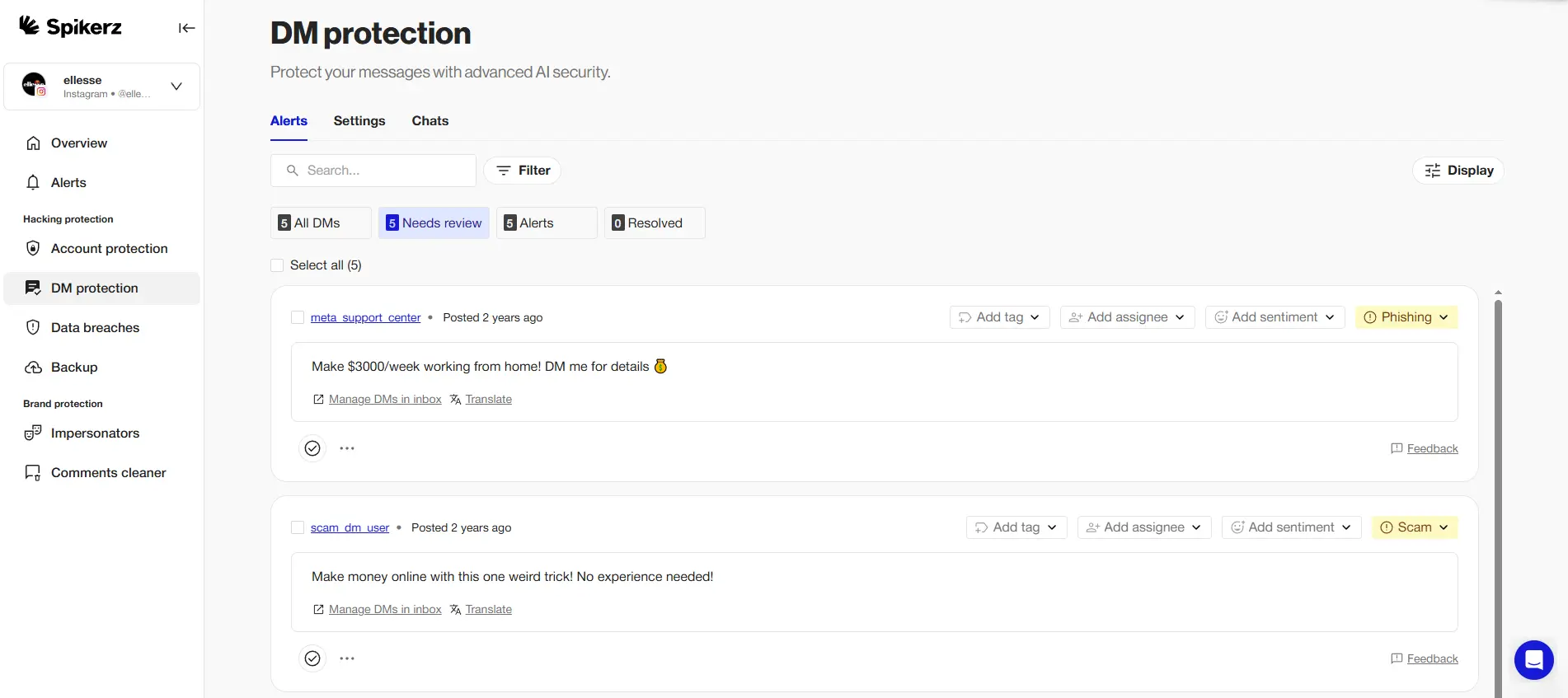
The best way to protect your social media presence is to use a dedicated social media security tool like Spikerz.
Spikerz is an all-in-one social media security and protection platform built for businesses and content creators who want to protect their online presence. We connect to your accounts through the official platform APIs, so there's no password or credentials needed, and setup takes just a few clicks. From there, our AI works around the clock to monitor your accounts, catch threats early, and shut them down before they cause harm.
That said, we help businesses stay protected on every front with a full suite of services:
- Account takeover protection: We lock down your logins and 2FA, eliminate shared credentials, and block hackers from hijacking your accounts, even while you're asleep.
- Impersonator takedown: We scan for fake profiles posing as your brand, talent, or executives, then verify and remove them fast before they can deceive your followers.
- Phishing protection: We continuously scan your comments, DMs, and inbox, filtering out phishing links and harmful messages in real time.
- Comment moderation: We automatically detect and hide spam, scams, hate speech, and phishing attempts in your comments across more than 25 languages.
- Permissions management: We give you full visibility and control over who can access your accounts, so ex-employees and rogue vendors can't put your brand at risk.
So, What Is Your Brand's Reputation Worth To You?
If the answer is "more than I'm willing to gamble," then there's no reason to leave your accounts exposed for one more day. The thousands of brands already protected by Spikerz aren't lucky, they're prepared. You can be too. Book a demo right now and see exactly how we keep your accounts safe.
Conclusion
The unfortunate reality is that phishing has moved to where your audience already spends its time: social media. And as we've seen, it doesn't look the same everywhere.
- On Instagram, it's a fake warning that your account is in trouble.
- On LinkedIn, it's a whaling message that looks like it came from your CEO or another executive.
- On Facebook, it's a hacked account begging friends and family for money.
- On X, it's a DM or tweet about crypto investments.
The way attackers do things changes, but the goal is always the same: to steal the trust you´ve built with your audience, your access, and/or your money or that of your audience.
The truth is that you can't control everything that happens on social media, but you don't have to face it blind, either. 90% of attacks start with a phishing message and social media is squarely in the line of fire.
The good news is that you can get ahead of the threat before it reaches you.
Spikerz gives you the visibility and control that social platforms never will, watching your accounts 24/7 so you can focus on growing your brand instead of defending it. Don't wait for a breach to find out how exposed you are. Book a demo right now, and let us show you what real protection looks like.
