How an Instagram Phishing Scam Works and How to Detect It

.webp)
Learn to identify phishing attacks in your Instagram DMs by recognizing red flags like suspicious sender profiles, artificial urgency tactics, and suspicious links—plus discover how automated security tools can catch threats you might miss. This guide equips you with both manual detection strategies and practical recommendations for AI-powered protection, ensuring you can safeguard your account against the 30.5% of phishing attacks now targeting social media platforms. By combining vigilance with the right tools, you'll dramatically reduce your risk of falling victim to increasingly sophisticated scams.
Phishing on Instagram has moved far beyond clumsy spelling errors and obvious fake links. In 2026, attackers use AI-generated messages, cloned login pages, and fake Meta Business chatbots that look indistinguishable from real support channels. For brands and creators managing high-visibility accounts, the cost of falling for one DM has never been higher.
This Spikerz article covers how these scams work, which campaigns are hitting brands right now, how to detect and block them, and what to do if your account is already compromised.
What is an Instagram Phishing Scam?
An Instagram phishing scam is a social engineering attack where criminals impersonate trusted entities such as Instagram Support, Meta Business, brand partners, or copyright teams to steal your login credentials or grant themselves account access. Unlike brute-force hacking, phishing tricks you into willingly handing over the keys.
Americans lost $2.1 billion to social media scams in 2025, an eightfold increase since 2020. Nearly 30% of victims said the scam started on social media. Instagram alone accounted for $234 million in reported losses that year. Meta removed over 159 million scam ads and took down 10.9 million accounts linked to criminal operations across its platforms in 2025.
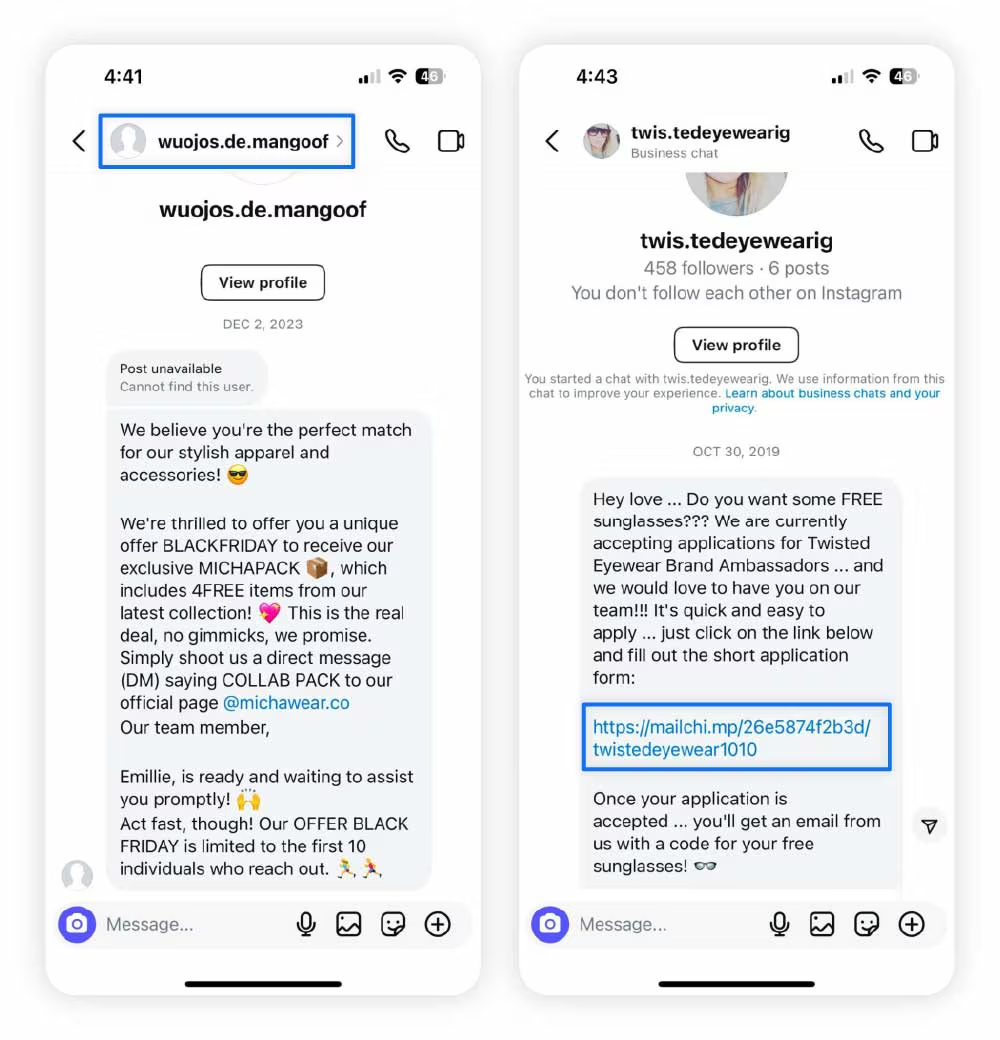
Scammers exploit urgency and fear.
- A DM claims your account will be disabled today
- An email warns your ads are suspended
- A fake copyright strike threatens your content
The message includes a link to a cloned login page that captures your username, password, and even your two-factor authentication code in real time. Once entered, attackers lock you out immediately.
The Most Active Phishing Scams Targeting Brands
- Fake copyright strike blackmail: Fraudsters file false copyright complaints, then demand payment to "remove" the strikes. One influencer with 57 million followers paid approximately $60,000.
- Fake Meta Business Support chatbots: Attackers link to cloned Help Center pages with fake chat interfaces that instruct victims to add the attacker's device as a trusted login method or hand over their 2FA code. The Cofense Phishing Defense Center uncovered this exact campaign in 2025.
- Fake verification badge emails: An email impersonating Instagram's Verified Badge Team informs the recipient that their account meets the criteria for a verified badge and includes a "Verify" button. The button then leads to a multi-step fake login page.
How to Protect Your Instagram Account From Phishing
Protection works best in two layers: manual detection to catch red flags and automated monitoring to catch what human attention misses. Use both.
Manual Detection
1. Check the Sender's Profile First
Look for recently created accounts, low follower counts, few posts, or handles that mimic legitimate brands with slight misspellings like "instagram-security-help." Low-resolution profile pictures copied from elsewhere are another warning sign.
2. Watch Out For Artificial Urgency
Phishing messages create panic: "Your account will be disabled today," "Verify immediately," "Your ads are suspended." Legitimate companies rarely demand instant action through DMs. If a message makes you feel rushed, stop.
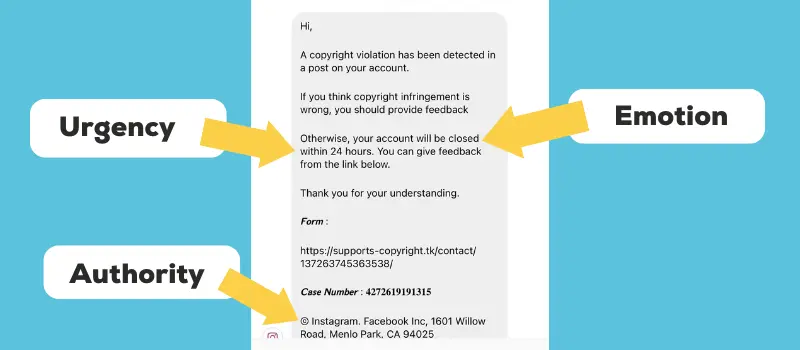
3. Examine Every Link Carefully.
- Never click links in DMs or emails unless you are certain they are legitimate.
- Phishing domains use subtle differences: "instagran.com" instead of "instagram.com" or "instagram-verify-account.com."
- Long-press links to preview the full URL before tapping.
- Treat shortened links (bit.ly, tinyurl) as high risk, as you cannot see where they lead.
- Instead of clicking, go directly to the official website by typing the address yourself or open the Instagram app directly.
- Avoid logging in via any link sent through messages, comments, or bio links.
4. Notice Generic Greetings
Messages starting with "Dear User," "Hello Customer," or "Valued Member" should raise suspicion. Real companies that have interacted with you before will know your name.
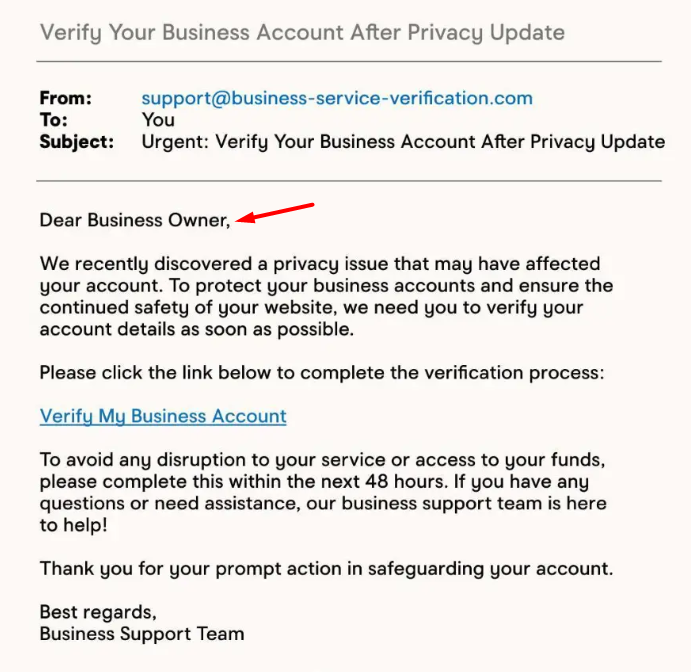
5. Question Every Request for Sensitive Information
Real companies never ask for passwords, credit card details, or 2FA codes through Instagram DMs or emails. Anyone requesting these is a scammer, even if they claim to be Instagram Support.
6. Verify Through Official Channels
When you receive a suspicious message from what appears to be a brand, do not respond through the DM. Contact the company directly through their official website or verified social media account.
7. Check Your Login Activity Regularly
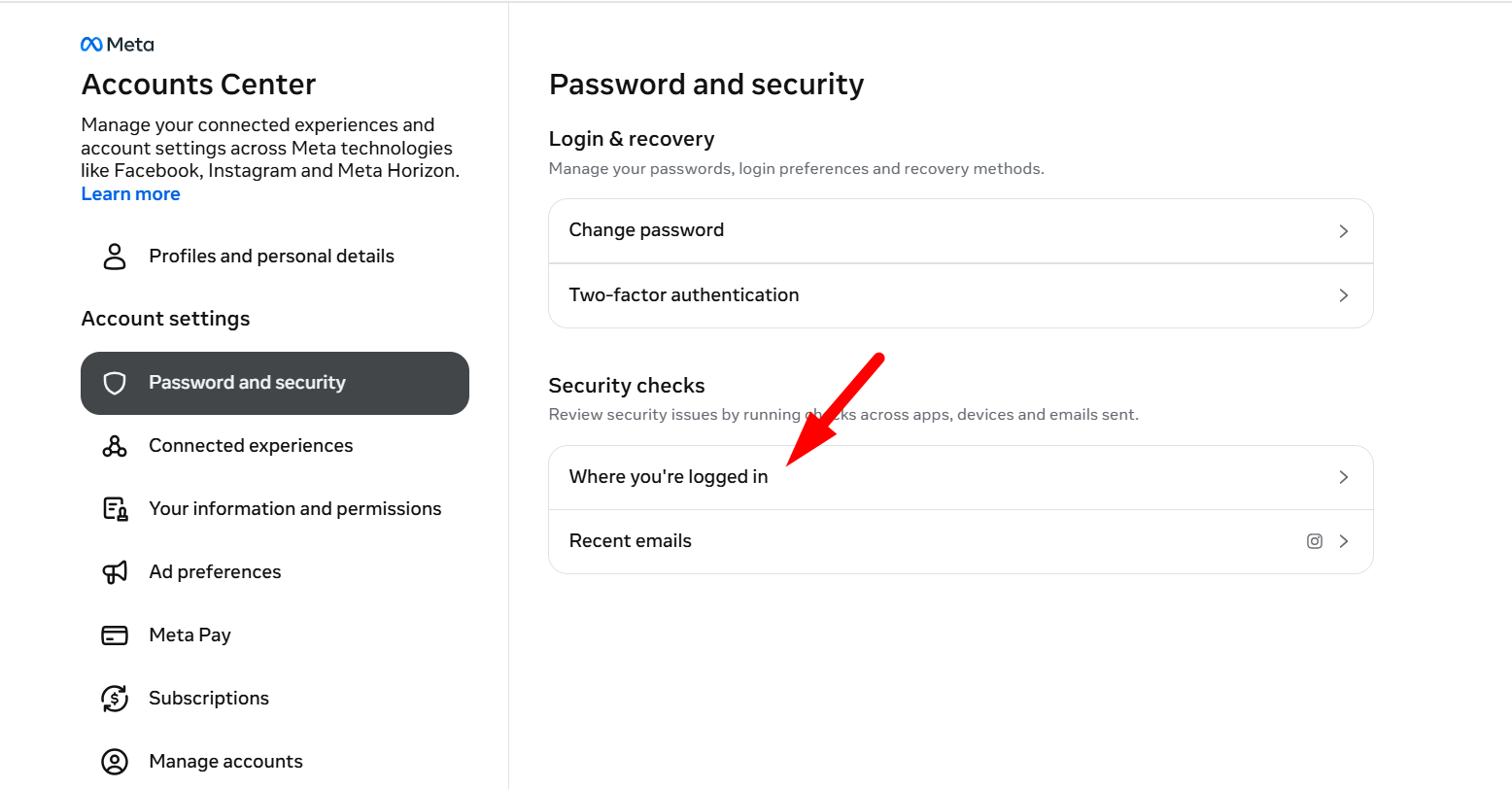
Go to Instagram Settings > Accounts Center > Password and Security > Where You're Logged In. Review devices, locations, and timestamps for the last 90 days. Remove any entry you do not recognize immediately, then change your password. This logs out all devices, including unauthorized ones.
8. Configure Two-Factor Authentication Correctly
- Enable 2FA on every brand account using an authenticator app (Google Authenticator, Microsoft Authenticator, or Authy), not SMS.
- Save backup codes securely offline, not in email or cloud storage.
- Regenerate fresh codes after any account recovery.
Automated Protection
Manual detection has limits. You cannot monitor every DM 24/7, and AI-generated phishing messages are increasingly polished and convincing. Automated tools fill this gap.
We’ve built Spikerz to monitor direct messages and comments continuously, filtering harmful links and alerting you to potential scams before they reach you or your followers.
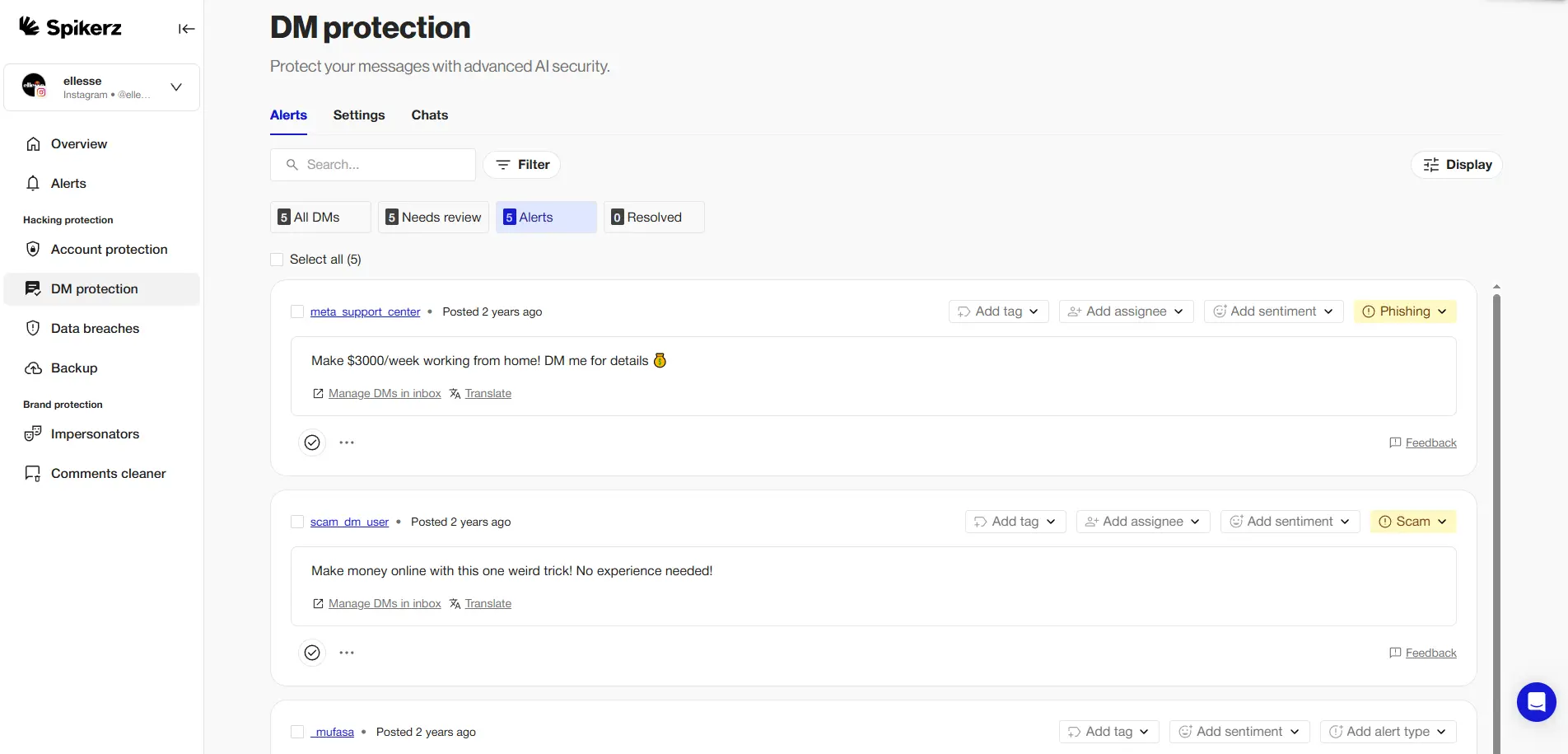
Our platform detects brand impersonators spreading misinformation or executing scams, analyzes abnormal account usage patterns to flag potential hijacking, and offers permission management that centralizes all social media role access in one place. You see exactly who has access to your accounts and their permission levels, ensuring team members never hold more access than necessary.
What to Do If Your Account Has Been Compromised
1. Act Immediately
If you can still log in, change your password at Settings > Password and Security > Change Password. Then go to Settings > Accounts Center > Password and Security > Where You're Logged In, review all active sessions, and log out every unrecognized device. Change your password again after logging out all devices. This blocks attackers from using stolen session tokens.
2. Review Recent Activity
Delete fraudulent posts, messages, or ads. If your ad account was compromised, check ad spend and billing for unauthorized changes.
3. Remove All Unauthorized Access
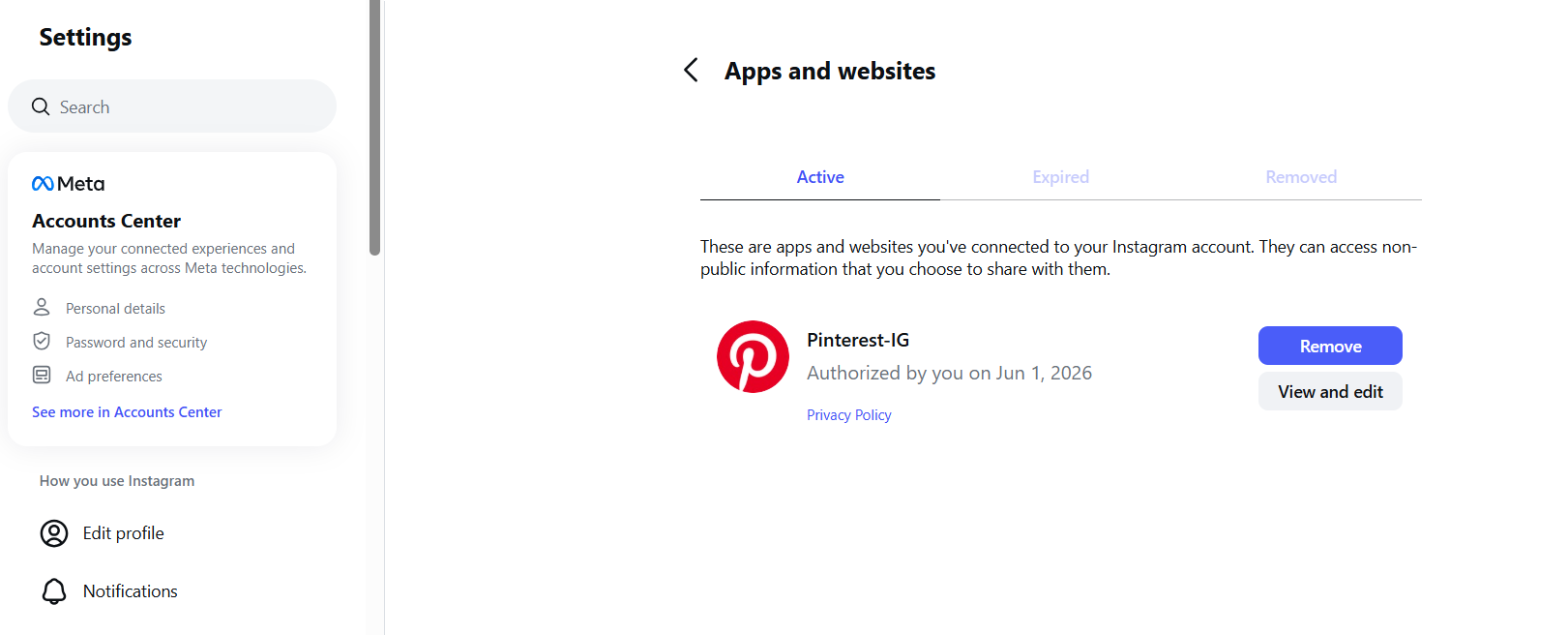
- Revoke third-party apps at Settings > Website Permissions > Apps and websites. Attackers often register malicious apps with persistent access. Changing your password alone does not remove them.
- Reconfigure 2FA completely. Remove unrecognized authentication methods, reset your authenticator app, and generate new backup codes. Store them offline.
- Review recovery contacts at Settings > Account Center > Personal Details. Remove any unrecognized emails or phone numbers attackers added to regain access.
- Check connected Facebook accounts. Attackers frequently pivot from Instagram to linked business assets.
4. Notify Your Team
Inform your social media team and agencies about the breach. Spikerz's permission management revokes access instantly across all connected accounts, preventing one breach from spreading.
5. Use Instagram's Recovery Portal
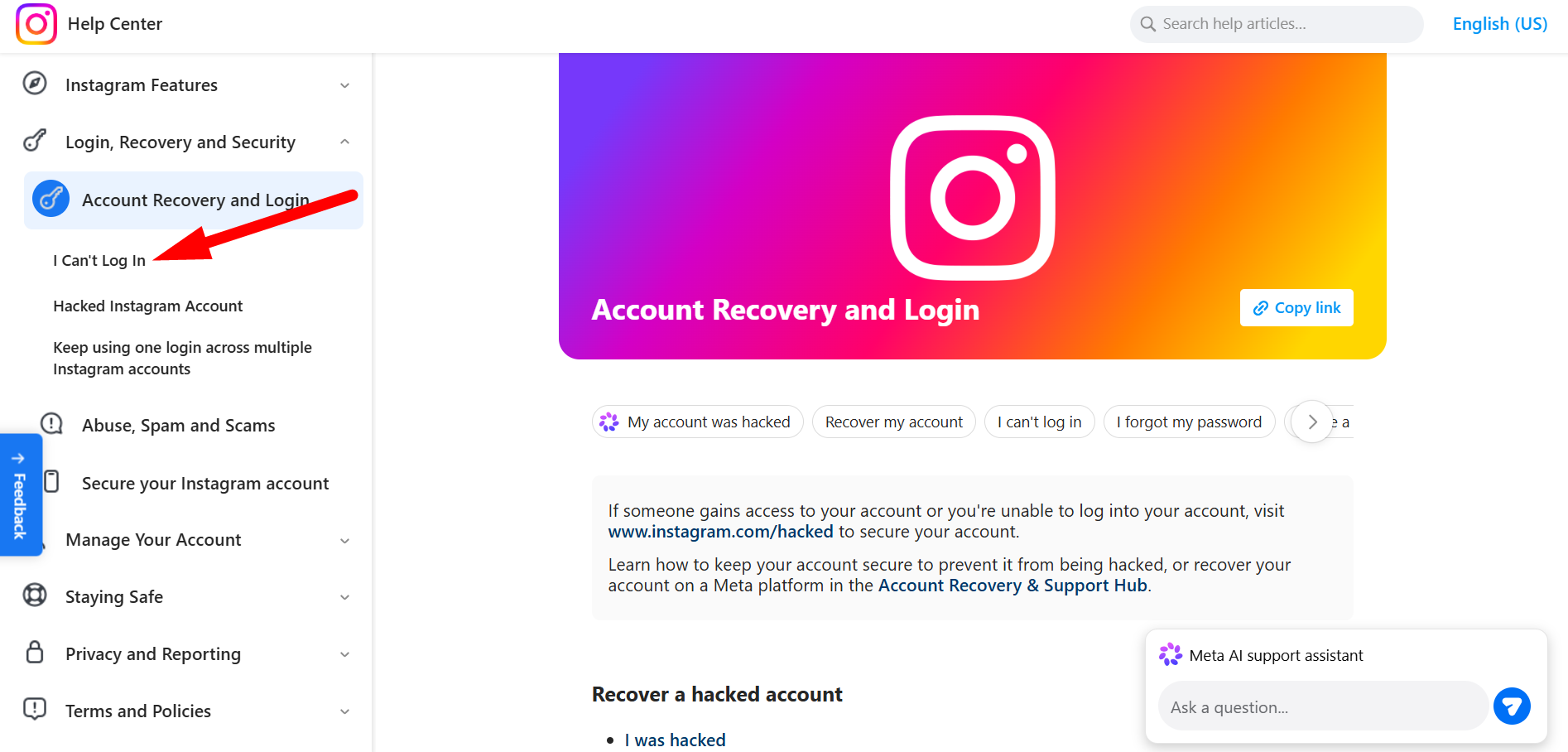
If you can’t log in, visit the Instagram account recovery center, click "I Can’t Log In" or “Hacked Instagram Account," and follow the instructions given. You may need to verify identity with a video selfie or a previously associated email or phone number.
Conclusion
Phishing attacks on Instagram DMs are a growing threat that shows no signs of slowing down. But you're not powerless against them. If you learn to recognize the warning signs, you'll be able to avoid most phishing attempts before they succeed.
That said, manual detection works, but it demands constant attention and can't catch every threat. That's where automated protection makes the difference. Tools like Spikerz work around the clock to monitor your messages, filter malicious content, and alert you to potential scams. They also protect against impersonators, account hijacking, and content violations. So use them to protect your digital presence today.
