How to contact social media platforms for support

%202.webp)
When an account is hacked or suspended, getting help from each platform can take hours. This guide gives step-by-step ways to contact Meta, X, TikTok, YouTube and LinkedIn, notes which offer chat or tickets, and covers protection against takeovers, impersonation and phishing.
Your social media account just got hacked. Or maybe someone is impersonating your brand. Perhaps your ad account got suspended out of nowhere, and you have no idea why.
Whatever the situation is, you need answers (and you need them fast). The problem? Getting in touch with a social media platform's support team is not always easy.
Every platform has its own process, its own forms, and its own set of hoops to jump through. If you don't know exactly where to go, you could waste hours clicking through help pages that lead nowhere.
In this post, we break down the exact steps you need to follow to contact Meta, X, TikTok, YouTube, and LinkedIn. We also cover how to protect your accounts so you can avoid needing support in the first place.
How to contact Meta
Not long ago, Meta made major improvements to their Help Center. They redesigned the process for account recovery, impersonation takedown requests, and other common issues. As a result, getting in contact with Meta is more straightforward than it used to be.
Here's how to do it:
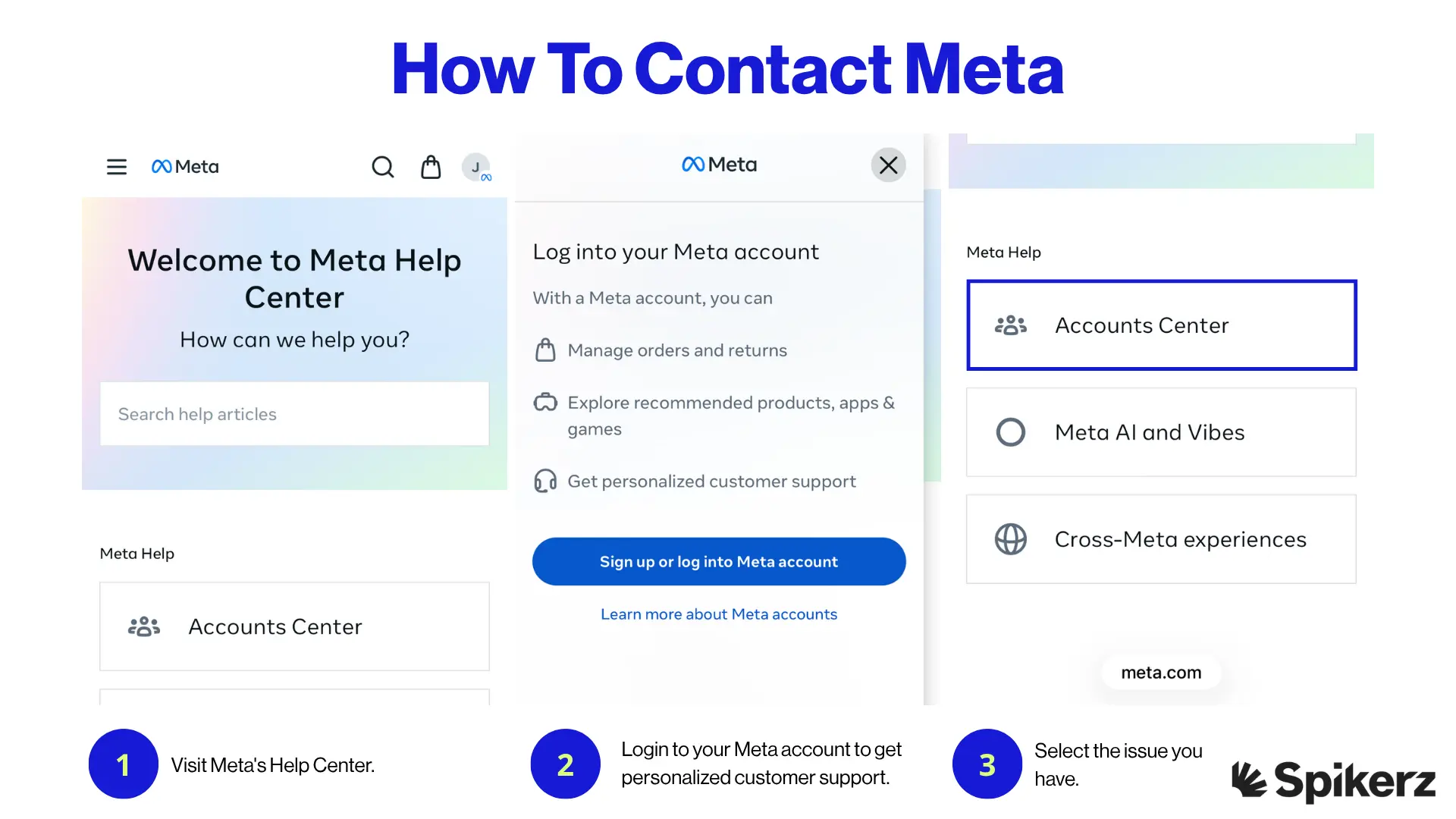
- Visit Meta's Help Center.
- Login to your Meta account to get personalized customer support. If you don't have one, create an account first.
- Select the issue you have, or use the search bar to find the right page.
If you want a more personalized experience, skip step #3 and scroll down until you see the "Meta Help Centers" section. This gives you dedicated support for each platform Meta owns.
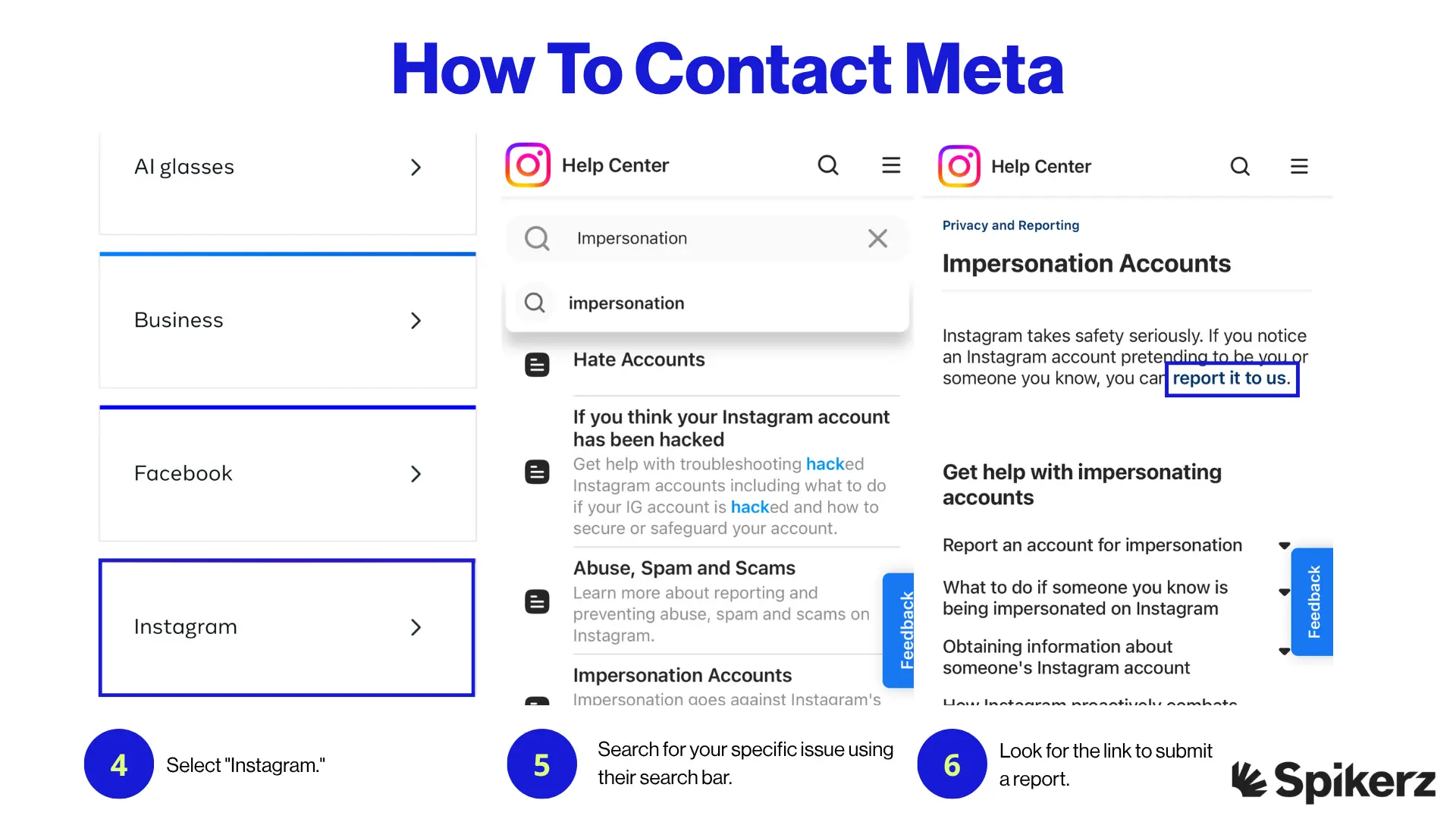
- For example, select "Instagram."
- Then, search for your specific issue using their search bar.
- Look for the link to submit a report so you can get in direct contact with Meta.
- Go through Meta's dedicated step-by-step process to resolve your issue.
Meta's updated Help Center is a big improvement, but the process still requires patience. Make sure you have all relevant details about your issue ready before you start (screenshots, email addresses tied to the account, and any error messages you've received). This will speed up the process significantly.
How to contact X
Getting in touch with X used to be a nightmare. Long wait times, confusing forms, and almost no response. But they've made significant improvements to their contact process. It's now easier to request revisions, prove your claims, and get real support.
Here's the process you need to follow:
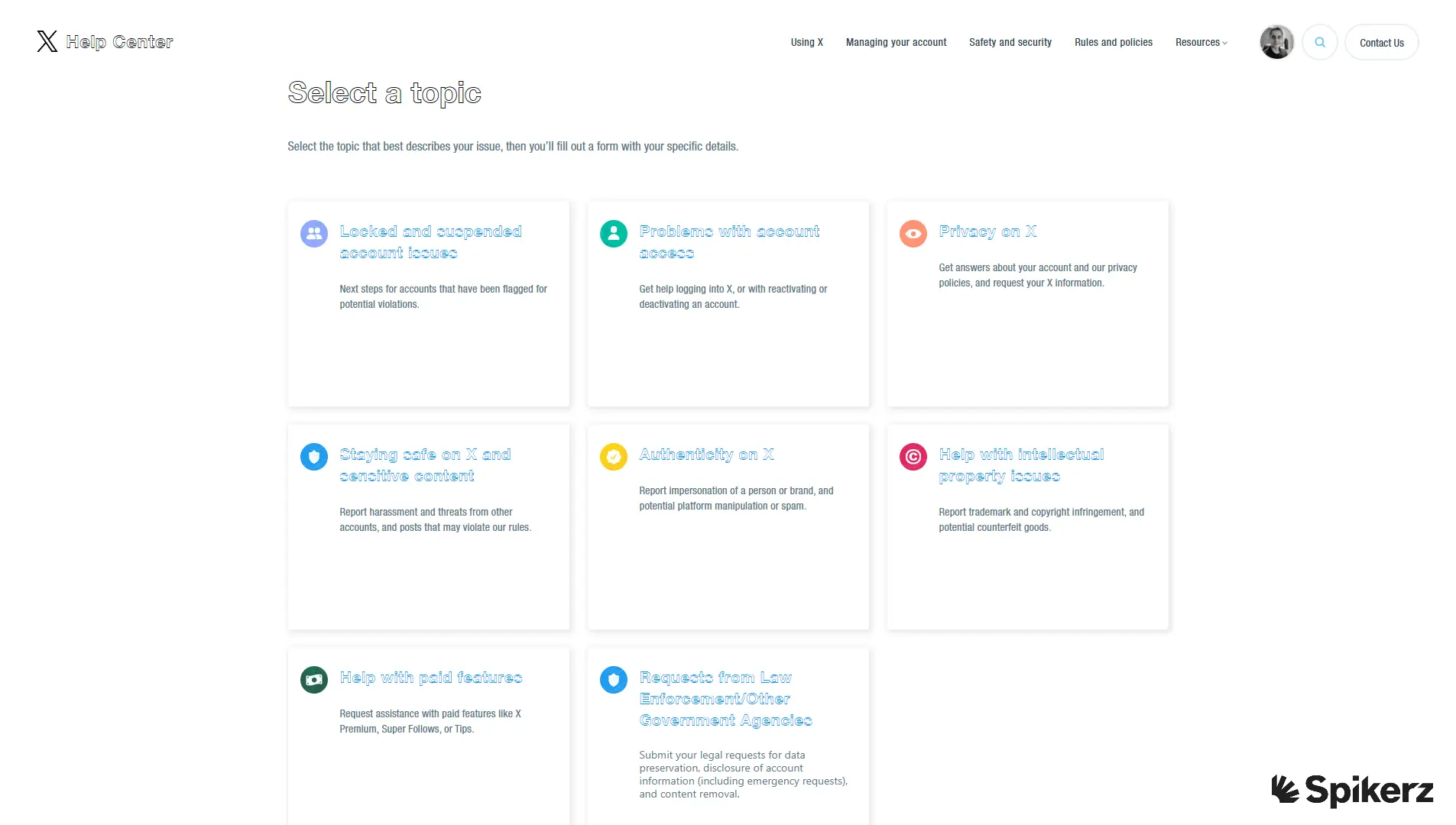
- Visit X's Contact us page.
- Select the issue you have.
Note: The process moving forward depends on the issue you select. Each category leads to a different set of forms and requirements.
- For example, if you select "Authenticity on X" to deal with impersonators, you have to choose the option, "I'd like to report impersonation on X."
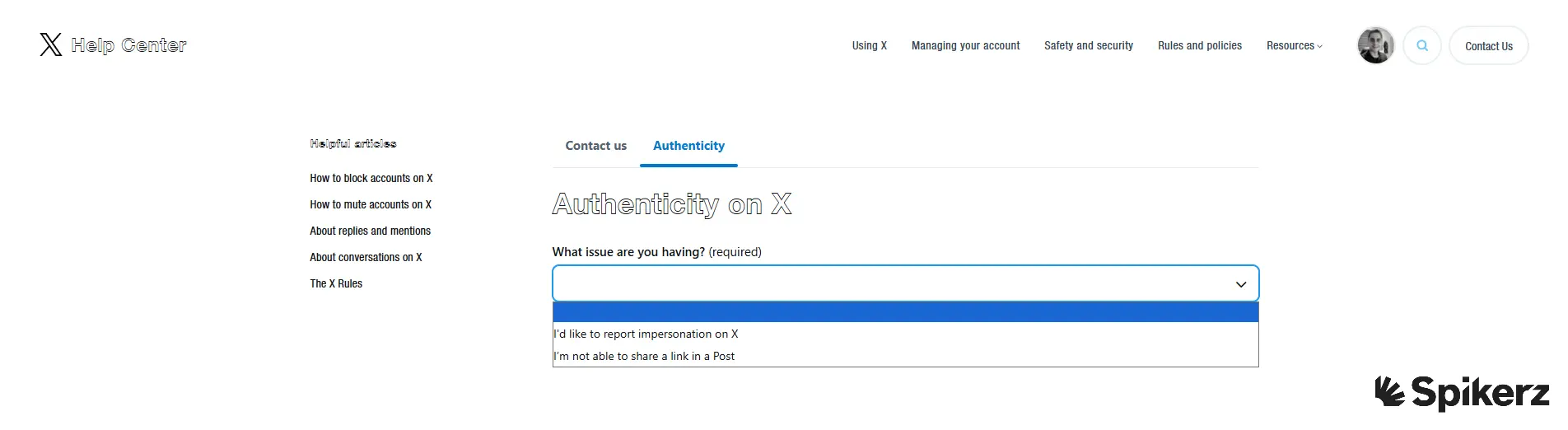
- Then, select who is being impersonated.
- Next, select the relationship you have with the victim.
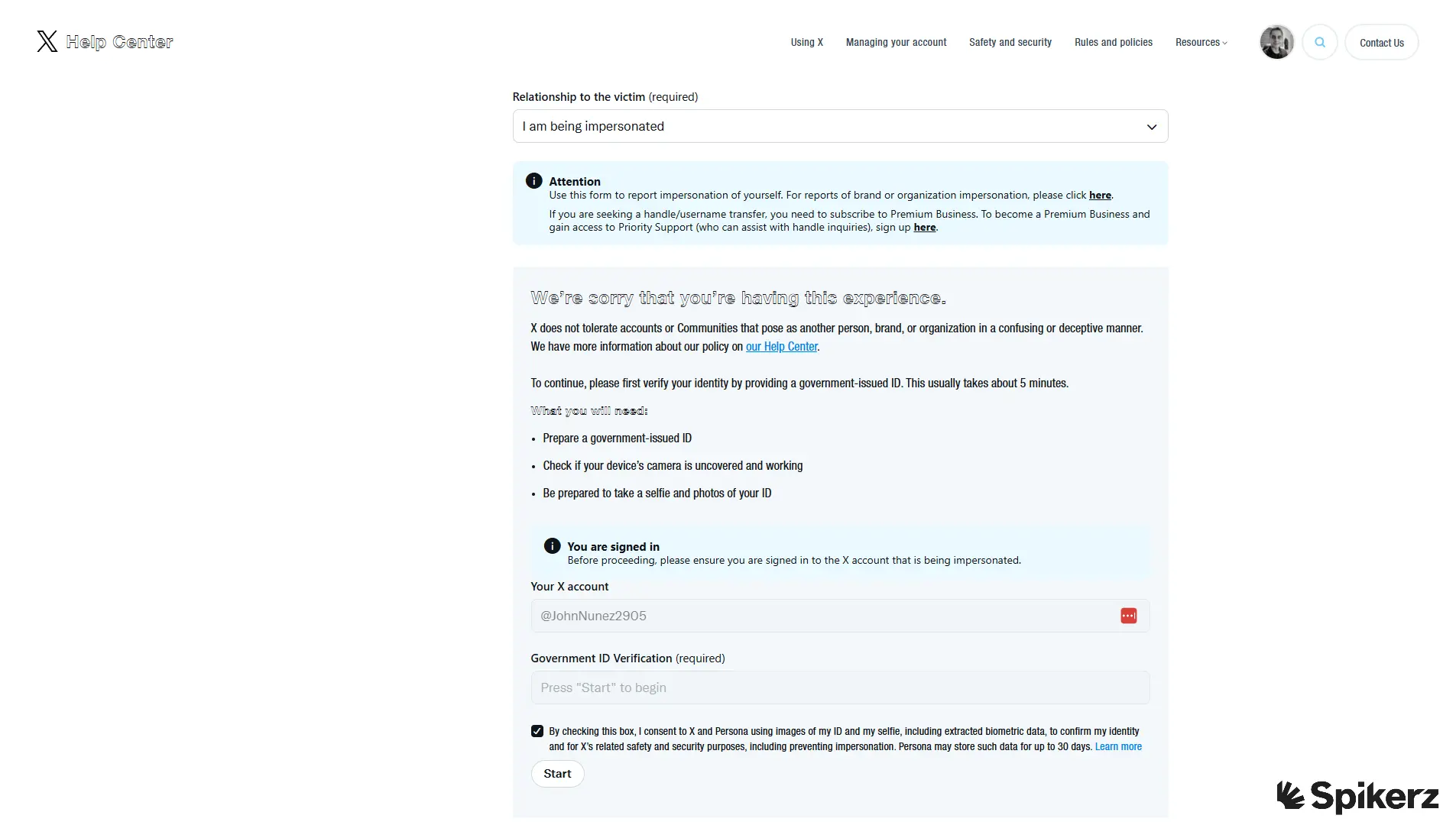
- After that, start the "Government ID Verification" process.
- Complete the form and click "Submit."
The Government ID Verification step catches many people off guard. But don’t worry about it, just have a government-issued ID ready before you start. This step is mandatory for impersonation reports, and skipping it means starting the process over.
How to contact TikTok
Unfortunately, TikTok doesn't make it easy to get in touch with them. And even when you do reach their support team, they aren't always helpful. According to the Better Business Bureau, TikTok has one of the lowest satisfaction ratings for customer support among major social platforms.
Still, if you need to contact them, here's how:
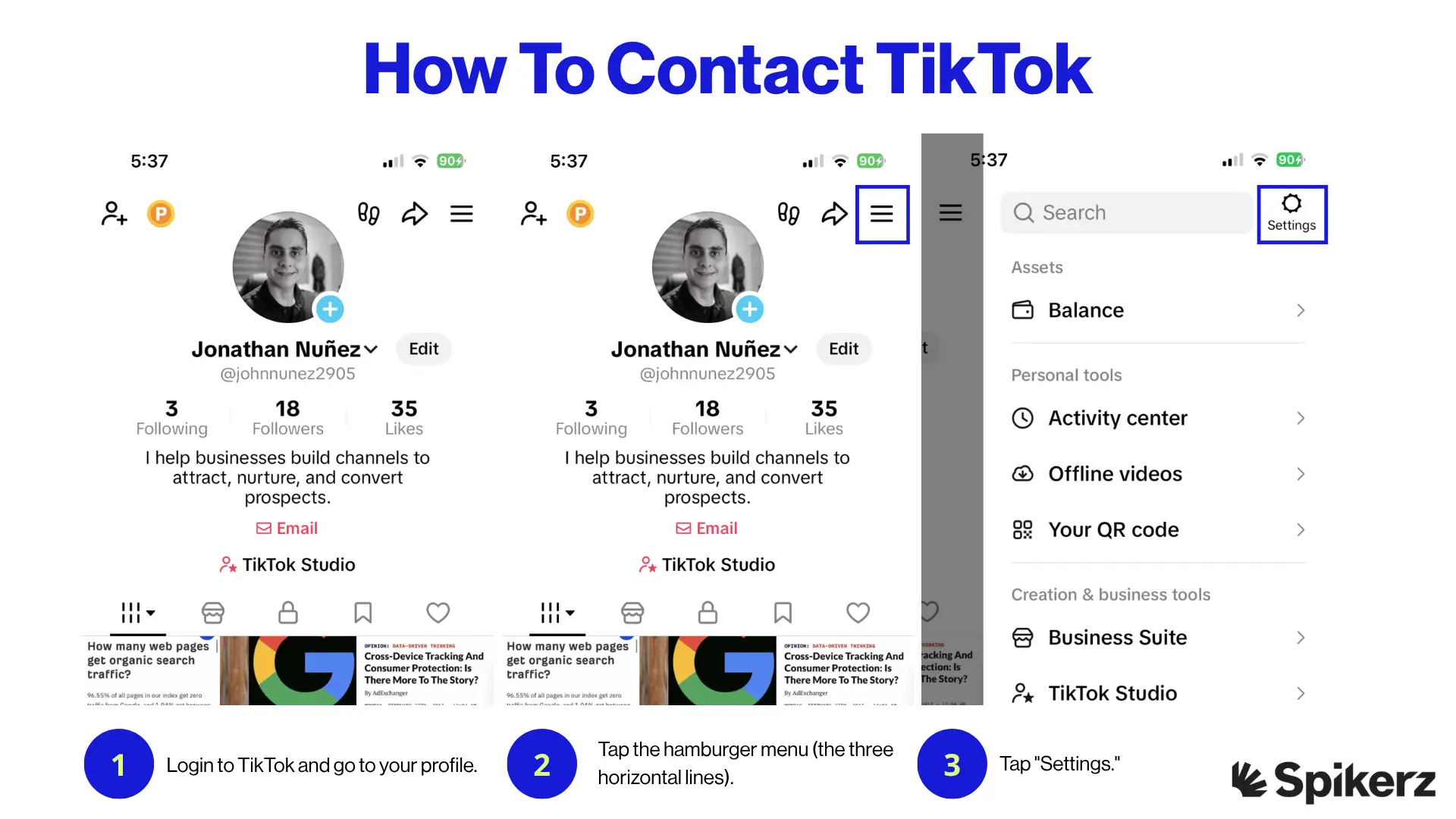
- Login to TikTok and go to your profile.
- Tap the hamburger menu (the three horizontal lines).
- Tap "Settings."
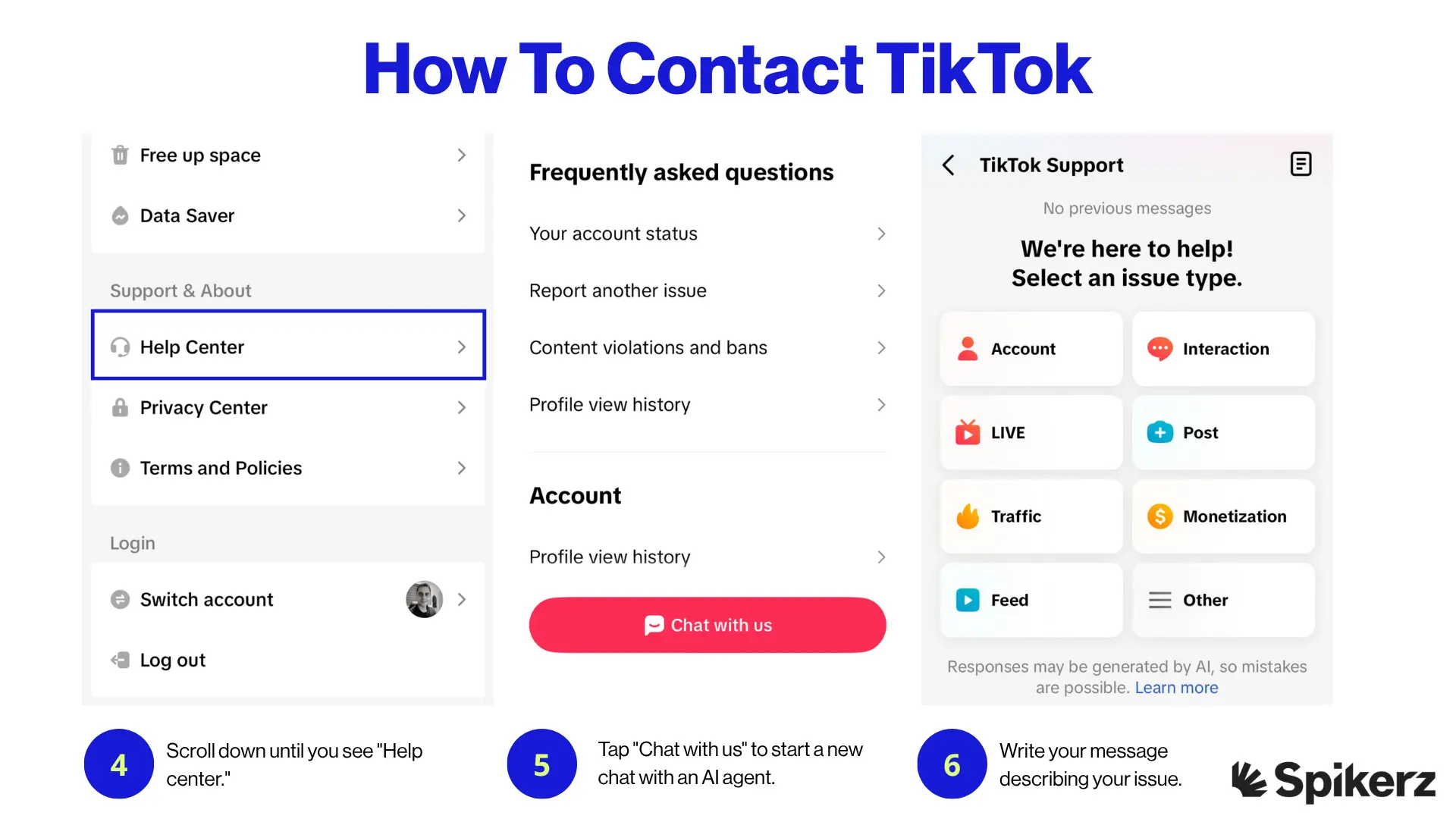
- Scroll down until you see "Help center."
- Tap "Chat with us" to start a new chat with an AI agent.
- Write your message describing your issue so the AI agent can help fix the problem.
Keep your message clear and specific. The AI agent works best when you provide exact details (your username, the date the issue started, and what you've already tried). Vague descriptions often lead to generic responses that won't solve your problem.
How to contact YouTube
YouTube help chat is limited to eligible creators only. If you're eligible, make sure you're logged in to the eligible channel before you start the process.
If you don't have an eligible account, you can still get in contact with YouTube by reaching out to creator support. Here's how to do it:
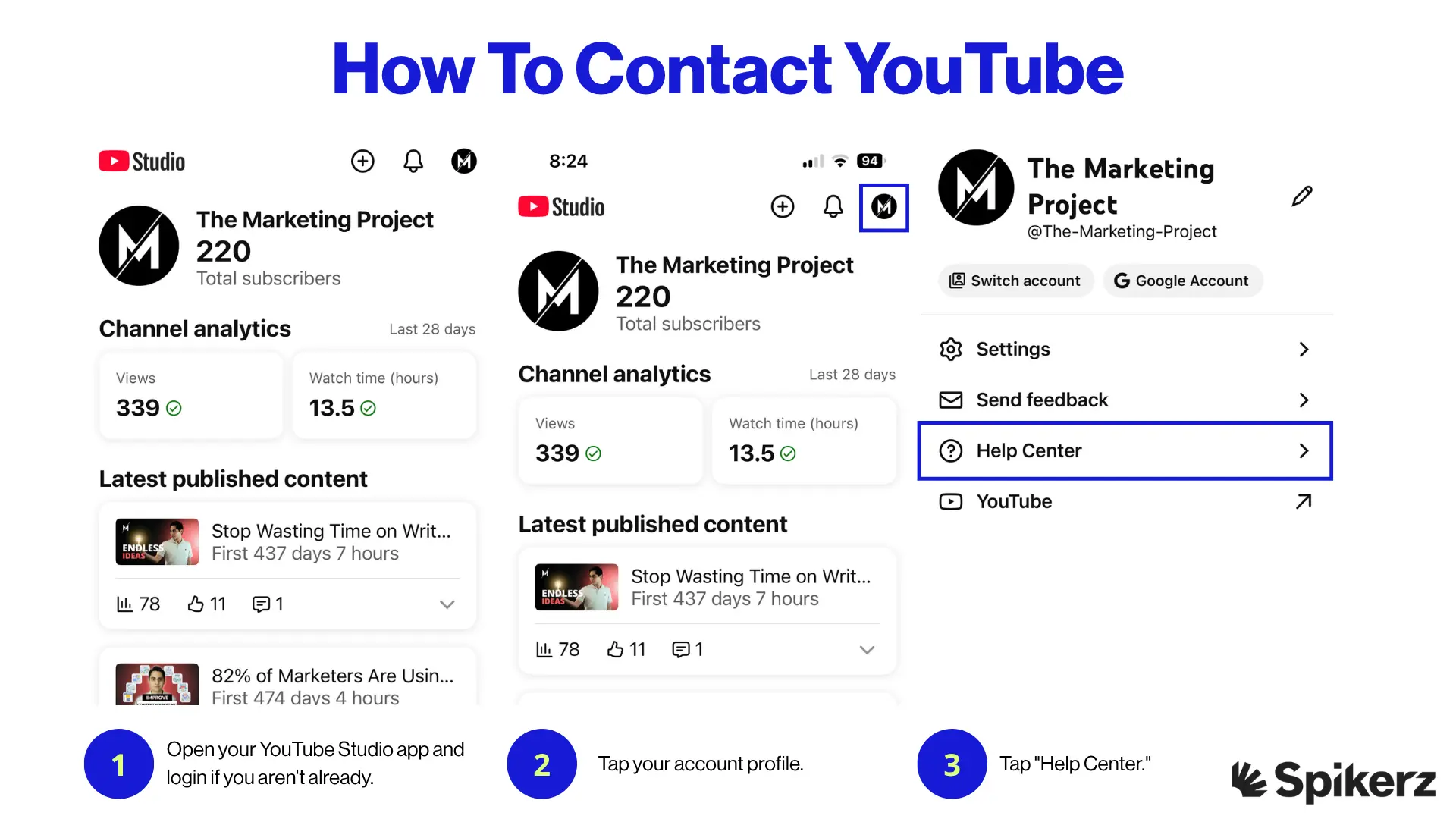
- Open your YouTube Studio app and login if you aren't already.
- Tap your account profile.
- Tap "Help Center."
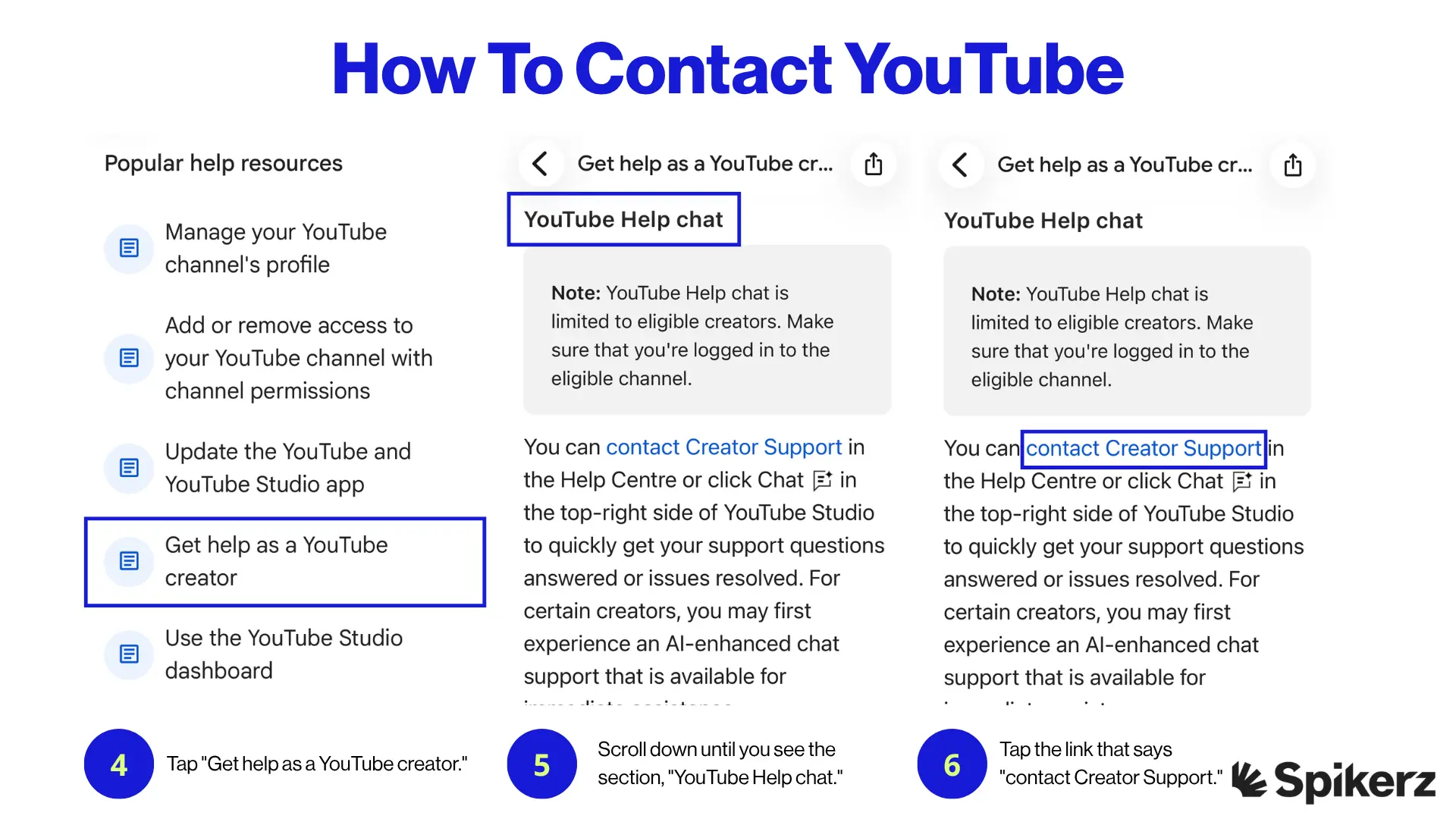
- Tap "Get help as a YouTube creator." You can also use the search bar to look for your specific issue.
- Scroll down until you see the section, "YouTube Help chat."
- Tap the link that says "contact Creator Support."
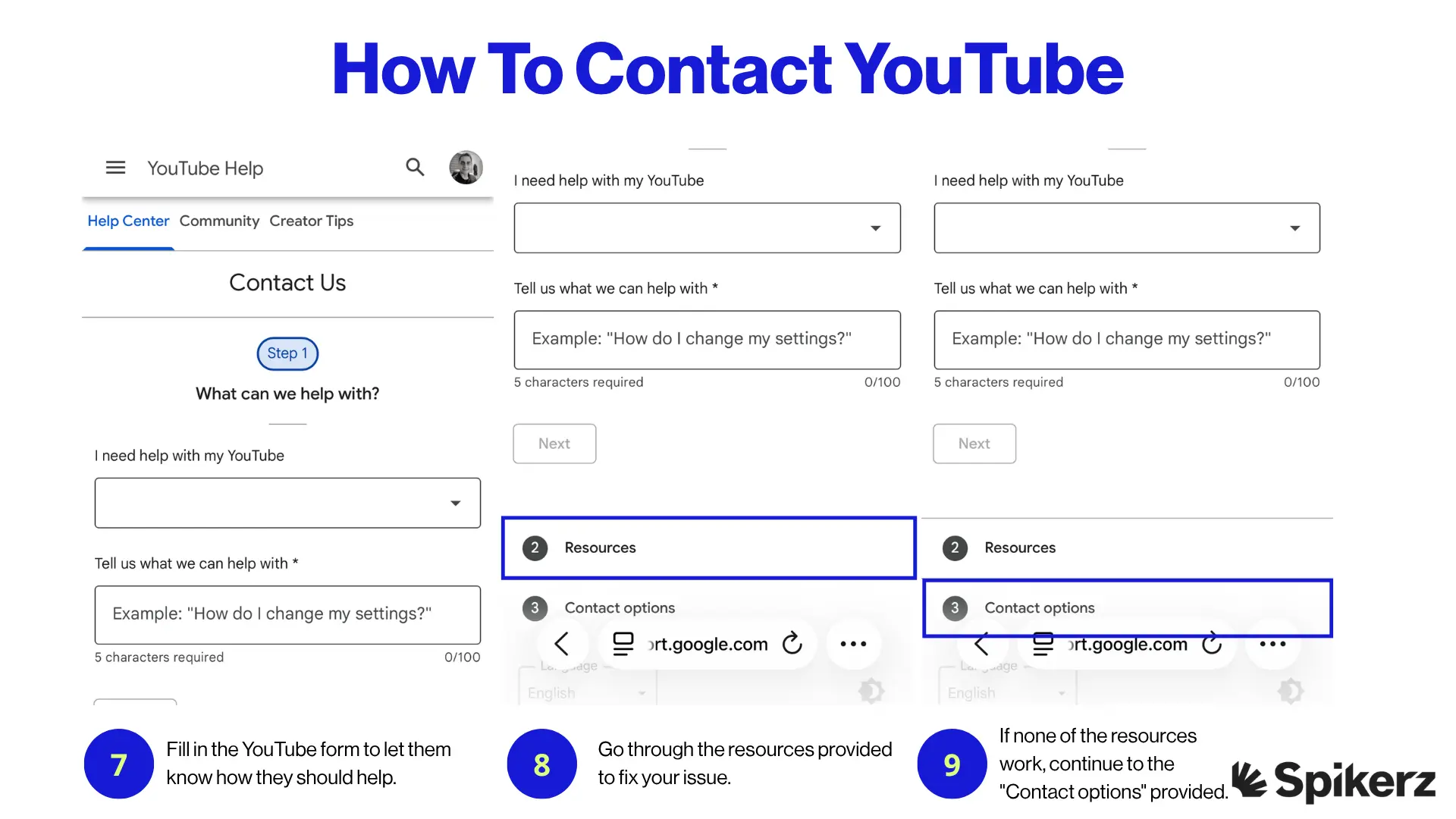
- Fill in the YouTube form to let them know how they should help.
- Go through the resources provided to fix your issue.
- If none of the resources work, continue to the "Contact options" provided.
YouTube's support process has multiple layers. You'll likely be directed to self-help resources before you can speak to someone. Work through these steps without skipping them, because YouTube tracks whether you've reviewed the resources before offering direct contact options.
How to contact LinkedIn
Getting in contact with LinkedIn support is one of the easiest experiences on any social platform. The process is direct and doesn't require you to jump through unnecessary steps.
Here's what you need to do:
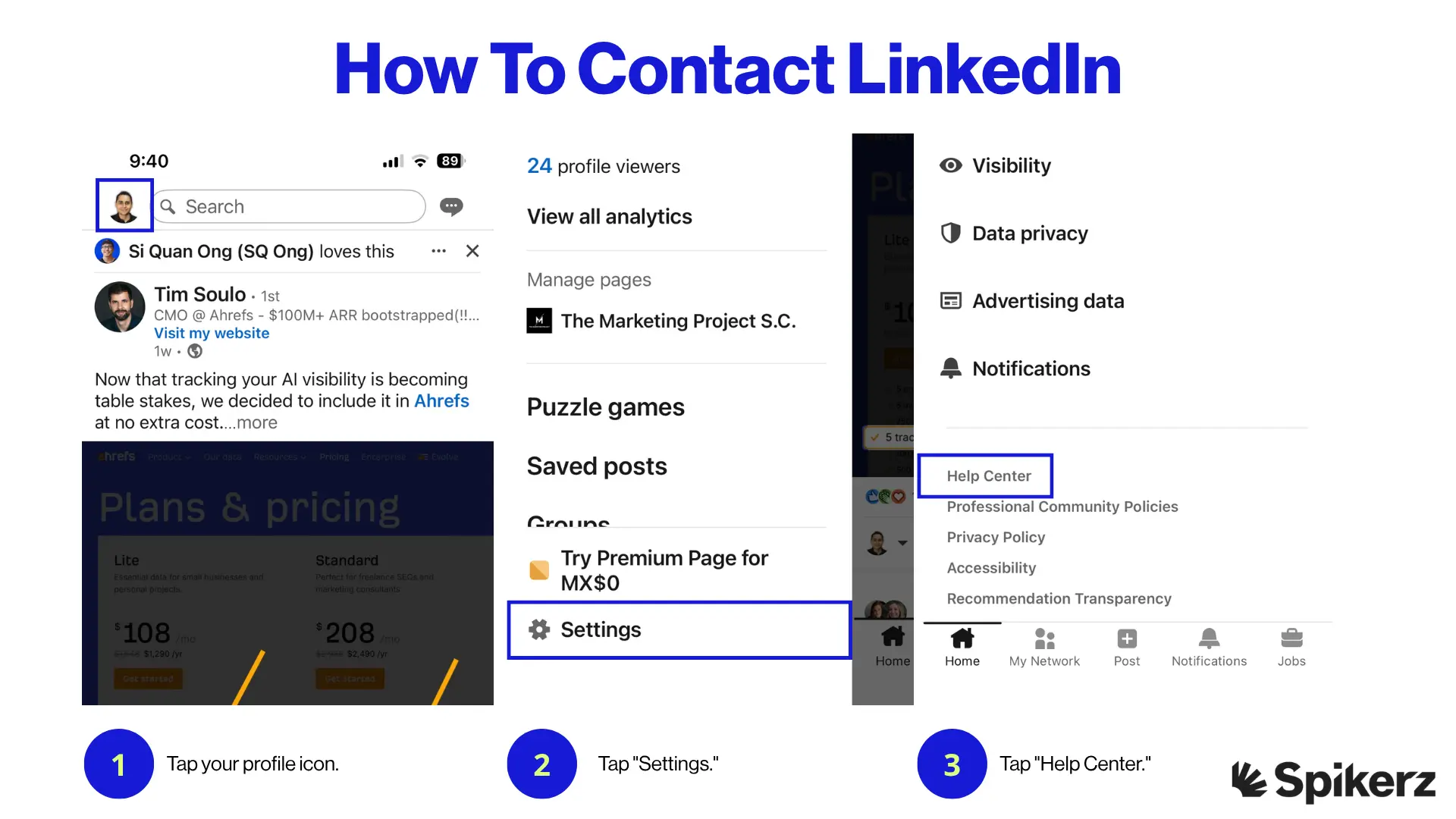
- Tap your profile icon.
- Tap "Settings."
- Tap "Help Center."
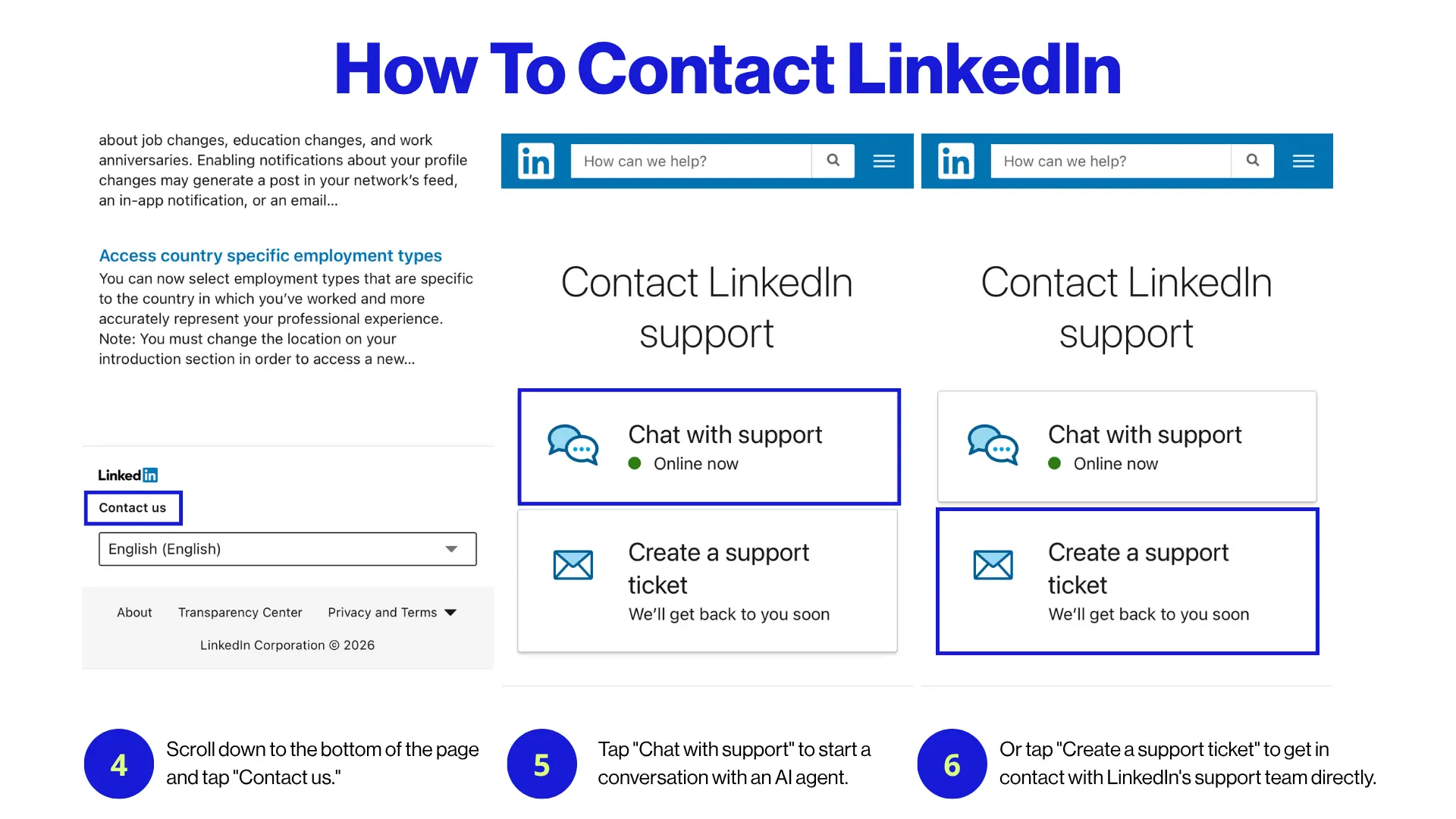
- Scroll down to the bottom of the page and tap "Contact us."
- Tap "Chat with support" to start a conversation with an AI agent.
- Or tap "Create a support ticket" to get in contact with LinkedIn's support team directly.
LinkedIn gives you two clear options:
Instant chat or a formal ticket. If your issue is urgent (like a hacked account or impersonation) go with the chat option for a faster response. For less time-sensitive issues, a support ticket works fine.
How to protect your social media presence to avoid needing support
The best way to avoid having to contact support is to prevent issues from happening in the first place. Prevention saves you time, money, and the stress of dealing with slow support processes. The good news is there are steps you can take to protect your accounts from threats like:
- Account takeovers
- Account impersonations
- Phishing messages
- Social engineering attacks
- Spam comments
The best way to protect your accounts is to use a social media monitoring tool like Spikerz. Spikerz is a social media security platform designed for businesses that rely on their online presence. It connects to your accounts through official APIs (no passwords or credentials needed) and provides 24/7 monitoring against cyber threats.
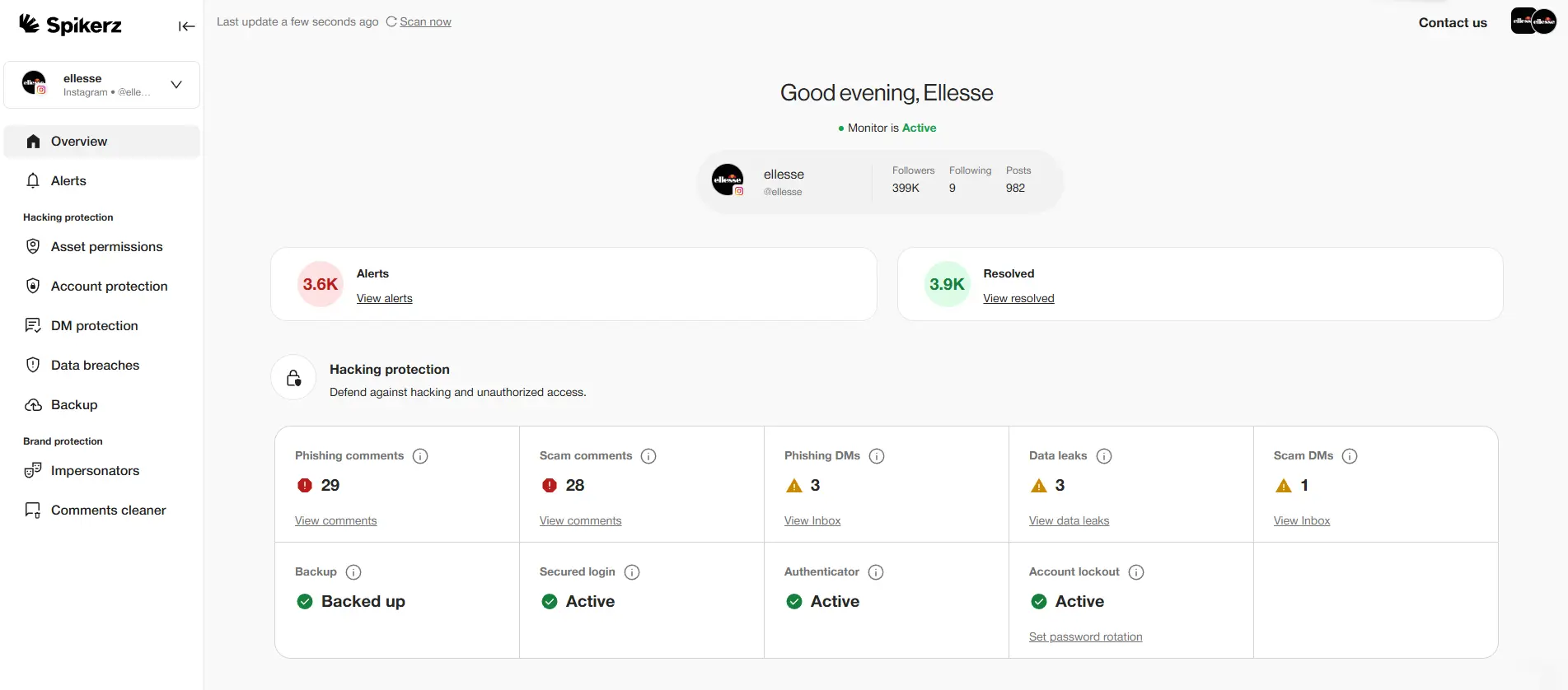
Here's how Spikerz helps brands protect their accounts:
- Account takeovers: Spikerz monitors your accounts around the clock for unauthorized access attempts. If it detects suspicious activity, it alerts you immediately so you can take action before you lose control.
- Impersonator takedown: Spikerz scans for fake accounts that copy your brand name, profile picture, or content. It flags impersonators so you can report them and protect your audience from scams.
- Phishing protection: Spikerz uses AI to detect phishing links and messages sent through and to your social accounts. It catches threats that traditional security tools miss because it's built specifically for social media.
- Comment moderation: Spikerz identifies and blocks spam comments in real time. This keeps your comment sections clean and protects your engagement.
- Permissions management: Spikerz flags outdated user permissions and unused access points tied to your accounts. Removing these weak spots reduces your exposure to attacks from former employee accounts or old integrations.
Are you spending more time recovering from social media threats than growing your business?
Book a demo with Spikerz to see how our platform monitors, detects, and blocks threats before they damage your brand. Your accounts deserve protection that works 24/7 (even when you're not watching).
Conclusion
Reaching out to social media platforms for support doesn't have to feel like hitting a wall. Each platform has its own process, and knowing the exact steps saves you from wasting time on dead-end help pages. So go ahead and use the step-by-step guides above to get to the right place faster the next time an issue comes up.
But reacting to problems after they happen is never the best strategy. The businesses that protect their social presence proactively spend less time in support queues and more time building their brand. That’s why you should use tools like Spikerz that give you 24/7 monitoring and real-time threat detection so you can catch account takeovers, impersonators, and phishing attacks before they cause damage.
Your social media accounts are business assets. Treat them that way. Start by following the contact steps above when you need help, and invest in the right protection so you need that help less often.