Why can't I see comments on YouTube?


Can't see comments on YouTube? It's usually one of three things: comments turned off, you've been blocked, or an overly aggressive blocked-words filter. Each has a quick fix in YouTube Studio. For creators managing comments at scale, tools like Spikerz automate spam and troll detection 24/7.
You open a YouTube video, scroll down to the comments, and… nothing. Just a blank space or a cold "Comments are turned off" message staring back at you.
If this has happened to you, you're not alone. And it's usually not a random glitch.
The good news?
Most of the time, there's a clear reason behind the issue (and a fix to go with it).
In this post, we'll break down the three main reasons you can't see comments on YouTube, how to fix each one, and how to manage your comments section like a pro.
TLDR:
Can't see comments on YouTube? It usually comes down to one of three things:
- Comments are turned off. Either on a single video or by default across your whole channel. Fix it in YouTube Studio under the video's settings or Community Moderation.
- You've been blocked by the creator. There's nothing you can do except message them and hope for the best.
- Your blocked words filter is too aggressive and is hiding legit comments. Trim the list in Community Moderation and you're back in business.
Each fix takes less than five minutes. But if you're a creator or business, keeping your comments section clean long-term is a bigger job. The good news is, there are tools like Spikerz that use AI to block spam, scams, and trolls automatically, so you're not stuck moderating 24/7. Use them to make your life easier.
Why can't I see comments on YouTube?
There are three main reasons why you or your viewers may not be able to see comments on a YouTube video. Each one has a different cause, and each one requires a different fix. Let's walk through them.
Comments are turned off
This is the most common reason. There are two things that could be happening: comments could be turned off on a single video, or they could be turned off by default across all your uploads.
Individual videos
You can change the comment settings for any individual video from your content page. Here's how:
- Sign in to YouTube Studio.
- From the left menu, select "Content."
- Click a video's thumbnail.
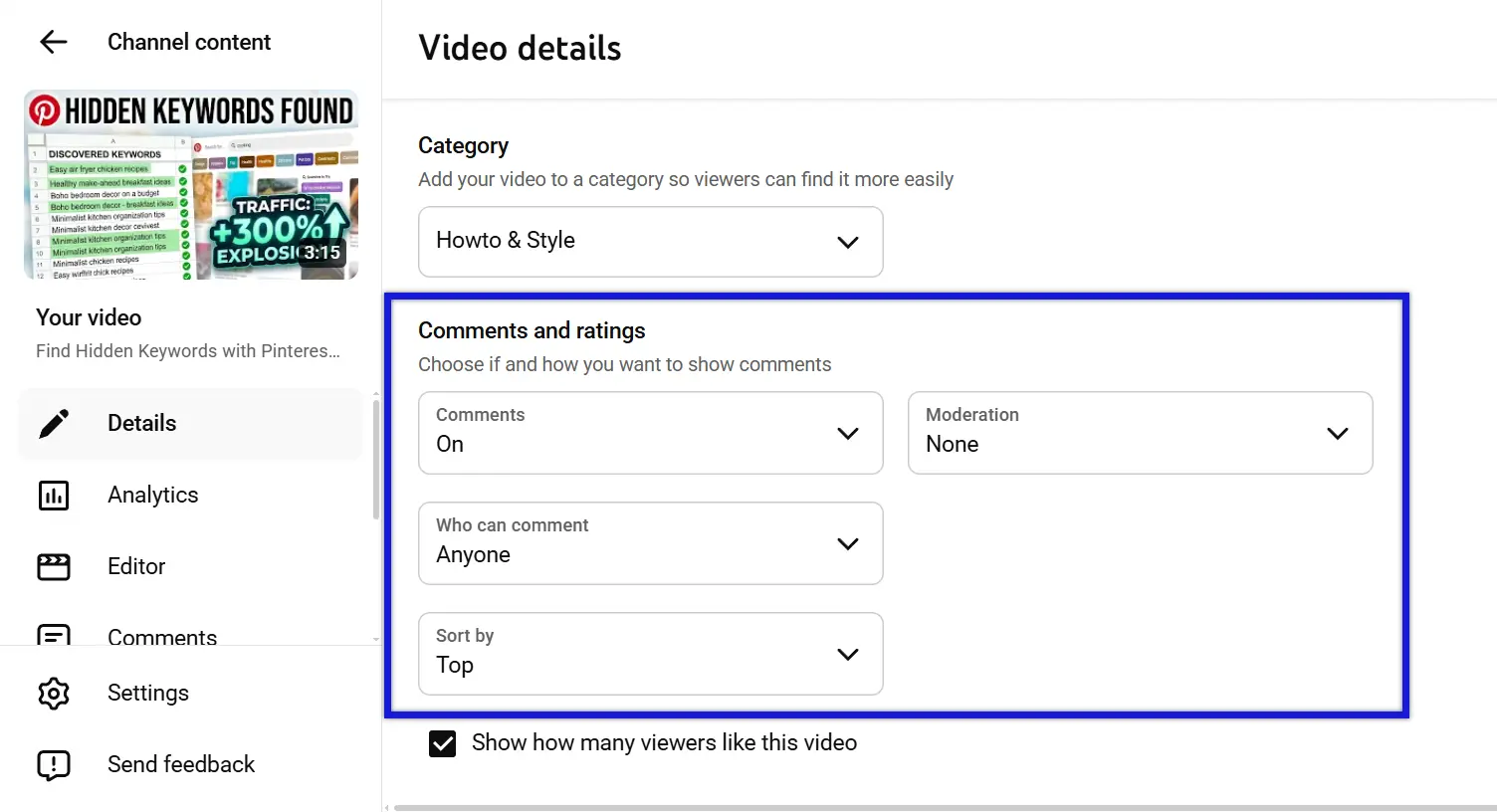
- Scroll down until you see the section, "Comments and ratings."
- Set "Comments" to "On" and "Who can comment" to "Anyone."
- Click "Save."
That's it. Once saved, viewers will be able to leave comments on that specific video right away.
Turned off by default
If comments are missing across multiple videos, you may have them turned off by default. You can enable comments across all uploads and save it as the default setting in YouTube Studio. Here's how:
- Sign in to YouTube Studio.
- From the left menu, select "Settings."

- Click "Community moderation."
- Set "Comments on new videos and posts" to "On." Moderation is up to you.
- Click "Save."
After this, every new video you upload will have comments enabled automatically. Keep in mind that this change only applies to future uploads. You'll still need to go back and enable comments on older videos individually if they were uploaded while the default was off.
You've been blocked
If you can't see comments on other creators' channels (and those channels clearly have comments enabled) you may have been blocked.
YouTube allows creators to block someone's channel if they no longer want to see their messages on live chat, in comments, or receive their mentions. This is YouTube's way of giving creators control over who participates in their community.
That said, there's no notification sent when someone blocks you, so the only sign is the sudden absence of comments on their videos.
Messages contain blocked words
Another common reason you're not seeing comments is an aggressive "Blocked words" filter.
YouTube lets creators set up a list of keywords that automatically hides any comment containing those words. If your filter is too broad, it might be catching comments from trusted viewers.
The fix is simple: just edit your list to reduce the filter's aggressiveness.
Here's how:
- Sign in to YouTube Studio.
- From the left menu, select "Settings."
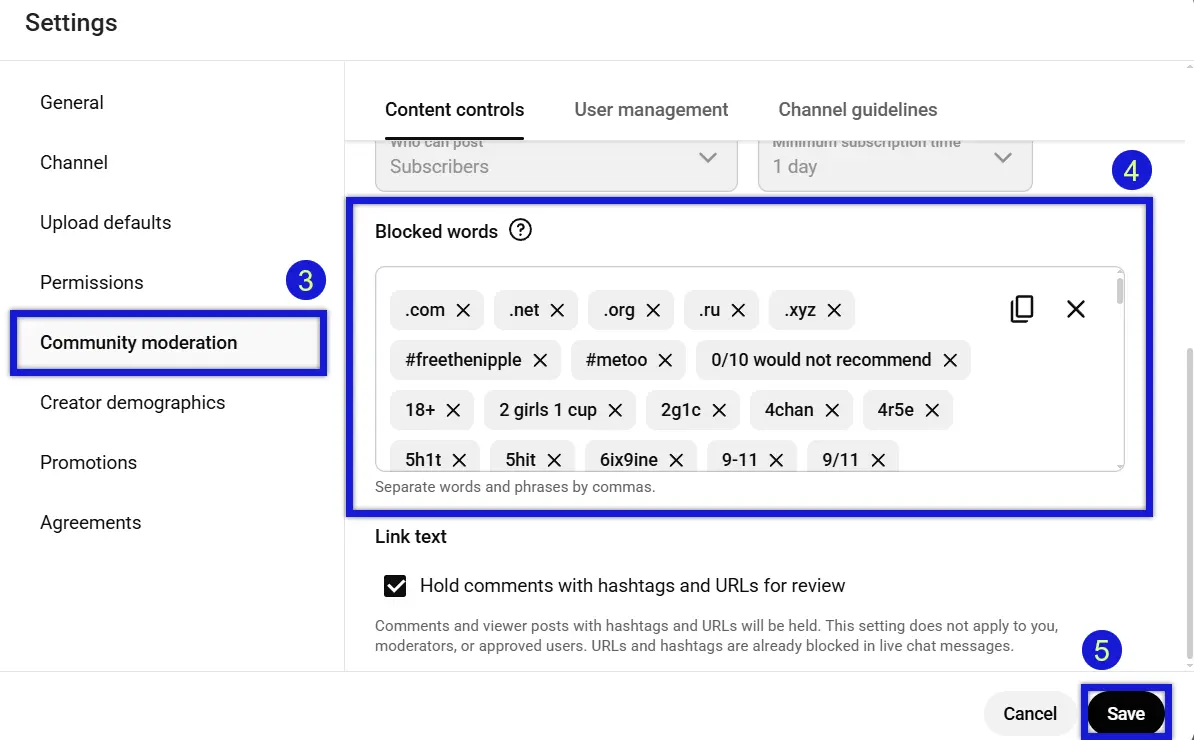
- Click "Community moderation."
- Scroll down until you see the section, "Blocked words." Edit your list of blocked keywords to reduce the aggressiveness of your filter.
- Click "Save."
Review your blocked words regularly. A word that made sense to block six months ago might be filtering out perfectly normal conversations today.
How to see comments again on YouTube
Depending on the reason, you may need to take different steps to see comments on YouTube again. Here's a quick breakdown:
- Turn On Comments: If your comments are turned off by default, visit your settings on YouTube Studio and turn comments on. If your comments are turned off on an individual video, visit your video's "Comments and ratings" section to re-enable them.
- Blocked Words: Visit your channel's "Community moderation" through settings on YouTube Studio to edit your list of "Blocked words." Remove or adjust any keywords that are hiding the comments you want to see.
- See Comments On Third-Party Channels: If the reason you can't see comments on other channels is because you've been blocked, there's nothing you can do on your end. Your best option is to reach out to the creator directly and ask to be unblocked (good luck with that).
The key takeaway here is to identify the root cause first. Once you know what's causing the problem, the fix is usually just a few clicks away.
How to effectively manage your comments
If you're a content creator or business owner who wants more control over your comments section, use a comment management platform like Spikerz.

Spikerz is a social media security platform built for businesses and individuals who need to protect their online presence. When it comes to comments, Spikerz uses AI to detect and block spam, scams, and hate speech. It analyzes message content and behavior patterns to separate real engagement from harmful noise (so your comments section stays clean without you having to monitor it 24/7).
With YouTube reaching over 2.7 billion monthly active users, your comment section is one of the most visible parts of your brand. Leaving it unprotected opens the door to spam, hate speech, and bot attacks that can damage your reputation in minutes.
But managing comments is only one of the many things Spikerz does. Here's how it helps protect the rest of your social media presence:
- Account Takeover Protection: Spikerz monitors your accounts around the clock for unauthorized access attempts. Our AI scans your account's activity, detects suspicious behavior, and alerts you immediately (giving you time to act before damage is done).
- Impersonation Takedown: Fake accounts pretending to be your brand can confuse your audience and damage brand trust. Spikerz identifies impersonators across platforms and helps you take them down fast.
- Phishing Protection: Hackers use phishing links in DMs, comments, and emails to steal login credentials. Spikerz flags these threats in real time so you and your team don't fall for them.
- Permissions Management: The more people who have access to your social accounts, the bigger the risk. Spikerz gives you full visibility into who has access and what level of permissions they hold, so you can tighten controls before a breach happens.
Want to see how Spikerz can protect your social media presence from threats you didn't even know existed?
Book a demo right now and find out what it takes to run your social media channels with confidence.
Conclusion
Missing comments on YouTube usually come down to one of three things: comments are turned off, you've been blocked, or your blocked words filter is catching too much. Each problem has a simple fix that takes less than five minutes.
But fixing missing comments is only the first step. If your business relies on social media for growth, your comment section is just one of many areas that need active protection. Spam, bots, impersonators, and phishing attacks don't wait for you to notice them.
That's where a platform like Spikerz makes the difference. Instead of reacting to problems after they happen, you get 24/7 protection that catches threats before they reach your audience.
Keep this in mind: Your social media presence is too valuable to leave unguarded. Do what you must to protect it.
