Social media impersonation: spot and stop it


Social media impersonation is when someone creates a fake account pretending to be you, your brand or your executives to scam the people who trust you. Learn how impersonation works, the main types from brand and executive impersonation to fake support accounts and account hijacking, and how it differs from identity theft and spoofing. Then see how to spot a fake account, what to do if you're impersonated and how to prevent it.
It takes a scammer a few minutes to copy your logo, your bio and your last ten posts into a new account. Then they message your followers with a giveaway, a refund offer or a support link, and most people can't tell it isn't you.
That's social media impersonation, and it's one of the most common threats brands face online. It costs your customers money, costs you their trust and keeps coming back after every takedown.
This guide explains what social media impersonation is, the main types, how it differs from identity theft and spoofing, how to spot a fake account, what to do if someone impersonates you and how to prevent it.
What is social media impersonation?
Social media impersonation is when someone creates an account that pretends to be you, your brand or someone on your team, to trick people into trusting it. Impersonators copy names, profile photos, logos, bios and posts, then use that borrowed trust to steal money, collect passwords or spread false information.
Parody and fan accounts aren't impersonation as long as they're clearly labeled. Impersonation is designed to make people believe they're dealing with the real you.
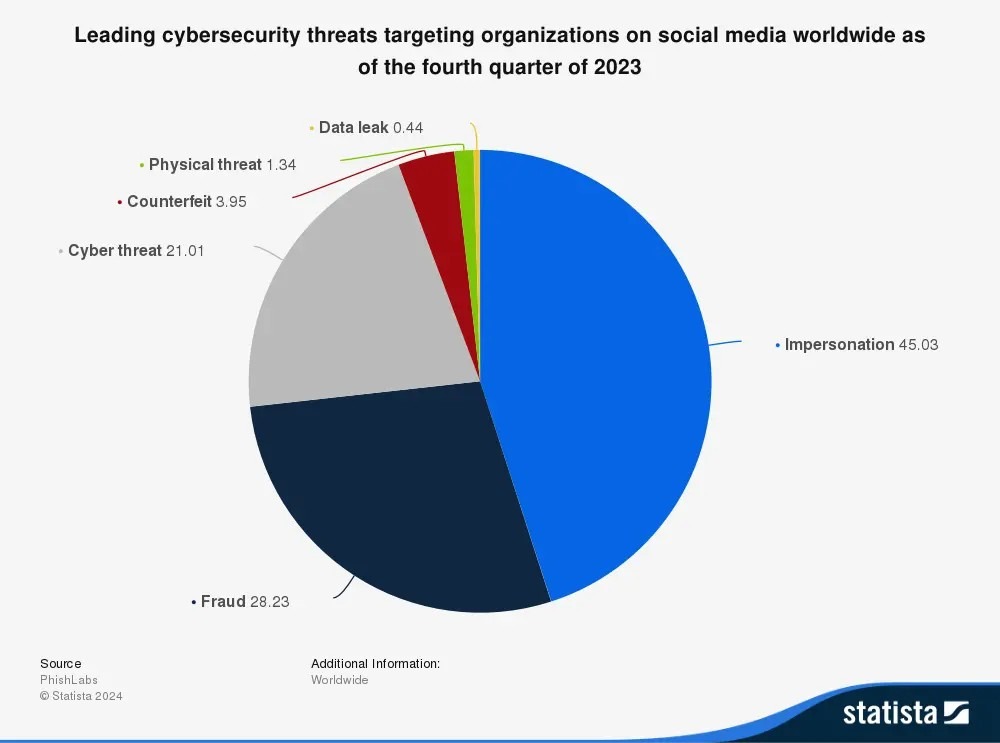
It's a problem on every major platform. Impersonation was the leading cybersecurity threat to organizations on social media in late 2023, at 45% of reported incidents,1 and Meta alone removed more than 20 million accounts impersonating large content creators in 2025.2
How social media impersonation works
Most impersonation follows the same pattern:
- Copy. The attacker builds a lookalike account using your name with a small change, like an extra letter, an underscore or "support" or "official" added.
- Find targets. They follow your followers, reply under your posts or search for people complaining to your brand.
- Build trust. They move the conversation to DMs, where nobody else can see it.
- Cash in. They send a link to a fake giveaway, checkout or login page, or ask for payment or personal details.
For example, a fake account called "@brandname.support" replies to a customer's complaint with an offer to process a refund. The link goes to a page that asks for their card details.
Types of social media impersonation
Brand impersonation
Brand impersonation copies your company: the name, the logo, the tone and sometimes a paid verification badge. The aim is to borrow your reputation for a scam.
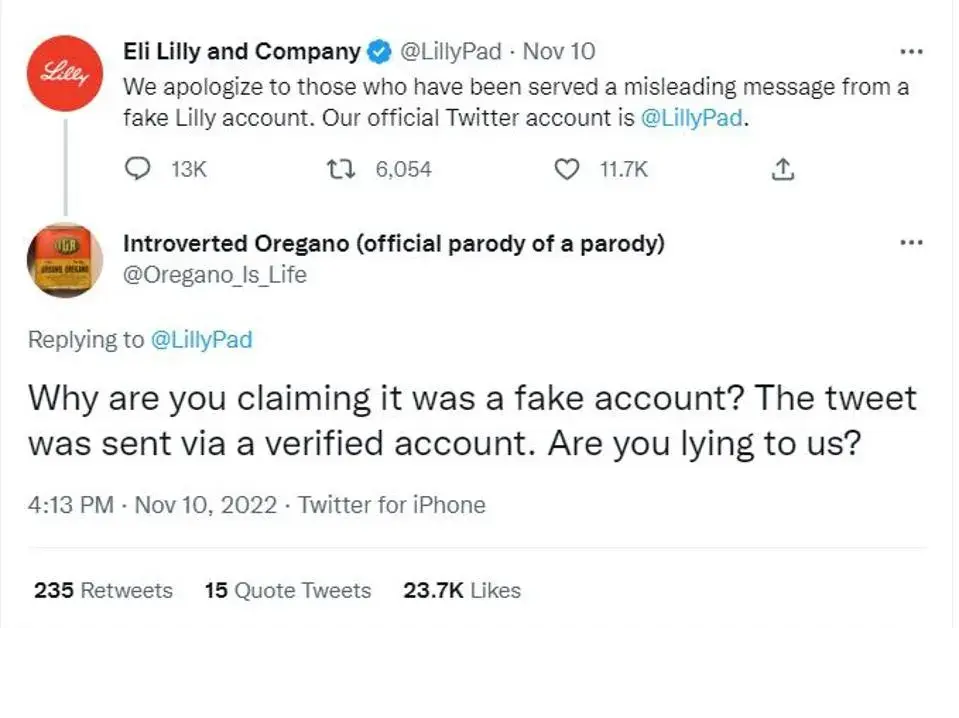
In November 2022, soon after X opened paid verification to anyone, an account with a paid badge posing as the drug maker Eli Lilly posted that insulin was now free. The post spread fast, and the company had to publicly apologize for a message it never sent.3
Fake support accounts
Fake support accounts pose as your customer service team. They watch your comments and mentions for complaints, then reply with a "help" link that leads to a phishing page. This is sometimes called angler phishing.
Executive impersonation
Attackers pose as a CEO, CFO or founder to pressure staff, partners or customers into acting fast, like approving a payment or sharing login details. AI makes this far more convincing: in 2024, a finance worker at the engineering firm Arup paid out about $25 million after a video call with deepfakes of the company's CFO and colleagues.4 Our guide to whaling attacks covers this in more detail.
Creator and talent impersonation
Creators, athletes and artists get cloned so scammers can message their fans directly, selling fake tickets, merchandise or investment schemes in the star's name.
Account hijacking
In account hijacking, the attacker doesn't build a copy. They take over the real account, so it keeps its followers, history and verification badge, which makes the scam far more convincing. Read more in our account takeover prevention guide.
Impersonation, identity theft and spoofing: what's the difference?
- Impersonation is pretending to be someone else, usually with a fake account, to deceive the people who trust them.
- Identity theft is stealing and using someone's personal information, like their name, ID or bank details, usually for financial gain. Impersonation is often how it starts.
- Spoofing is faking the source of a message or connection so it looks legitimate, like a lookalike website, a forged email sender or a faked caller ID.

Attackers often combine all three: a spoofed domain, linked from an impersonating account, to collect the details they need for identity theft.
Why social media impersonation works so well
Impersonation targets trust, not technology. Your followers already believe in your brand, so a copy that looks right gets past their guard, especially on a phone, where handles are small and people scroll fast.
It's also cheap and quick. Creating an account costs nothing, and as email defenses have improved, attackers have moved to social platforms, where checks are lighter. AI tools now copy faces, voices and writing styles in minutes.
How to spot a fake account
Check these signs before you trust an account that claims to be a brand or a person you know:
- The handle has an extra character, a swapped letter or words like "support", "official" or "help" added.
- The account is new, has few posts or posts that were all uploaded on the same day.
- The follower count is much lower than the real account's, or it follows thousands of people.
- It contacts you first, by DM, about a prize, a refund or a problem with your account.
- It asks for a password, a login code, card details or payment outside the platform.
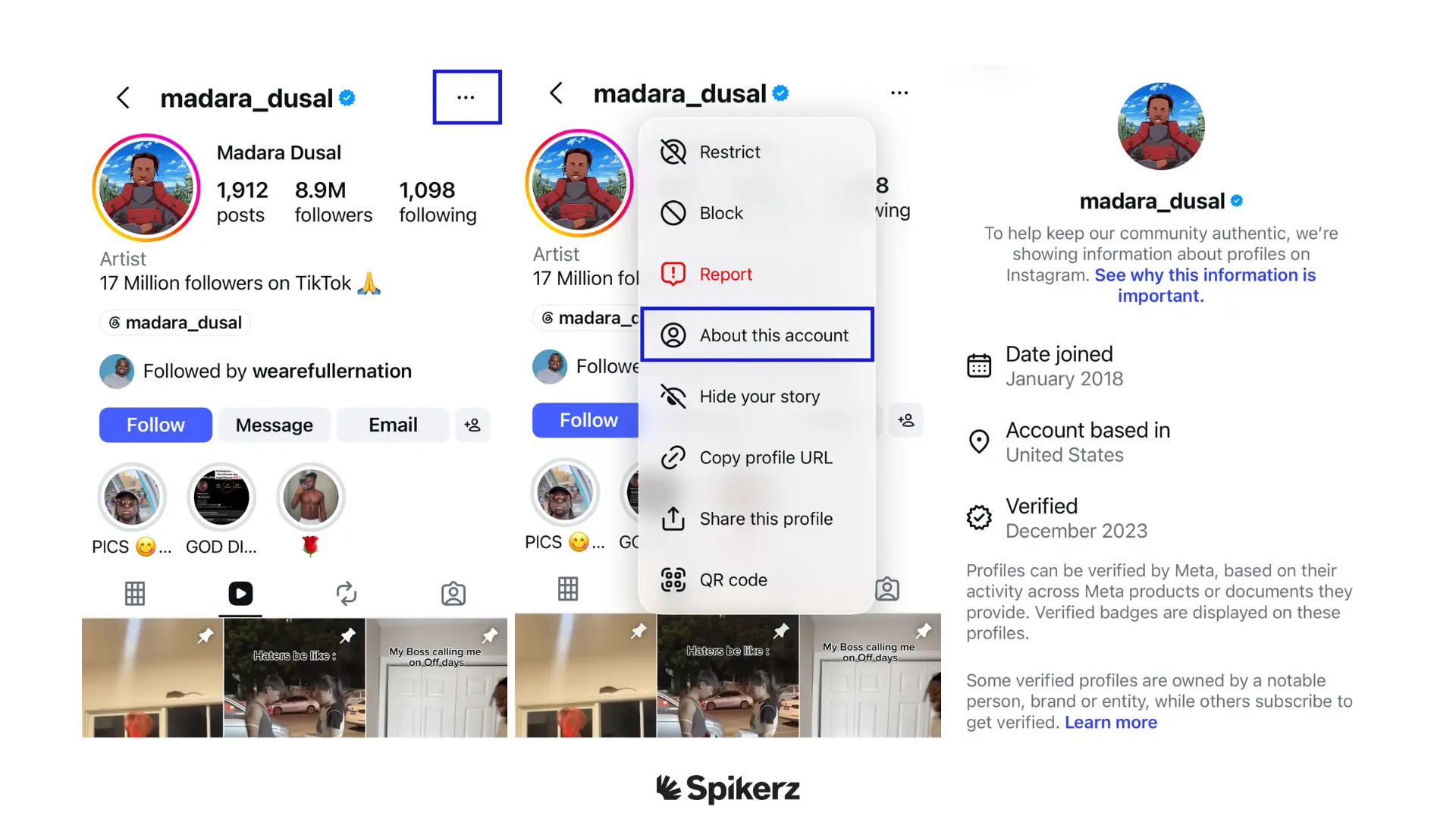
- "About this account" on Instagram shows a recent join date or a different country from the real brand.
For more examples, see how to spot a fake Instagram account.
What to do if someone impersonates you or your brand
1. List every impersonator
Search your brand name, common misspellings and your executives' names on every platform your audience uses, and record each fake account in one place.
2. Gather evidence
Screenshot each fake profile and save its link. Pull together proof that you own the brand, like trademark registrations and links to your official accounts. Strong evidence is what turns a report into a removal.
3. Report each account to the platform
Every platform has an impersonation report, and most also have a form you can use without an account. Here's how to report a Facebook impersonation step by step. Timelines vary from days to weeks.
4. Warn your audience
If a fake account is actively scamming people, post a warning on your official channels. Tell followers which accounts are real and that you'll never ask for payment or passwords in a DM. If people have lost money, they can also report it to the FTC.
How to prevent social media impersonation
- Claim your name everywhere. Register your brand handle on every major platform, even ones you don't use yet, so nobody else can take it.
- Verify your official accounts. A verification badge helps followers tell the real account from a copy.
- Register your trademarks. Platforms act faster on reports backed by a registered trademark.
- Limit what you share. The less personal information executives and staff post publicly, the harder they are to copy convincingly.
- Tell your audience how you'll contact them. Publish your official accounts and support channels, and remind followers that you'll never ask for payment in a DM.
- Monitor continuously. New fakes appear after every takedown, so one-off searches aren't enough.
Impersonation is one part of a wider plan to protect your brand on social media.
How Spikerz finds and removes impersonators
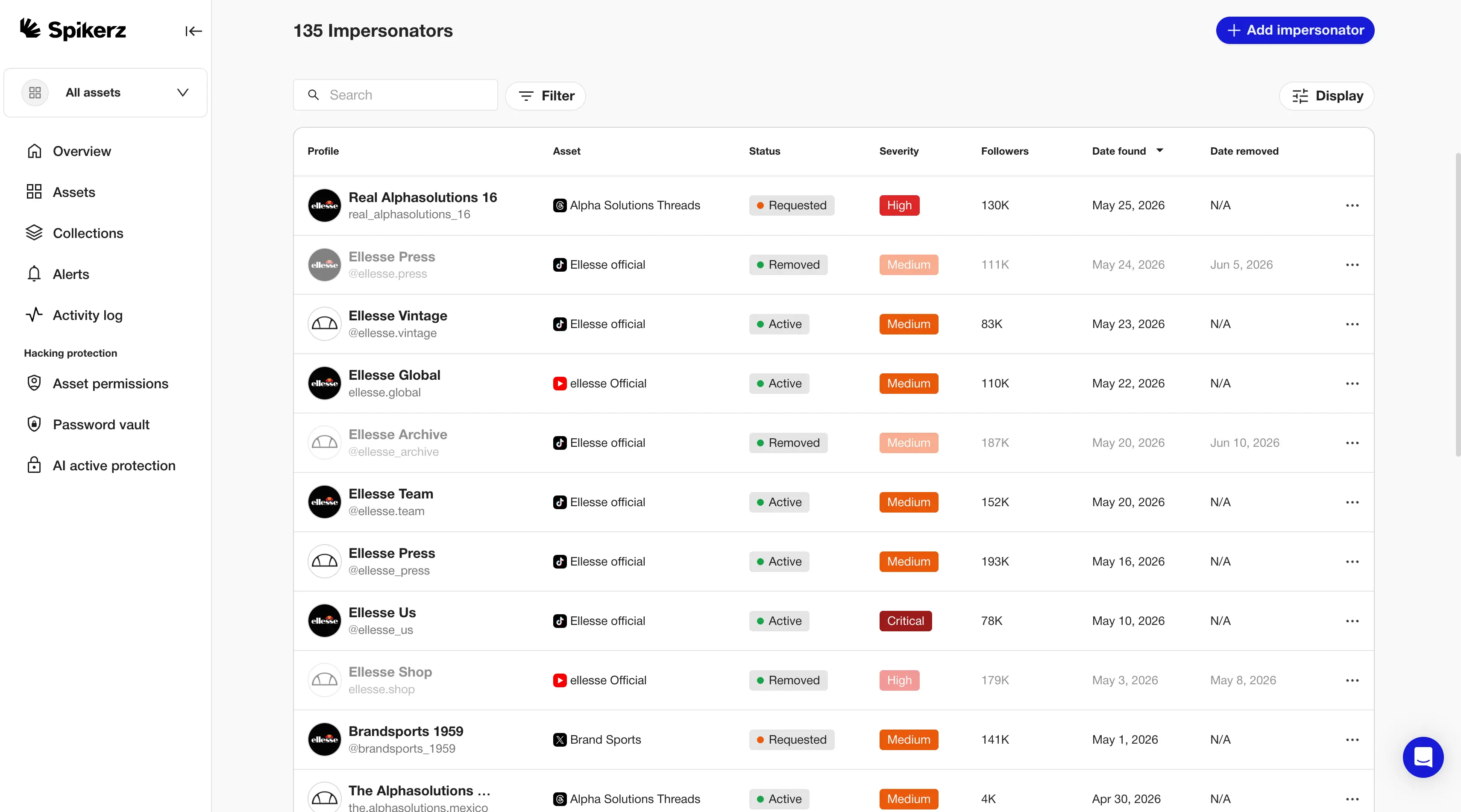
Taking down impersonators by hand is a cycle: you remove five, and more appear next week. Spikerz does the searching and reporting for you.
- Scans social platforms for accounts using your brand's name, logo, photos and executives, and tells real threats apart from fan pages and parody accounts.
- Verifies each impersonator, collects the evidence and files the takedown through platform workflows.
- Tracks every case in one dashboard, so you can see what's been found, reported and removed.
Spikerz also protects your accounts from takeover, catches phishing in your comments and DMs, and shows who has access to every account. Book a consultation to see the impersonators targeting your brand.
Conclusion
Social media impersonation works because people trust your brand. Fake accounts borrow that trust to scam your customers, and new ones appear after every takedown.
Know the signs, report fakes quickly with strong evidence, tell your audience how to find the real you, and monitor continuously so impersonators are caught before they reach your followers.
Book a consultation to see how Spikerz finds and removes impersonators across every platform.
Sources
- Statista, "Leading cybersecurity threats targeting organizations on social media worldwide as of the fourth quarter of 2023". statista.com
- Meta, "Rewarding original creators on Facebook", March 2026. about.fb.com
- Forbes, "Fake Eli Lilly Twitter account claims insulin is free, stock falls 4.37%", November 12, 2022. forbes.com
- World Economic Forum, "'This happens more frequently than people realize': Arup chief on the lessons learned from a $25m deepfake crime", February 2025. weforum.org