Instagram account suspended? How to get it back


Instagram suspends accounts for rule breaks, suspicious activity and sometimes by mistake. Learn why it happens, how long a suspension lasts, how to appeal within the 180-day window, and how to avoid it in the future.
Instagram usually suspends an account because its automated systems think the account broke the Community Guidelines or Terms of Use, for example through spam, bot-like activity, copyright problems, or content that was reported. Sometimes the account was hacked and the intruder's activity triggered the suspension, and sometimes the system simply gets it wrong. To get your account back, open the Instagram app (or the email Meta sent you), follow the suspension notice to disagree with the decision, and confirm your identity if asked. Instagram has said you have 180 days to appeal before the account is permanently disabled, so don't wait.
It helps to understand why Instagram suspends your account and what the recovery process looks like. Instagram's huge user base means the platform leans heavily on automation, and its moderation systems flag millions of accounts for review. That catches a lot of abuse, but legitimate accounts sometimes get caught too.
What happens when Instagram suspends your account?
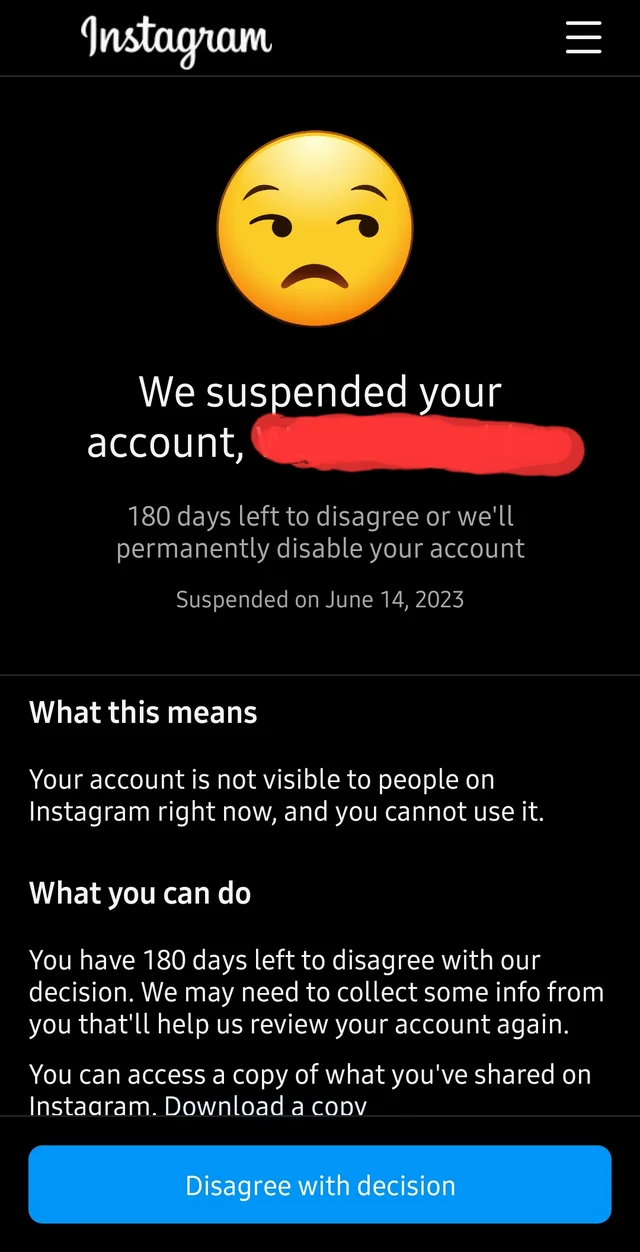
When Instagram suspends an account, you'll usually see a notice the next time you open the app saying your account has been suspended, along with a deadline to disagree with the decision. While the account is suspended, your profile isn't visible to other people and you can't use the account normally. If you don't appeal in time, or the appeal is rejected, Instagram can permanently disable the account.
It's worth knowing the difference between a few terms that often get mixed up:
- Suspended: Instagram has restricted the account and given you a window to appeal.
- Disabled: the account has been shut down, either after a failed appeal, a missed deadline, or a serious violation.
- Deactivated: you chose to hide your own account temporarily.
Why does Instagram suspend accounts?
Several things can trigger a suspension, from clear violations of Instagram's rules to activity that simply looks suspicious to an automated system. Common reasons include:
- Community Guidelines violations: posting content that breaks Instagram's policies, such as hate speech, harassment, or graphic violence.
- Unusual activity: sudden spikes in following or unfollowing, liking or commenting at a pace that looks like bot activity.
- Spam: using automation tools to generate likes, comments or follows, or sending unsolicited messages to large numbers of people.
- Copyright or intellectual property issues: sharing content you don't have the rights to.
- A hacked account: if someone takes over your account and uses it to post scams or spam, Instagram may suspend it even though you didn't do anything wrong.
You can also check your Instagram account status to see whether any of your content has been removed or flagged.
How long does an Instagram suspension last?
There's no single answer. Some restrictions, like temporary limits on commenting or following, lift on their own after a short time. A full account suspension, on the other hand, generally lasts until you appeal and Instagram reviews it. Instagram has stated that you have 180 days to disagree with the decision, and if you don't, the account can be permanently disabled. Severe or repeated violations can also lead straight to a permanent ban.
If your account was suspended for no reason, don't panic. Follow the official appeal steps below and keep a record of everything you submit.
How to recover a suspended Instagram account
Here's the process for how to recover a suspended Instagram account:
- Open the Instagram app and log in: the suspension notice usually appears as soon as you log in. It explains that the account was suspended and shows how much time you have left to appeal.
- Check your email: Meta usually sends an email about the suspension too. Use the link in that email or the notice in the app, and nothing else.
- Disagree with the decision: follow the prompts in the notice to request a review. Explain clearly and calmly why you think the suspension is a mistake. Keep it short and avoid aggressive language.
- Confirm your identity: Instagram may send a security code to your phone number or email, or ask for a video selfie or other proof that you're the account owner.
- Wait for a response: after you submit, avoid sending repeated appeals. Check the app and your email for updates.
If you'd like a visual walkthrough, here are the steps to appeal the suspension laid out screen by screen.
How long does an Instagram appeal take?
Instagram doesn't publish a fixed timeline. Some appeals are answered within a day or two, while others take a few weeks, especially if identity verification is needed. Sending the same appeal repeatedly won't speed it up.
What to do if your Instagram appeal is rejected
If your first appeal doesn't resolve the issue, here are some next steps:
- Provide more information: if Instagram asks for it, send the extra details or documents it requests to verify your identity, such as a government-issued ID.
- Check the Help Center: Instagram's Help Center covers other review options and common issues.
- Get legal advice: as a last resort, if you believe your account was wrongly suspended and you have strong evidence, you might consider legal advice. This is rarely necessary and can be costly.
Instagram suspended.com and fake appeal sites
There's no separate "instagram suspended.com" website you need to visit. The official appeal comes from the suspension notice inside the Instagram app or from the email Meta sends you.
Scammers know people are desperate to get their accounts back, so fake "appeal" sites and messages are a common phishing scam. They often arrive as DMs or emails claiming your account will be deleted unless you "verify" right away, and they link to look-alike pages that steal your password and login codes. To stay safe:
- Only appeal through the notice in the Instagram app or a link in a genuine email from Meta.
- Instagram doesn't send appeal forms through DMs. Ignore any message that does.
- Never share your password or two-factor authentication codes with anyone who claims they can restore your account.
For more on spotting these scams, read our guide on how to detect phishing on Instagram DMs.
Why did Instagram suspend my account for no reason?
Many users report that Instagram suspended their account for no reason. Often, an automated system flagged legitimate activity as suspicious, or someone else accessed the account without the owner knowing. If this happens to you, here's what to do:
- Review Instagram's policies: make sure your posts and activity comply with Instagram's community guidelines.
- Secure your account: once you're back in, change your password and turn on two-factor authentication to block unauthorized access. If you've seen a suspicious login attempt on Instagram, act on it straight away.
- Appeal: use the official appeal option and explain why you believe the suspension is unjustified.
- Be persistent: if your appeal isn't answered, keep checking the app and your email, and respond promptly to any requests for information.
How to stop getting suspended on Instagram
You can't control every automated decision, but you can make one much less likely:
- Avoid third-party apps that automate likes, follows, comments or DMs, and don't buy followers.
- Grow and engage at a natural pace rather than in sudden bursts.
- Only post content you own or have permission to use.
- Use a strong, unique password and two-factor authentication, and remove access for people or apps that no longer need it.
How to suspend your own Instagram account
You can't put a suspension on your own account, since suspensions come from Instagram. If you want a break, you can temporarily deactivate your account instead. You'll find the option in Accounts Center within your Instagram settings. Deactivating hides your profile until you log back in.
How Spikerz helps protect your Instagram account
Spikerz is a social media security platform for brands, creators and executives. It can't reverse a suspension, but it helps protect against the hacks, spam and scams that often lead to one:
- Account takeover protection: Spikerz detects suspicious logins and can log intruders out and rotate the password before they post anything that puts your account at risk.
- AI comment moderation: it hides spam, scams, phishing links and hate speech in your comments, with custom rules you write in plain language.
- Access management: see who has access to your accounts and remove anyone who shouldn't, plus 2FA for teams so shared accounts stay secure.
Spikerz connects through official platform APIs, so you never have to share your password. Book a consultation to see how Spikerz protects your accounts.
Final thoughts
An Instagram suspension is stressful, but it's often reversible if you act quickly. Use the official notice in the app or the email from Meta, appeal within the deadline, and ignore anyone offering a shortcut. After that, following the guidelines and keeping your account secure will help keep it in good standing.
